PMA 2000-DM Installation Guide page 5
3
CONFIGURATION 1 (continued - Bar below the TV using the TV/VESA attachment)
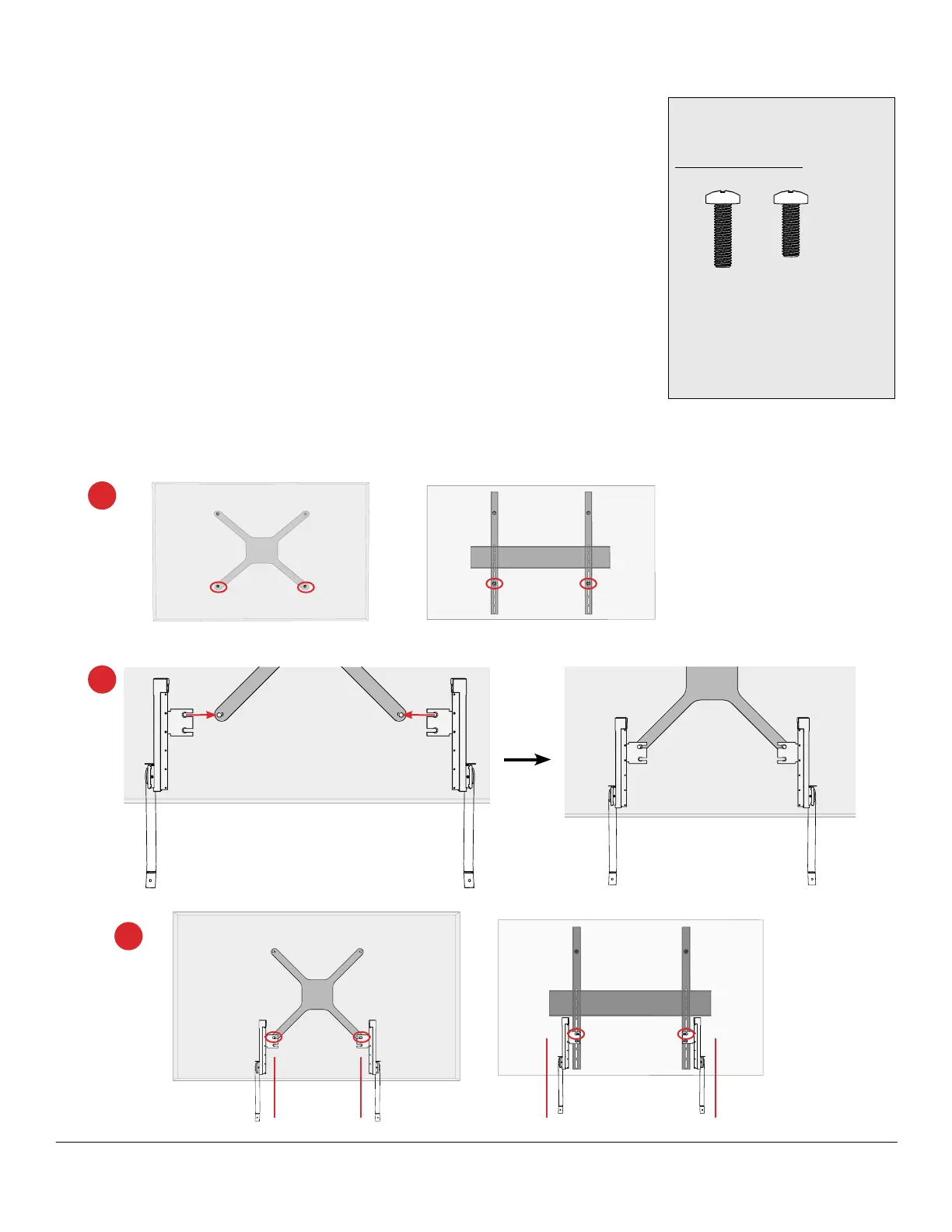
Attach arms at the lower TV/VESA mounting points
If feasible, pull the display away from the wall for easier access to the mounting
screws. If it can't be pulled away, use a short or 90° ratcheting screwdriver from the
front or side to access the screws securing the mount to the display.
Note: Mount the arms to the outside of the VESA mount for increased stability. If connectors
or power cords interfere, the arms may be mounted to the inside.
1. Loosen the lower VESA screws (circled) 3mm (.12"). If the (M8) VESA
mounting screws aren't long enough to stay threaded in the TV, replace them
one at a time with the included 25 or 30mm M8 screws.
2. Slide the bracket between the TV and the VESA mount the full length of the
notch. The upper bracket notch is preferred, but both arms must hang at the
same level.
3. Arms should hang parallel. Snug tighten the circled screws to hold the arms in
place.
2
1
Kit parts
Congured arms x2
Optional hardware
M8 x 25
PH Screw
M8 x 30
PH Screw
Substitute for existing VESA
bolts that are too short
to accommodate the arm
brackets



 To Next Page