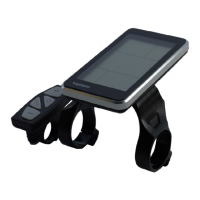
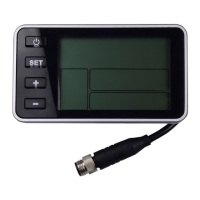
The Bigstone C800-TFT is an e-bike display designed to provide a comprehensive range of functions and indicators to meet user needs. This manual details its features, operation, and troubleshooting.
Function Description
The C800-TFT display serves as the central interface for controlling and monitoring an e-bike. Its primary functions include:
- Riding Mode Selection: Allows users to choose between different riding modes (POWER, STD, ECO) to adjust the e-bike's performance. The default mode is NORMAL.
- ECO Mode: Limits current to approximately 6A, suitable for elderly riders.
- STD Mode: Limits current to approximately 10A, suitable for city riding.
- POWER Mode (referred to as ECO in the manual's description of 15A limit): Limits current to approximately 15A, suitable for young riders and mountain biking.
- Speed Display: Shows the current riding speed.
- KM/H & MPH Selection: Users can select their preferred unit for speed and mileage display.
- Light Indicator: Indicates the status of the e-bike's lights.
- 6KM/H Work (Walk Assist): Provides a walk-assist function at 6 km/h.
- PAS Level Selection: Allows adjustment of the Pedal Assist System (PAS) levels, which control the output power ratio. The default is level 1, with a range from 1 to 5. Modes 3, 6, and 9 can be customized in advanced settings.
- Error Code Indicator: Displays error codes and messages if there are issues with the electronic control system. The e-bike will not operate until the problem is fixed.
- Total Distance (ODO) and Trip Distance: Tracks both the total distance ridden and the distance of the current trip.
- Battery Capacity Indicator: Shows the remaining battery capacity.
Important Technical Specifications
- Material: The C800 display is made of black metal, and its bracket is made of nylon.
- Operating Temperature: Designed to function normally within a temperature range of -20 to 60°C.
- Leakage Current (Display Off): No more than 2μA, ensuring minimal battery drain when the display is off.
- Speed Limit Range: Adjustable from 20 km/h to 99.9 km/h. Setting it to 99.9 km/h effectively removes the speed limit.
- Wheel Size Settings: Supports wheel sizes of 16, 20, 24, 26, 700C, and 28 inches for accurate speed and mileage calculations.
- Battery Voltage Settings: Compatible with 24V, 36V, and 48V battery systems. This setting must match the e-bike's actual battery parameter.
- Current Limit (Advanced Setting): Adjustable from 3A to 18A.
- Poles In Motor (Advanced Setting): Can be set to 1 or 6, requiring consistency with the motor's actual parameters.
- Start After Poles (Advanced Setting): Range from 2 to 16.
- Assist Levels (Advanced Setting): Can be set to 3, 5, 6, or 9. If 3 is selected, the assist levels range from 1-3.
- Auto Sleep: The system automatically enters sleep mode after 5 minutes of inactivity (riding speed of 0 km/h).
Usage Features
- Button Definitions: The C800 features four buttons: ON/OFF, SET, UP (+), and DOWN (-).
- ON/OFF:
- Hold to start the display and power the controller.
- Press again to turn on/off the e-bike's lights.
- Hold for 3 seconds to turn off the power.
- SET: Used to enter and confirm settings.
- UP (+): Used to increase values, navigate up in menus, and select parameters.
- DOWN (-): Used to decrease values, navigate down in menus, and select parameters. Also, holding DOWN for 2 seconds activates the 6km/h walk-assist function.
- Setting Operation:
- Hold SET for 2 seconds to enter the setting interface.
- Use "+" or "-" to select a setting item.
- Click SET again to highlight the item in green, allowing parameter adjustment with "+" or "-".
- Click SET again to confirm the parameter change, and the item color will revert to white.
- Trip Clear: An option within settings to clear the current trip distance. Selecting "Y" (YES) will clear the trip upon returning to the main interface.
- Brightness Adjustment: Allows users to adjust the display brightness from level 1 (darkest) to 5 (brightest).
- Throttle Control (Advanced Setting):
- Throttle 6KM: Can be set to "Y" to enable 6KM mode via throttle or "N" for normal throttle operation.
- Throttle Level: If "Throttle 6KM" is "N", this setting determines if the throttle has different levels ("Y") or a single level ("N").
- Password Protection: Users can set a power-on password (default is no password).
- Information Display: Provides hardware (HW ver) and software (SW ver) version details.
Maintenance Features
- Troubleshooting (Common Problems & Solutions):
- Display not starting up: Check the connector between the display and the controller.
- Error codes: If an error code appears, the e-bike will not run. The problem must be fixed at a maintenance place. The manual provides an "ERROR CODE TABLE" for diagnosis.
- Error Code Table: A comprehensive list of error codes and their definitions:
- 0: Normal
- 1: Current error or MOS damaged
- 2: Throttle error (Start detection)
- 3: Motor no phase position
- 4: Hall error
- 5: Brake error (Start detection)
- 6: Under voltage
- 7: Motor stalling
- 8: Communication controller receiving error
- 9: Communication display receiving error
- Quality & Warranty:
- Warranty Period: 18 months from the date of purchase for quality problems under normal use.
- Exclusions from Warranty:
- Unauthorized demolition of the device.
- Damage caused by incorrect installation or operation.
- Broken shell when the display is out of the factory.
- Broken wires.
- Damage due to force majeure (e.g., fire, earthquake, lightning).
- Issues occurring beyond the warranty period.
The C800-TFT is designed to be a user-friendly and robust display for e-bikes, offering essential control and monitoring capabilities with clear indicators and straightforward settings.

 Need help?
 General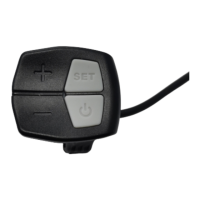

 To Next Page