
 Need help?
Do you have a question about the BIGTREETECH BTT SKR MINI E3 V3.0 and is the answer not in the manual?
Describes the solid red state of the Power LED indicating normal power supply.
Explains the red blinking Status LED during firmware updates and its control by firmware.
Provides a detailed dimensional diagram of the BTT SKR MINI E3 V3.0 motherboard.
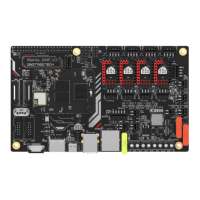
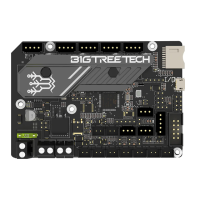
Illustrates the connection points and layout for various components on the motherboard.
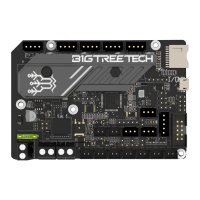
The BIGTREETECH SKR MINI E3 V3.0 is a motherboard specifically designed as a direct replacement for the original Ender3 motherboard, developed by the 3D printing team at Shenzhen Big Tree Technology Co., Ltd. This board aims to enhance the performance and user experience of Ender3 3D printers through a series of thoughtful design improvements and feature additions.
At its core, the SKR MINI E3 V3.0 serves as the central control unit for a 3D printer, managing all aspects of its operation from motor movements to temperature regulation and user interface interactions. It processes G-code commands, translates them into precise electrical signals for the stepper motors, and monitors various sensors to ensure accurate and consistent printing. The board's primary function is to provide a robust and reliable platform for 3D printing, offering improved stability and control compared to its predecessor. It integrates the necessary components to drive the extruder, control the hot bed, manage cooling fans, and interface with display screens, all while maintaining compatibility with the Ender3 ecosystem.
The SKR MINI E3 V3.0 introduces several features aimed at improving the user experience and the overall functionality of the Ender3 printer.
Enhanced Aesthetics and Design: The motherboard boasts a redesigned Industrial Design (ID), giving it a more appealing and modern look. This aesthetic upgrade ensures that the board not only performs well but also contributes to a cleaner and more professional internal appearance of the printer.
Advanced Microcontroller: At the heart of the board is an STMicroelectronics G0 series MCU, specifically the STM32G0B1RET6. This advanced microcontroller provides increased processing power and efficiency, enabling smoother operation and potentially faster execution of complex printing tasks. The enhanced MCU contributes to more precise control over printer movements and functions, which can lead to higher quality prints.
Improved Thermal Management: An upgraded heat sink is integrated into the design, specifically chosen to improve heat dissipation. Effective thermal management is crucial for the longevity and stable performance of electronic components, especially under continuous operation. This feature helps prevent overheating, ensuring the board operates reliably even during long print jobs.
Protected Thermistor Inputs: The thermistor inputs on the board are protected from short circuits to Vin. This protection mechanism is a significant safety and reliability feature, safeguarding sensitive temperature sensors and the motherboard itself from potential electrical damage. This reduces the risk of component failure due to wiring errors or unexpected electrical events, contributing to the overall durability of the printer.
Additional Cooling Fan Output: The board includes a third PWM (Pulse Width Modulation) controlled cooling fan output. This extra fan output provides greater flexibility for managing cooling within the printer, allowing for more targeted or comprehensive cooling solutions. Users can utilize this output to cool specific components, improve print quality by better managing part cooling, or enhance the overall thermal environment of the printer. PWM control allows for variable fan speeds, enabling precise adjustment of airflow based on printing needs.
Modernized USB Interface: The SKR MINI E3 V3.0 adopts a MicroUSB interface, replacing the older MiniUSB. MicroUSB is a more common and robust standard, making it easier for users to find compatible cables and connect the printer to a PC or other host devices. This change improves connectivity convenience and reliability.
Dedicated SPI Output Header Power Supply: A +3.3V power supply has been added for the SPI output header. This dedicated power supply ensures stable and reliable communication with SPI-based peripherals, which are often used for advanced sensors or expansion modules. This feature supports greater expandability and compatibility with a wider range of accessories, enhancing the printer's versatility.
Sensorless Homing Functionality: The motherboard supports sensorless homing, a feature that allows the printer to determine the position of its axes without the need for physical endstop switches. This is achieved by detecting motor stall events. Users can enable this function by connecting specific axes with jump caps, simplifying wiring and potentially improving the aesthetics of the printer by removing external switches. It's important to note that if sensorless homing is chosen, external endstops cannot be used for the configured axes.
Flexible 5V Power Supply for Peripherals: The board offers flexible options for providing 5V power to peripherals such as BLtouch, TFT displays, and RGB interfaces. Users can choose to utilize the onboard 5V PSU by shorting specific pins with a jumper, or they can opt for an external BIGTREETECH DCDC5V V1.0 module for 5V power by shorting different pins. This flexibility allows users to select the most suitable power solution based on their specific peripheral requirements and setup, ensuring stable power delivery to sensitive components.
Connectivity with External Modules: The SKR MINI E3 V3.0 is designed to integrate seamlessly with other BIGTREETECH modules, such as the BIGTREETECH Relay V1.2 and the BTT UPS 24V V1.0. These connections expand the capabilities of the printer, allowing for features like power-off recovery or automated power management, enhancing the printer's reliability and user convenience.
Neopixel Light Support: The motherboard includes dedicated connections for Neopixel lights, allowing users to add customizable RGB lighting to their printer. This feature enables aesthetic enhancements and can provide visual feedback on printer status, adding a personalized touch to the 3D printing experience.
BLtouch Compatibility: The board provides clear connection points for BLtouch auto-leveling sensors. This compatibility ensures that users can easily integrate this popular bed leveling solution, which significantly improves print adhesion and first-layer quality by automatically compensating for uneven print surfaces.
The design of the SKR MINI E3 V3.0 incorporates elements that simplify maintenance and troubleshooting.
Clear LED Indicators: The motherboard features several LED indicators that provide immediate visual feedback on the board's status.
These LED indicators are invaluable for diagnosing issues, confirming proper operation, and monitoring the printer's state without needing to connect to a computer or display.
Simplified Firmware Update Process: The firmware update process is designed to be straightforward. Users simply copy the firmware.bin file to the root directory of an SD card, insert the card into the slot, and then re-power or reset the board. The update completes automatically within approximately 10 seconds, with the Status LED blinking red during the process. This user-friendly update mechanism ensures that users can easily keep their motherboard's software up-to-date, benefiting from the latest features and bug fixes.
Comprehensive Documentation for DIY: The availability of a BTT SKR MINI E3 V3.0-PIN.pdf document is a key maintenance feature for advanced users. This document provides detailed pinout information, enabling users to perform DIY modifications, troubleshoot complex wiring issues, or integrate custom components with confidence.
Clear Communication Interface: The motherboard communicates with a PC via a USB Micro B type interface, which is easy to plug in. The communication baud rate is set at 115200, ensuring reliable data transfer. This consistent and well-defined communication channel simplifies debugging, monitoring, and controlling the printer from a computer.
Software Compatibility: The board is compatible with popular slicing and host software such as Cura, Simplify3D, Pronterface, Repetier-host, and Makerware. This broad compatibility ensures that users can continue to use their preferred tools for preparing and managing print jobs, minimizing the learning curve for new users and providing flexibility for experienced ones.
Wiring Diagrams: The manual includes detailed wiring diagrams for various connections, such as cooling fans, external modules (Relay, UPS), Neopixel lights, and BLtouch sensors. These diagrams are essential for correct installation and troubleshooting, guiding users through the physical connections and reducing the likelihood of wiring errors.
Cautionary Notes: The manual provides important cautions regarding firmware updates (not changing the firmware.bin file name), the necessity of completing wiring before powering on, and specific LCD screen compatibility (LCD12864 with CR10_STOCKDISPLAY interface). These notes help users avoid common pitfalls and ensure proper setup and operation, preventing potential damage or malfunction.
In summary, the BIGTREETECH SKR MINI E3 V3.0 is a well-rounded motherboard that offers significant improvements for Ender3 users. Its focus on enhanced performance, user-friendly features, and robust maintenance capabilities makes it an excellent upgrade for those looking to optimize their 3D printing experience.
 General
| Processor | 32-bit |
|---|---|
| Heated Bed Output | 1 |
| Hotend Output | 1 |
| Fan Outputs | 2 |
| Thermistor Inputs | 2 |
| Firmware | Marlin |
| Input Voltage | 12V-24V |
| Motor Driver Socket | TMC2209 |
| Motor Drivers | TMC2209 |
| Max Stepper Motor Current | 2A |
| Display | 12864 LCD |
| Connectivity | USB |
| Dimensions | 100mm x 80mm |

 To Next Page