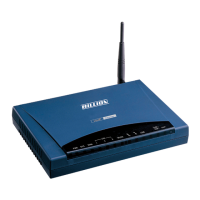
Phone Port
1. Click on Phone Port
2. Click on Edit (for relevant account)
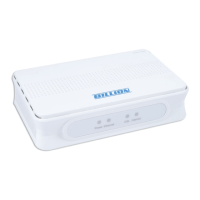
3. Under Login Account Configuration
a. Phone Number Your Freshtel Number
b. Authentication Username Your Freshtel Number
c. Authentication Password Your Freshtel Password
d. Confirm Password Your Freshtel Password
e. Display Name Your Freshtel Number
4. Codec Preference
a. Priority 1 G.729
b. Priority 2 PCMU (G.711 u-Law)
c. Priority 3 PCMU (G.711 a-Law)
d. DTMF Method RFC2833
Figure 1.7
Figure 1.8




 To Next Page