257
Diagnostics
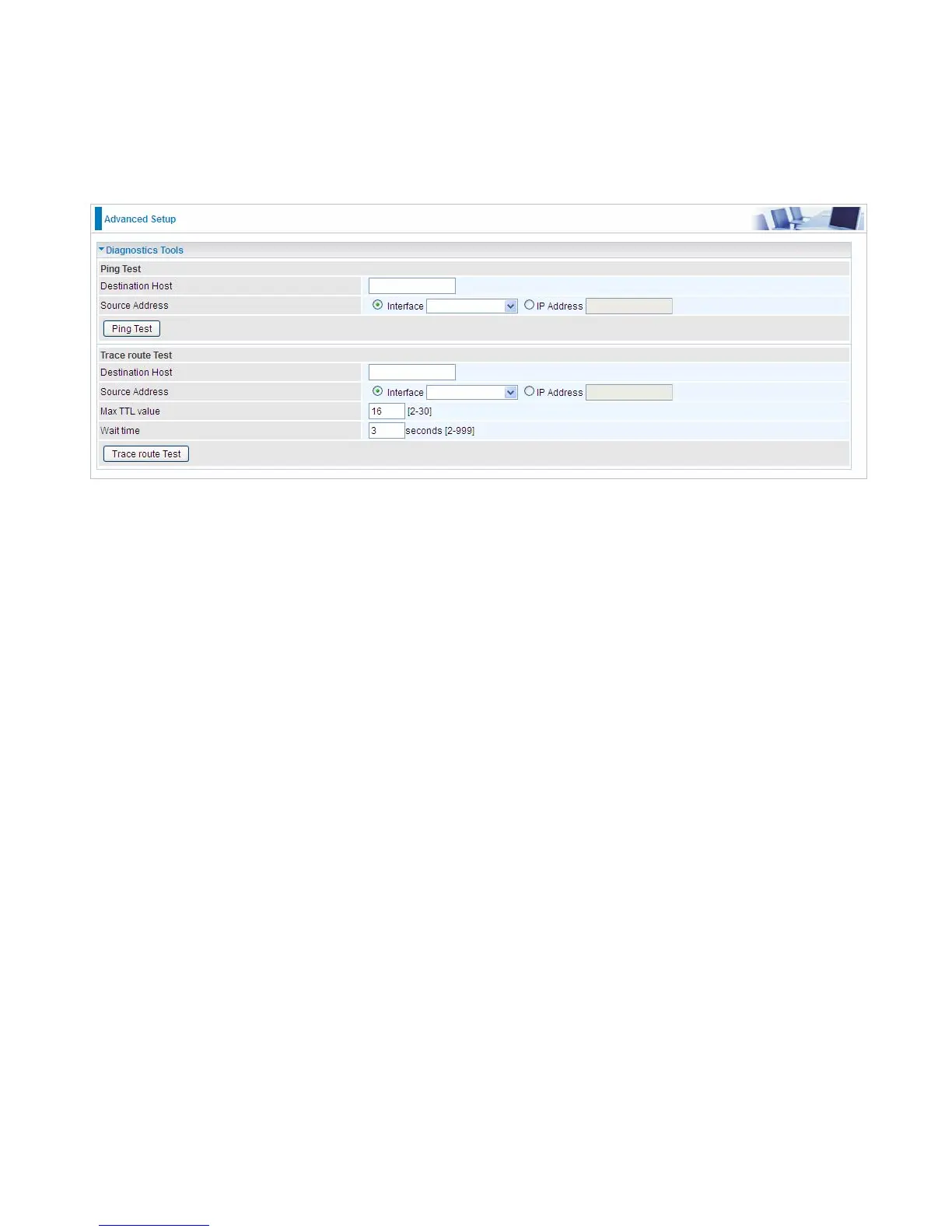
Diagnostics Tools
BiPAC 7800DX(L) offers diagnostics tools including “Ping” and “Trace route test” tools to check for
problems associated with network connections.
Ping Test: to verify the connectivity between source and destination.
Destination Host: Enter the destination host (IP, domain name) to be checked for connectivity.
Source Address: Select or set the source address to test the connectivity from the source to the
destination.
Ping Test: Press this button to proceed ping test.
Trace route Test: to trace the route to see how many hops (also see the exact hops) the packet of
data has to take to get to the destination.
Destination Host: Set the destination host (IP, domain name) to be traced.
Source Address: Select or set the source address to trace the route from the source to the
destination.
Max TTL value: Set the max Time to live (TTL) value.
Wait time: Set waiting time for each response in seconds.




 To Next Page