VoIP/(802.11g) ADSL2+ (VPN) Firewall Router
Chapter 4: Configuration
132
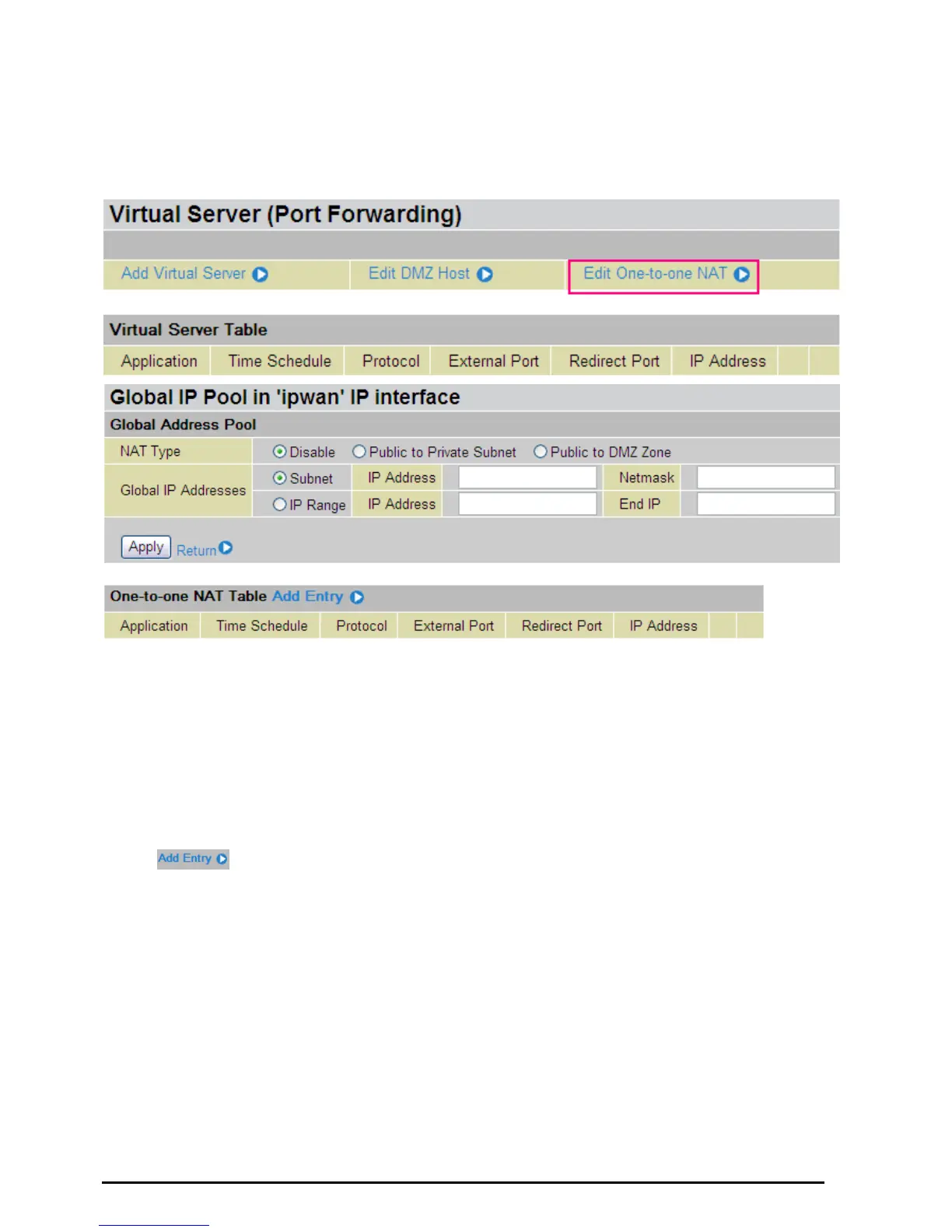
Edit One-to-One NAT (Network Address Translation)
One-to-One NAT maps a specific private/local IP address to a global/public IP address.
If you have multiple public/WAN IP addresses from you ISP, you are eligible for One-to-One NAT to utilize
these IP addresses.
NAT Type: Select desired NAT type. As set in default setting, it disables the One-to-One NAT function.
Global IP Address:
~ Subnet: The subnet of the public/WAN IP address given by your ISP. If your ISP has provided
this information, you may insert it here. Otherwise, use IP Range method.
~ IP Range: The IP address range of your public/WAN IP addresses. For example, IP:
192.168.1.1, end IP: 192.168.1.10
Select the Apply button to apply your changes.
Check
to create a new One-to-One NAT rule:













 To Next Page