VoIP/(802.11g) ADSL2+ (VPN) Firewall Router
Chapter 4: Configuration
77
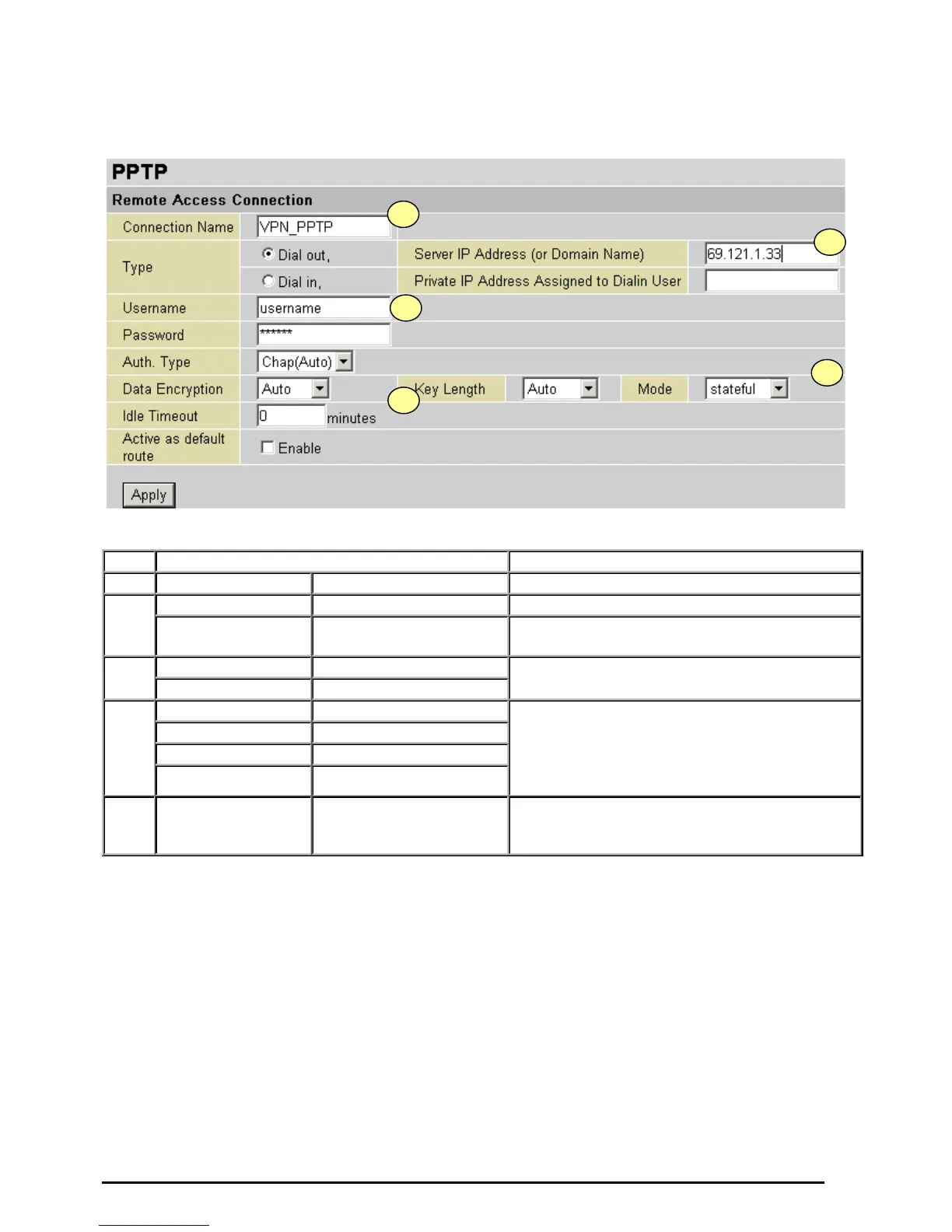
Configuring the PPTP VPN in the Office
You can either input the IP address (69.1.121.33 in this case) or hostname to reach the server.
Item Function Description
1
Connection Name VPN_PPTP Given name of PPTP connection
Dial out Check Dial out
2
Server IP Address
(or Domain name)
69.121.1.33 An Dialed server IP
Username username
3
Password 123456
A given username & password
Auth.Type Chap(Auto)
Data Encryption Auto
Key Length Auto
4
Mode stateful
Keep as default value in most of the cases,
PPTP server & client will determine the value
automatically. Refer to manual for details i
you want to change the setting.
5
Idle Time 0
The connection will be disconnected when there
Is no traffic in a predefined period of time. Idle
time 0 means the connection is always on.













 To Next Page