VoIP/(802.11g) ADSL2+ (VPN) Firewall Router
Chapter 4: Configuration
96
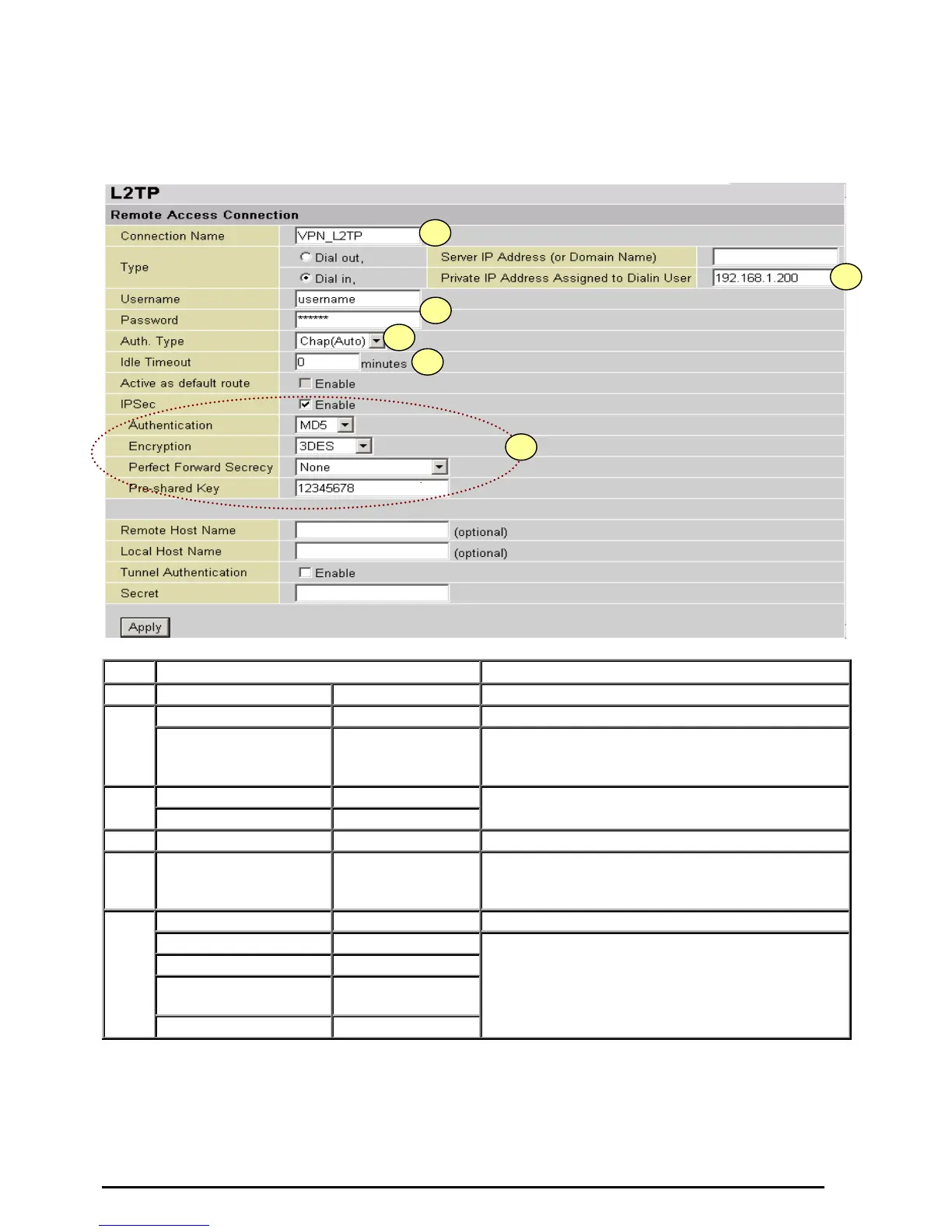
Configuring L2TP VPN in the Office
The input IP address 192.168.1.200 will be assigned to the remote worker. Please make sure this IP is
not used in the Office LAN.
Item Function Description
1
Connection Name VPN_L2TP Given a name of L2TP connection
Dial in Check Dial in
2
Private IP Address
Assigned to Dialing
User
192.168.1.200 An assigned IP address for the remote worker
Username username
3
Password 123456
Input username & password to authenticate
remote worker
4
Auth.Type Chap(Auto) Keep as default value in most of the cases.
5
Idle Timeout 0
The connection will be disconnected when there
Is no traffic in a predefined period of time. Idle
time 0 means the connection is always on.
IPSec Enable for enhancing your L2TP VPN security.
Authentication MD5
Encryption 3DES
Perfect Forward
Secrecy
None
6
Pre-shared Key 12345678
Both sites should use the same value.













 To Next Page