12
12. RESETTING FACTORY DEFAULTS
Select to restore factory default settings for Inputs/Outputs Factory Values:
EDIDs for all Inputs: 1080P60, 2 Channel Audio
I/O: All Outputs set to Input 1
13. OTHER SETTINGS
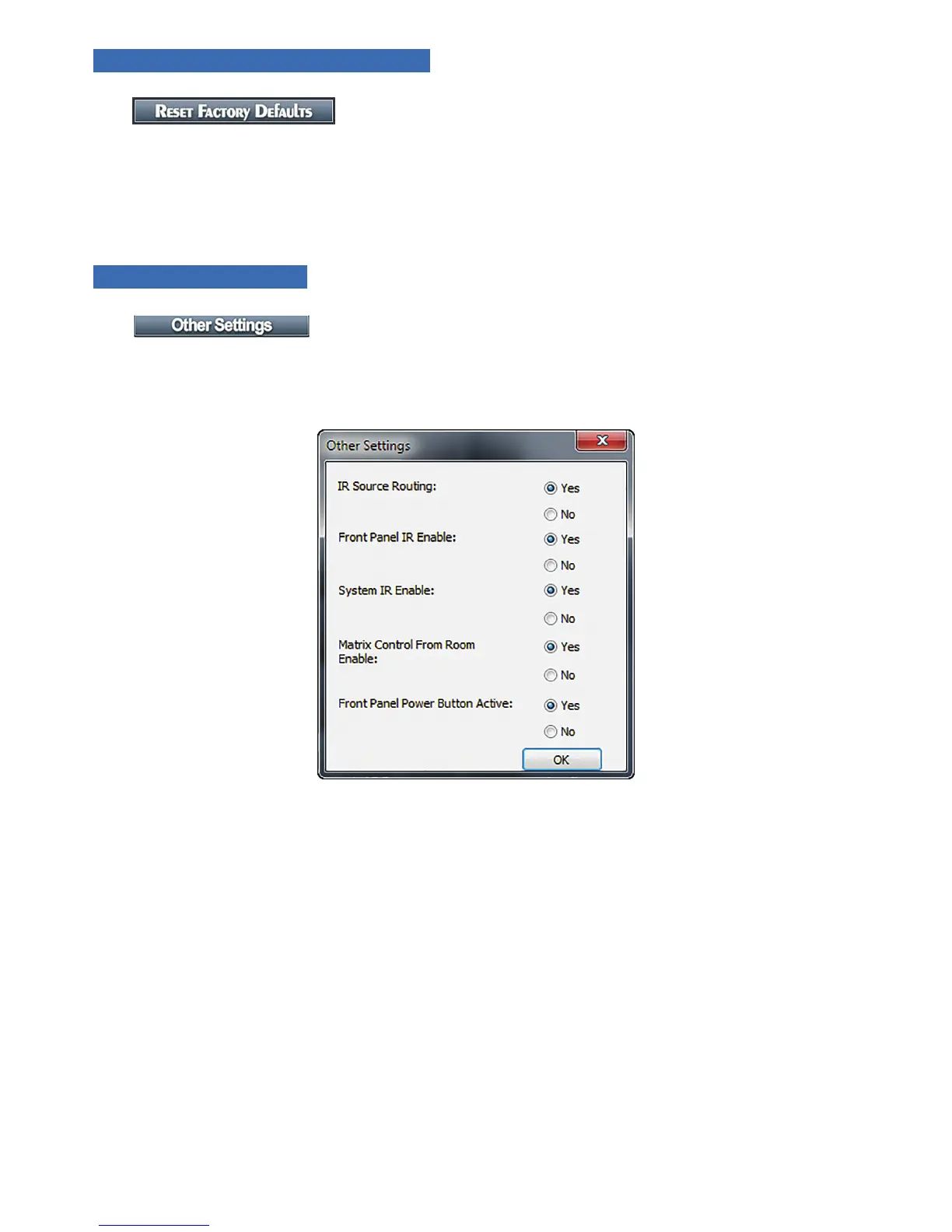
During the installation of a matrix, there are settings that provide Advanced Conguration not available via the
remote control. These allow for ne tuning the matrix when used under certain conditions and the settings listed
below are not available from the remote.
FIGURE 6
13.1. IR Source Routing:
The 3.5mm IR Output to Source jacks on the back of the matrix may be used in two ways. In the default setting,
IR coming from the room is routed to the IR Output corresponding to the selected Source (Input). Set IR Source
Routing to Yes for this functionality (default). If set to No, the IR coming from a room is routed to the IR output
corresponding to the Room (Output) number.
13.2. Front Panel IR Enable
Use this setting to Enable (default) and Disable the front panel IR receiver. This is useful if the matrix is placed
in a location that causes IR ooding from sunlight or other source. This setting only affects the Front Panel IR
Receivers.
13.3. System IR Enable
Use this setting to disable the System IR Input on the back of the matrix.


 To Next Page