7
8. EDID CONFIGURATION
The purpose of EDID Conguration is to set the EDID for each input appropriately. This EDID will be passed to the
connected source input. Unless the source has a xed audio or video format, it will transmit content at the best
audio and video formats that do not exceed the capabilities specied in the EDID. Note that all outputs on the
B-520-MTRX-230 receive the same audio and video format.
For example, assume you have two displays (Outputs) that will view the source connected to Input 1. One of the
displays is capable of 7.1 multi-channel audio but the other is only capable of stereo audio. In this case, you will
store an EDID in Input 1 that restricts the audio to stereo so that both display outputs will produce audio.
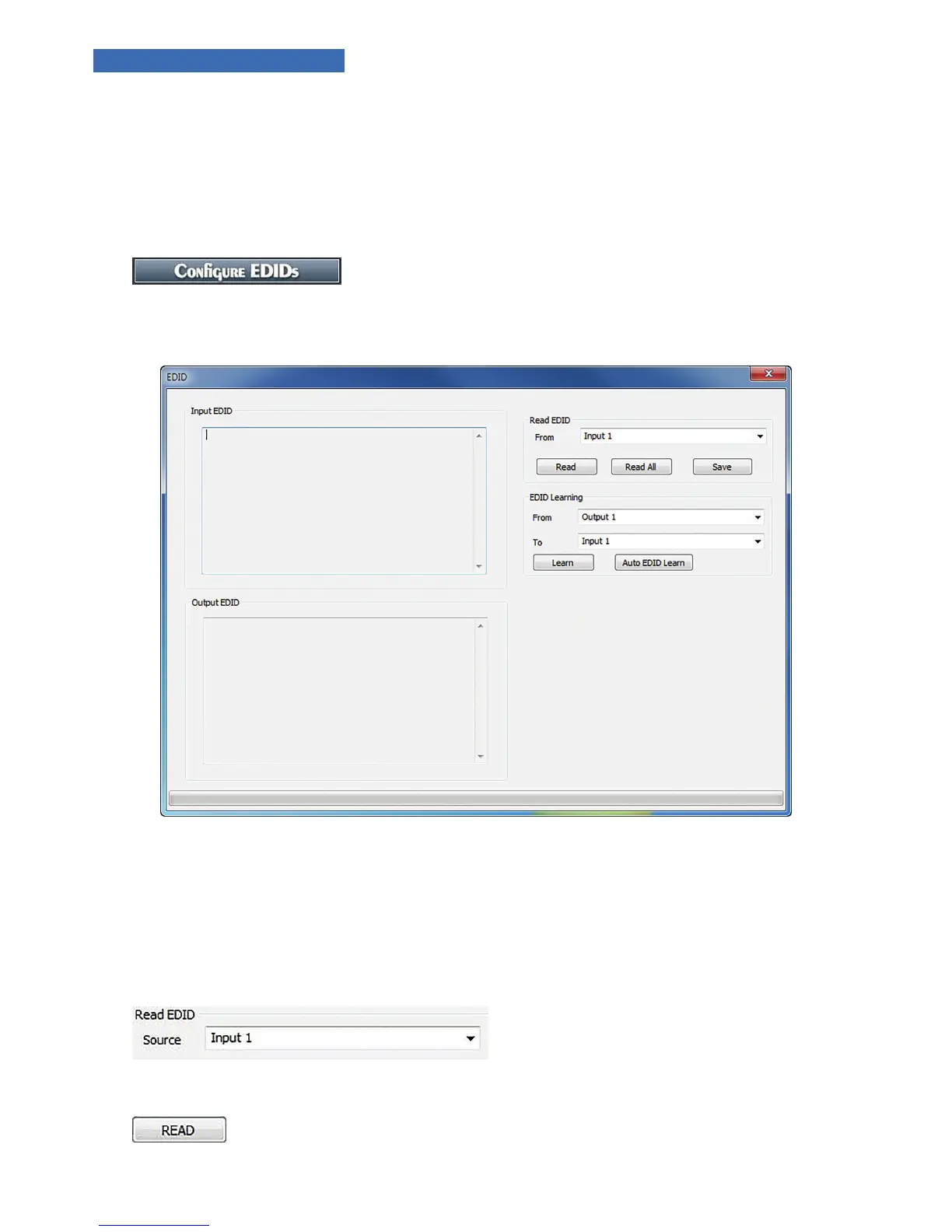
Select “Congure EDID’s” to access EDID congurations.
NOTE: If the PC is not communicating with the B-520-MTRX-230, a “NOT CONNECTED” window will appear.
FIGURE 2
8.1. Display EDID for Particular Input/Output
Read EDID allows you to read the currently stored EDID for each Input and to read the EDID from display (if any)
connected to each HDMI and HDBaseT output. Note that EDIDs for the Inputs are displayed in the upper left box
while EDIDs for the outputs are displayed in the lower left box.
1. Select an input or an output from the dropdown list:
2. Select READ to display the information.
3. The EDID values for the selected Input or Output will be displayed on the left side of the screen.


 To Next Page