12
6.3.1.1. RS-232 Operation Mode
The RS232 connection is used for performing Firmware updates in addition to sending RS232
signals. Switch 2 is used to set the RS232 Mode.
Note: Switch 2 must set to ON (Up) during normal RS232 Pass-Through operation.
1 2
ON
DCE
DTE
SERVICE
ON
DCE
DTE
SERVICE
ON
RS-232 Pass-Through
(Up)
1 2
ON
Service
(Down)
6.3.1.2. Firmware Update Operation
As new source and display devices become available, it may be necessary to modify the
rmware in the B-540-EXT-230-RS. To perform rmware updates, the dipswitches must be set
to DTE (Down) and Service. Detailed instructions and updated rmware will be posted to www.
snapav.com as they are released.
6.4. Thread-Locking Power Connector
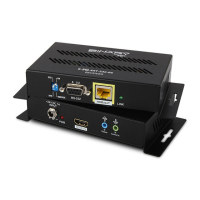
This extender pair is Power over Cable capable and therefore can be powered from either
the transmitter or receiver. When a power supply is connected to either the transmitter or
receiver, the HDBaseT link sends power to the other end.
CAUTION: DO NOT connect the power supply to the device until it is completely
installed and all connections have been made.


 To Next Page