EasyManua.ls Logo

Binatone Acura 3000 - User Manual

Binatone Acura 3000
36 pages
Print Icon
To Next Page IconTo Next Page
Loading...
1
Acura 3000
If you need help …
The Binatone Help Line is available
0845 345 9677
from 9.00 am to 5.00 pm, Monday
to Friday, on
Calls are charged at Local Call rate.
Or visit our website:
www.binatonetelecom.com
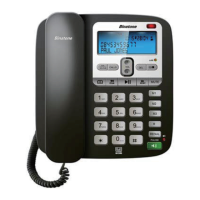
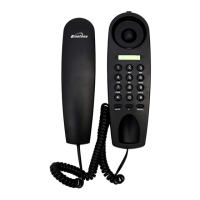
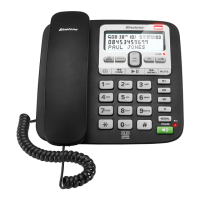
Unpacking your Acura 3000
Wall mount bracket
Question and Answer IconNeed help?

Do you have a question about the Binatone Acura 3000 and is the answer not in the manual?

Summary

Acura 3000 User Guide

Unpacking Your Acura 3000

Details the contents of the box for the Acura 3000 telephone.

Emergency Call Information

Important note regarding emergency calls during power failures.

Where to Find It

CALLS Button

Press to access caller display records.

OK;MENU Button

Enter Options Menu to set date, time, and TAM settings.

Phonebook Button

Press to access phonebook records.

OGM Button

Play current OGM or record a new outgoing message.

Play;Pause Button

Play back messages and memos, or pause playback.

Ringer Light

Indicates when the phone is ringing.

Message Light

Indicates TAM status and new messages.

DEL Button

Delete messages, memos, or records.

ON;OFF Button

Control TAM operation and select OGM.

MUTE Button

Mute microphone during a call.

Redial;Pause Button

Access redial list or insert a pause.

Speakerphone Button

Make, answer, or end calls using speakerphone.

Display Messages and Symbols

Number and Letter Fields

Shows telephone number and name/status of a call.

LCD Screen Icons

Explains icons for phone connection, time, date, new records, messages, speakerphone.

Installation Guide

Locating the Base Unit

Placement guidelines for the base unit to ensure optimal performance.

Connecting Handset Cord

Instructions for connecting the coiled handset cord.

Placing Handset on Base

Guidance on placing the handset correctly on the base unit.

Connecting Telephone Line

Steps to connect the telephone line cord to the base and socket.

Connecting Power Supply

Instructions for plugging in the power adapter.

Initial Power On

Procedure for switching on the mains power and initial display.

Checking Dial Tone

How to lift the handset and check for a dial tone.

Broadband Connection Note

Broadband Line Setup

Guidance on using micro-filters with broadband connections.

Wall Mount Installation

Attaching Wall Mount Bracket

Instructions for connecting the wall mount bracket to the phone.

Removing Wall Mount Bracket

Steps to detach the wall mount bracket from the phone.

Wall Mounting Preparation

Marking points and fixing screws for wall mounting.

Hanging the Telephone

How to hang the phone on screws and secure the handset.

Setting Up Your Acura 3000

Setting Language

Procedure to set the phone's language preference.

Setting Time and Date

Instructions for configuring the phone's time and date.

Setting Flash Time

Adjusting the recall function's flash time setting.

Adjusting LCD Contrast

Setting the screen contrast level for better visibility.

Setting Message Length

Configuring the maximum recording time for messages.

Setting Rings to Answer

Determining the number of rings before the answering machine answers.

Remote Access Code Setup

Setting up a three-digit code for remote operation access.

TAM ON;OFF Setting

Selecting recording quality and total recording time.

Telephone Operation

Ringer Volume Adjustment

Adjusting the ringer volume using the switch.

Making a Call

Steps to make a call using the handset or speakerphone.

Answering a Call

How to answer an incoming call.

Adjusting Speakerphone Volume

Modifying speakerphone volume during a call.

Switching Between Handset and Speakerphone

How to toggle between handset and speakerphone modes.

Muting Microphone;Mouthpiece

Instructions for muting audio during a call.

LCD Screen Backlight

Information on the display backlight activation.

Accessing Voice Messages

How to access your voice messaging service.

One Touch Memory

Storing Numbers in Memory

Procedure to store phone numbers in one-touch memory.

Dialing Stored Numbers

How to dial numbers stored in memory.

Outgoing Call Record

Last Number Redial

Redialing the last number called.

Viewing Outgoing Calls

Accessing and browsing the list of outgoing calls.

Making Call from Record

How to make a call directly from the call record.

Deleting Outgoing Calls

Steps to delete specific outgoing call records.

Phonebook Features

Storing Calls in Phonebook

Saving outgoing call records into the phonebook.

Viewing Phonebook Records

Accessing and navigating the phonebook entries.

Adding New Phonebook Records

Instructions for adding new contact entries.

Editing Phonebook Entries

Modifying stored phone numbers and names.

Deleting Phonebook Records

Steps to remove entries from the phonebook.

Caller Display Operation

Caller Display Service Requirement

Notes the need for a subscription to the Caller Display service.

Viewing Caller Display List

Accessing and browsing the list of incoming calls.

Returning Calls from List

How to redial a number directly from the caller list.

Storing Caller Display Records

Saving incoming call details into the phonebook.

Deleting Caller Display Records

Removing individual or all caller display records.

Answering Machine System

Outgoing Messages (OGM)

Information on pre-recorded and custom outgoing messages.

Playing Current OGM

How to listen to the currently set outgoing message.

Recording OGM 1 and OGM 2

Procedure to record custom outgoing messages.

Switching Between OGMs

How to select between Announcement 1 and Announcement 2.

Turning Answering Machine ON;OFF

Steps to activate or deactivate the answering machine.

Recording a Memo

Instructions for recording personal memo messages.

Playback and Pause Messages

How to play, pause, and resume message playback.

Repeat and Skip Messages

Navigating through recorded messages.

Stopping Message Playback

How to stop the current message playback.

Volume Control During Playback

Adjusting volume levels during message playback.

Intercepting a Call

How to interrupt an answering message to speak to the caller.

Deleting Recorded Messages

Steps to delete individual recorded messages.

Deleting All Old Messages

How to erase all previously played messages.

Returning to Default OGM

Procedure to revert to the factory-set outgoing messages.

Remote Operation

Checking Remote Access Code

Viewing the current remote access code setting.

Checking Messages Remotely

How to call and access messages from a remote location.

Remote Instruction Codes

List of commands for operating the answering machine remotely.

Switching Machine ON Remotely

Instructions for turning the answering machine on remotely.

Operational Notes

Electrical Safety Precautions

Guidelines for safe use of electrical equipment.

Base Unit Placement

Recommendations for optimal placement of the base unit.

Cleaning and Care Instructions

Advice on how to clean and maintain the phone.

Troubleshooting Guide

Basic Installation Checks

Initial checks for installation and power.

Cannot Make or Answer Calls

Solutions for issues with making or receiving calls.

Phone Does Not Ring

Troubleshooting steps for a non-ringing phone.

Phone Does Not Dial

Solutions for problems with dialing numbers.

Caller Display Not Working

Reasons and fixes for Caller Display feature issues.

Answering Machine Issues

Troubleshooting for recording and message-related problems.

Remote Operation Problems

Fixes for issues with remote access and operation.

PBX Compatibility Issues

Solutions for using the phone with a PBX system.

Guarantee and Service Information

Product Guarantee Period

Details on the 1-year guarantee against manufacturing defects.

Returning the Product

Procedure for returning the product for service or replacement.

Statutory Rights

Information regarding the customer's statutory rights.

Technical Details

Standard and Temperature Range

Specifications for the telephone standard and operating temperatures.

Electrical Power Specifications

Details on the power input and output requirements.

EC Declaration of Conformity

Manufacturer's declaration of compliance with directives.

Connection and Conditions for Use

Connection Types

Information on connecting to exchange lines or PBX systems.

Ringer Equivalence Numbers (REN)

Explanation of REN values for connected devices.

Button Pressing Instructions

Guidance on how to press buttons briefly or hold them.

Summary

Acura 3000 User Guide

Unpacking Your Acura 3000

Details the contents of the box for the Acura 3000 telephone.

Emergency Call Information

Important note regarding emergency calls during power failures.

Where to Find It

CALLS Button

Press to access caller display records.

OK;MENU Button

Enter Options Menu to set date, time, and TAM settings.

Phonebook Button

Press to access phonebook records.

OGM Button

Play current OGM or record a new outgoing message.

Play;Pause Button

Play back messages and memos, or pause playback.

Ringer Light

Indicates when the phone is ringing.

Message Light

Indicates TAM status and new messages.

DEL Button

Delete messages, memos, or records.

ON;OFF Button

Control TAM operation and select OGM.

MUTE Button

Mute microphone during a call.

Redial;Pause Button

Access redial list or insert a pause.

Speakerphone Button

Make, answer, or end calls using speakerphone.

Display Messages and Symbols

Number and Letter Fields

Shows telephone number and name/status of a call.

LCD Screen Icons

Explains icons for phone connection, time, date, new records, messages, speakerphone.

Installation Guide

Locating the Base Unit

Placement guidelines for the base unit to ensure optimal performance.

Connecting Handset Cord

Instructions for connecting the coiled handset cord.

Placing Handset on Base

Guidance on placing the handset correctly on the base unit.

Connecting Telephone Line

Steps to connect the telephone line cord to the base and socket.

Connecting Power Supply

Instructions for plugging in the power adapter.

Initial Power On

Procedure for switching on the mains power and initial display.

Checking Dial Tone

How to lift the handset and check for a dial tone.

Broadband Connection Note

Broadband Line Setup

Guidance on using micro-filters with broadband connections.

Wall Mount Installation

Attaching Wall Mount Bracket

Instructions for connecting the wall mount bracket to the phone.

Removing Wall Mount Bracket

Steps to detach the wall mount bracket from the phone.

Wall Mounting Preparation

Marking points and fixing screws for wall mounting.

Hanging the Telephone

How to hang the phone on screws and secure the handset.

Setting Up Your Acura 3000

Setting Language

Procedure to set the phone's language preference.

Setting Time and Date

Instructions for configuring the phone's time and date.

Setting Flash Time

Adjusting the recall function's flash time setting.

Adjusting LCD Contrast

Setting the screen contrast level for better visibility.

Setting Message Length

Configuring the maximum recording time for messages.

Setting Rings to Answer

Determining the number of rings before the answering machine answers.

Remote Access Code Setup

Setting up a three-digit code for remote operation access.

TAM ON;OFF Setting

Selecting recording quality and total recording time.

Telephone Operation

Ringer Volume Adjustment

Adjusting the ringer volume using the switch.

Making a Call

Steps to make a call using the handset or speakerphone.

Answering a Call

How to answer an incoming call.

Adjusting Speakerphone Volume

Modifying speakerphone volume during a call.

Switching Between Handset and Speakerphone

How to toggle between handset and speakerphone modes.

Muting Microphone;Mouthpiece

Instructions for muting audio during a call.

LCD Screen Backlight

Information on the display backlight activation.

Accessing Voice Messages

How to access your voice messaging service.

One Touch Memory

Storing Numbers in Memory

Procedure to store phone numbers in one-touch memory.

Dialing Stored Numbers

How to dial numbers stored in memory.

Outgoing Call Record

Last Number Redial

Redialing the last number called.

Viewing Outgoing Calls

Accessing and browsing the list of outgoing calls.

Making Call from Record

How to make a call directly from the call record.

Deleting Outgoing Calls

Steps to delete specific outgoing call records.

Phonebook Features

Storing Calls in Phonebook

Saving outgoing call records into the phonebook.

Viewing Phonebook Records

Accessing and navigating the phonebook entries.

Adding New Phonebook Records

Instructions for adding new contact entries.

Editing Phonebook Entries

Modifying stored phone numbers and names.

Deleting Phonebook Records

Steps to remove entries from the phonebook.

Caller Display Operation

Caller Display Service Requirement

Notes the need for a subscription to the Caller Display service.

Viewing Caller Display List

Accessing and browsing the list of incoming calls.

Returning Calls from List

How to redial a number directly from the caller list.

Storing Caller Display Records

Saving incoming call details into the phonebook.

Deleting Caller Display Records

Removing individual or all caller display records.

Answering Machine System

Outgoing Messages (OGM)

Information on pre-recorded and custom outgoing messages.

Playing Current OGM

How to listen to the currently set outgoing message.

Recording OGM 1 and OGM 2

Procedure to record custom outgoing messages.

Switching Between OGMs

How to select between Announcement 1 and Announcement 2.

Turning Answering Machine ON;OFF

Steps to activate or deactivate the answering machine.

Recording a Memo

Instructions for recording personal memo messages.

Playback and Pause Messages

How to play, pause, and resume message playback.

Repeat and Skip Messages

Navigating through recorded messages.

Stopping Message Playback

How to stop the current message playback.

Volume Control During Playback

Adjusting volume levels during message playback.

Intercepting a Call

How to interrupt an answering message to speak to the caller.

Deleting Recorded Messages

Steps to delete individual recorded messages.

Deleting All Old Messages

How to erase all previously played messages.

Returning to Default OGM

Procedure to revert to the factory-set outgoing messages.

Remote Operation

Checking Remote Access Code

Viewing the current remote access code setting.

Checking Messages Remotely

How to call and access messages from a remote location.

Remote Instruction Codes

List of commands for operating the answering machine remotely.

Switching Machine ON Remotely

Instructions for turning the answering machine on remotely.

Operational Notes

Electrical Safety Precautions

Guidelines for safe use of electrical equipment.

Base Unit Placement

Recommendations for optimal placement of the base unit.

Cleaning and Care Instructions

Advice on how to clean and maintain the phone.

Troubleshooting Guide

Basic Installation Checks

Initial checks for installation and power.

Cannot Make or Answer Calls

Solutions for issues with making or receiving calls.

Phone Does Not Ring

Troubleshooting steps for a non-ringing phone.

Phone Does Not Dial

Solutions for problems with dialing numbers.

Caller Display Not Working

Reasons and fixes for Caller Display feature issues.

Answering Machine Issues

Troubleshooting for recording and message-related problems.

Remote Operation Problems

Fixes for issues with remote access and operation.

PBX Compatibility Issues

Solutions for using the phone with a PBX system.

Guarantee and Service Information

Product Guarantee Period

Details on the 1-year guarantee against manufacturing defects.

Returning the Product

Procedure for returning the product for service or replacement.

Statutory Rights

Information regarding the customer's statutory rights.

Technical Details

Standard and Temperature Range

Specifications for the telephone standard and operating temperatures.

Electrical Power Specifications

Details on the power input and output requirements.

EC Declaration of Conformity

Manufacturer's declaration of compliance with directives.

Connection and Conditions for Use

Connection Types

Information on connecting to exchange lines or PBX systems.

Ringer Equivalence Numbers (REN)

Explanation of REN values for connected devices.

Button Pressing Instructions

Guidance on how to press buttons briefly or hold them.

Binatone Acura 3000 Specifications

General IconGeneral
TypeAnalog telephone
Answering machineYes
Mounting typeDesk/Wall
Product colorBlack, Silver
Number of handsets included1
Phonebook capacity120 entries
Caller IDNo
Volume controlDigital
Backlight colorBlue

Related product manuals