
 Need help?
Do you have a question about the Binatone LYRIS 110 and is the answer not in the manual?
Contact details and operating hours for the Binatone Help Line.
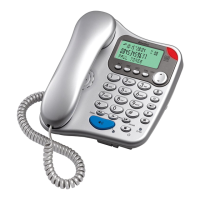
Indicator that flashes when the phone receives an incoming call.
Buttons for storing and dialing frequently used numbers.
Button used to store numbers in memory.
Button used for accessing stored numbers.
Button to redial the last dialed number.
Button to temporarily silence the microphone during a call.
Button used for PBX systems or to access network features.
Button to insert a pause in dialing sequences.
Switch to adjust the ringer volume between high and low settings.
Guidelines for selecting an optimal and safe location for the base unit.
Instructions for connecting the handset cord to the base unit.
Ensuring the handset is correctly seated on the base unit.
Connecting the phone to the telephone line socket via the wall jack.
Verifying phone functionality by listening for dial tone.
Steps involved in initiating a telephone call.
Procedure for responding to an incoming call.
How to properly conclude a telephone conversation.
Functionality to redial the most recently dialed number.
Using the mute button to temporarily block microphone audio.
How to use the recall button for PBX systems.
Adding pauses to dialing sequences for specific network access.
Saving numbers to the one-touch memory buttons (M1, M2, M3).
Saving numbers to the two-touch memory (0-9).
Procedures for dialing numbers stored in one-touch or two-touch memory.
Details of the 12-month guarantee and conditions.
Steps for returning the phone for repair while under guarantee.
Procedure for obtaining repairs and quotations after the guarantee period.
Specifications including standard, temperature range, and PBX compatibility.
Information on intended network usage and country limitations.
Clarification on how to press buttons: brief press vs. press and hold.
Guidelines for connecting the phone to exchange lines and PBX systems.
Explanation of REN and its importance for multiple devices on a line.
 General
| Type | Analog telephone |
|---|---|
| Answering machine | No |
| Mounting type | Wall |
| Product color | White |
| Microphone mute | Yes |
| Phonebook capacity | - entries |
| Storage temperature (T-T) | -20 - 60 °C |
| Operating temperature (T-T) | 0 - 40 °C |











 To Next Page