2. Installation
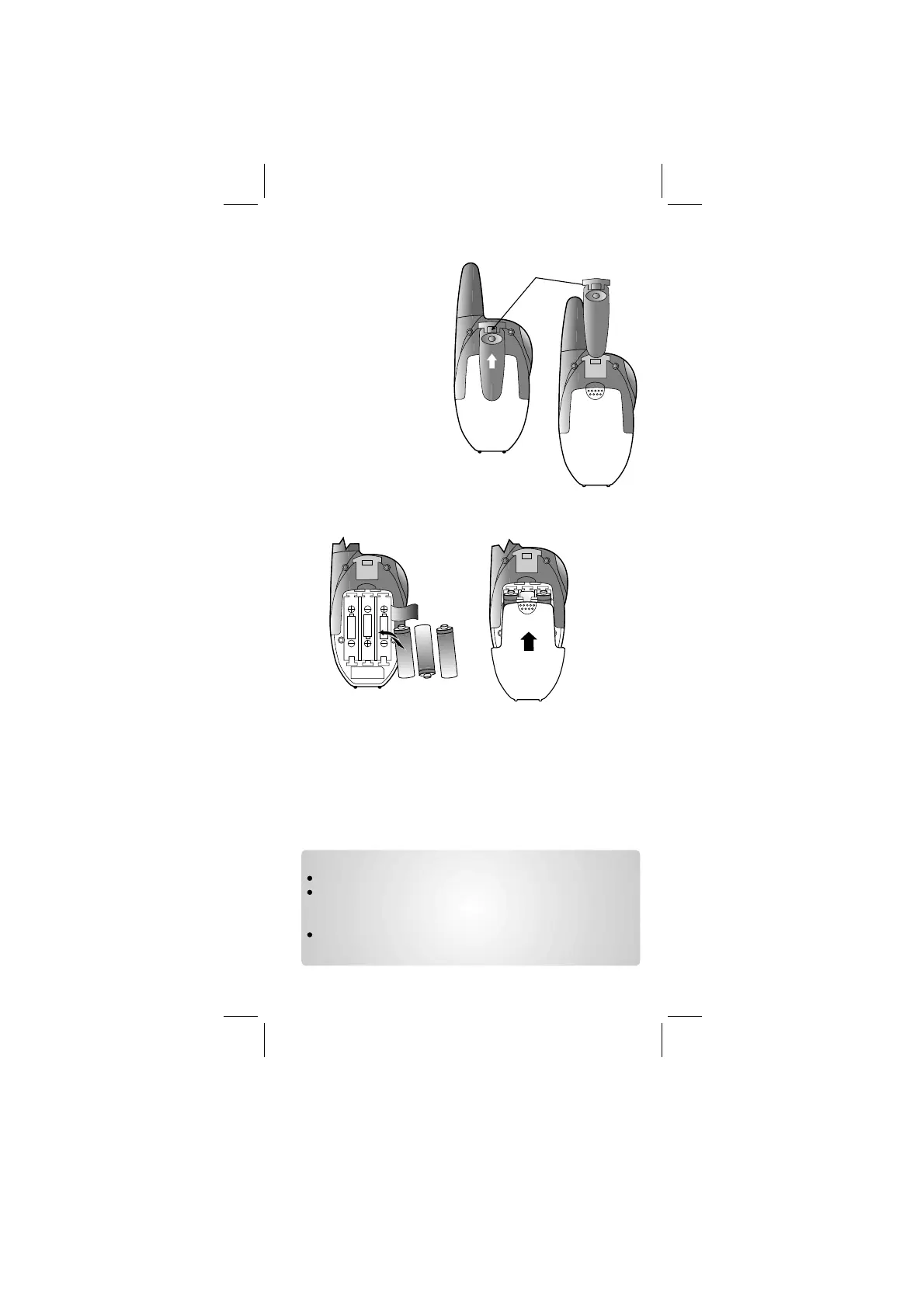
2.1 Removing the Belt Clip
a. Pull the Belt Clip Latch
away from the PMR.
b. While pulling the Belt
Clip Latch, push up
the Belt Clip as
shown in Figure 1.
Figure 1
Figure 2
Belt clip
latch
2.2 Installing the Belt
Clip
a. Slide the Belt Clip into
the slot as shown in
Figure 2.
b. A “click” indicates the
Belt Clip is locked into
position.
a. Slide down the Battery Compartment Cover.
b. Insert 3 “AAA” size batteries (not included) by following the
polarity marking inside the Battery Compartment as shown in
Figure 3.
c. Replace the Battery Compartment Cover. See Figure 4.
Figure 3
Figure 4
Notes:
Use only same type and make of batteries on the PMR units.
The PMR units have a built-in Power Saver (PS) for maximum
battery life, but when not in use, turn the units OFF to
conserve battery power.
Remove the batteries if the units will not be used for a long
period of time.
2.3 Installing the Batteries
Caution: Observe the proper battery polarity orientation when
installing batteries. Incorrect positioning can damage both the
batteries and the unit.
Binatone Help Line - 0845 345 9677
AAA
AAA
AAA
AAA
AAA
AAA




 To Next Page