- 14 -
Find phone
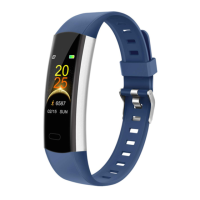
Sedentary reminder
Basics Navigation
Please turn on this function in app.
Steps: Settings →Sedentary Alert →Turn on Switch→Set start/ Stop
time/ Sedentary duration→Sync with Device.
[Click the touch key] Go to the next interface: " ".
[Press and hold the touch key for 2s] Enter and
start to find the connected phone as it alerts by
vibrating or exit it.


 To Next Page