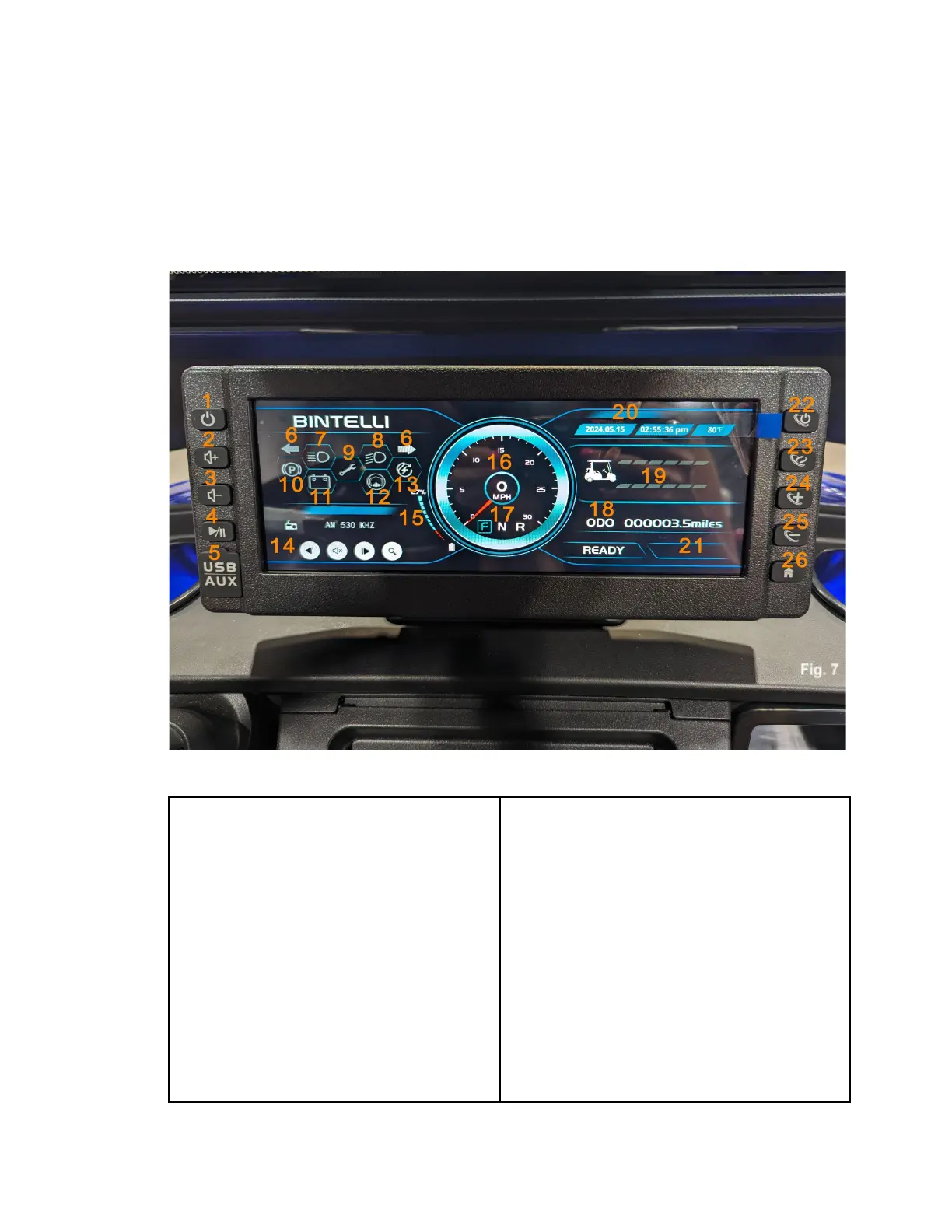
Touchscreen Display
The touchscreen display communicates all of your Nexus’ vital information, and allows you to control all of
the features of your cart, Fig. 7.
Home Screen
1. Display Power Button
2. Volume Up Button
3. Volume Down Button
4. Play/Pause/Mute Button
5. USB and 3.5mm Headphone Jack
Under Cover
6. Turn Signal Indicators
7. High Beam Indicator
8. Low Beam Headlight Indicator
9. Diagnostic Code Indicator
10. Parking Brake Indicator
11. Battery Warning Indicator
12. Brake Fluid Level Indicator
13. Regenerative Braking Indicator
14. Multimedia Information Display
15. Battery Level Indicator
16. Speedometer
17. Gear Selection Indicator
18. Odometer
19. Amp Draw/Regenerative Braking
Display
20. Date, Time, Temperature Display
21. Diagnostic Code Display
22. Ambient Lighting Power Button
23. Ambient Lighting Mode Button
24. Ambient Lighting Color Selection Button
25. Ambient Lighting Color Selection Button
26. Home Button



 To Next Page