5400230 Rev. H
8 Troubleshooting and Repairs
8.1 TROUBLESHOOTING
The following tables list warning and error messages which indicate conditions that can usually be
remedied by the user. If the recommended corrective action does not solve the problem and the
message persists, restart the iLase by removing the battery, waiting 5 seconds. and then re-installing
the battery. If the error message reappears after restarting the iLase, the system cannot be used until
the cause of the error has been remedied. Call Biolase Service at (800) 321-6717 or your Biolase
Authorized Service Representative.
8.2 WARNING AND ERROR MESSAGES
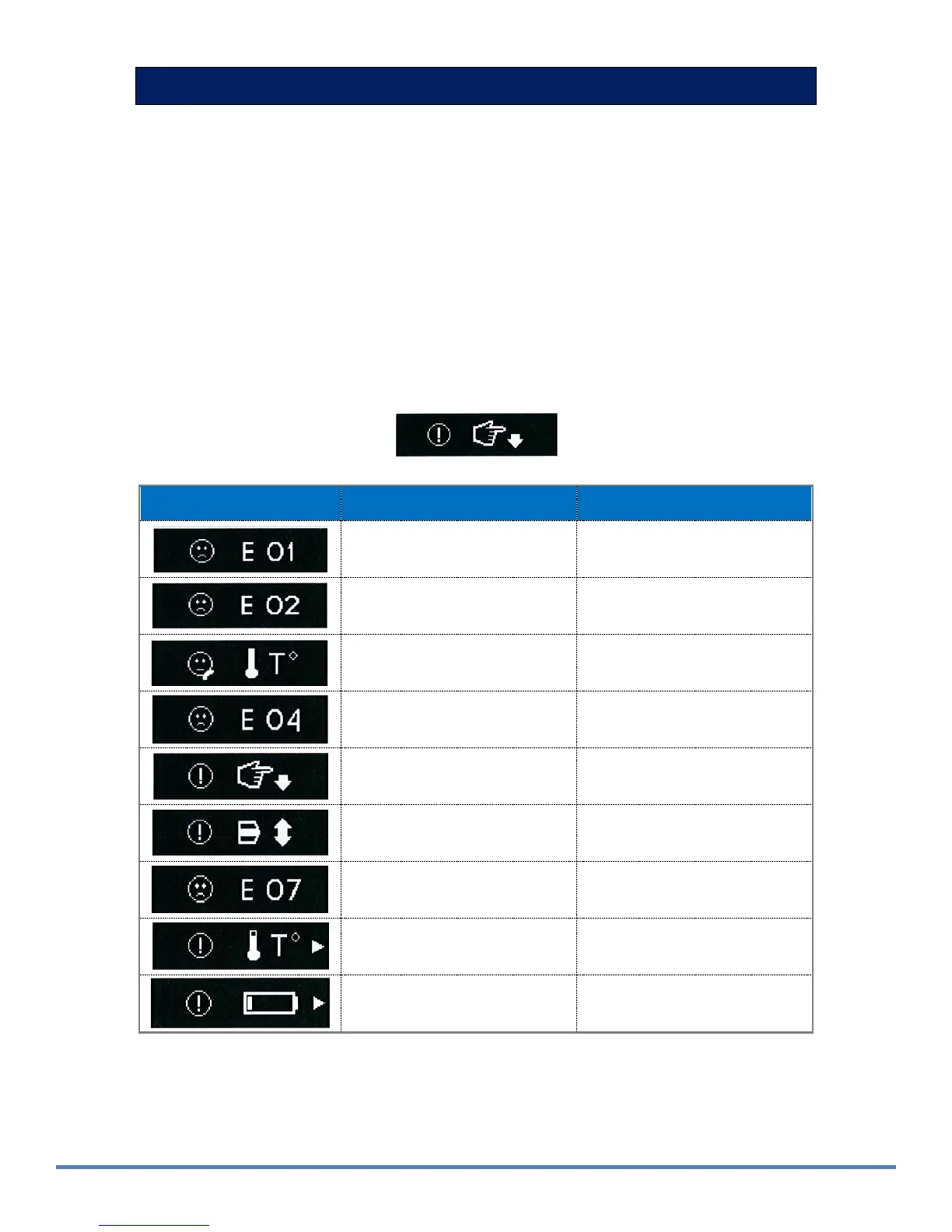
The Warning and Error screens display codes and recommended corrective actions. If a Warning or
Error message is displayed, perform the indicated corrective action
.
Error/Warning Code Error/Warning Description Action
E01 Temperature Sensor open
(check at start up)
Call Service
E02 Temperature Sensor short
(check at start up)
Call Service
E03 Laser system overheated Wait to cool off
E04 Laser current is outside of
allowed range
Call Service
E05 Finger switch actuated in
STANDBY mode
Release Finger Switch
E06 Up/down/select switch
stuck
Call Service
E07 Check Sum Error
(memory integrity)
Call Service
W01 Warning temperature Wait to cool off
W02 Warning low battery level
Battery replacement may be
necessary
Figur
e
8
-
1
:
Fi
n
ger
Switch
Actuated.


 To Next Page