9. How to Recall 12 Readings in Memory Mode
The thermometer can recall the last 12 readings. To recall please
follow the sequence below.
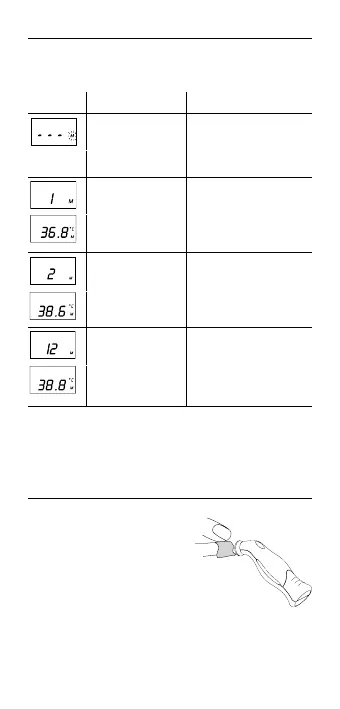
Display Display Meaning Description
Recall Mode Press the START button to
enter Recall Mode when
power is off.The memory
icon «M» flashes.
Reading 1 (the last
reading)
Press and release the
START button to recall the
last reading.
Reading 2 (the
second latest
reading)
Press and release the
START button to recall the
second latest reading.
Reading 12 (the last
reading)
Press and release
the START button
consecutively to recall
readings in succession, up
to the last 12 readings.
Pressing and releasing the START button after the last 12
readings have been recalled will resume the above sequence
from reading 1.
10. Cleaning and Storage
Use an alcohol swab or cotton
tissue moistened with alcohol (70%
Isopropyl) to clean the thermometer
casing and the measuring probe.
Ensure that no liquid enters the
interior of the thermometer.
Never use abrasive cleaning
agents, thinners or benzene for
cleaning and never immerse the
instrument in water or other
cleaning liquids.
7



 To Next Page