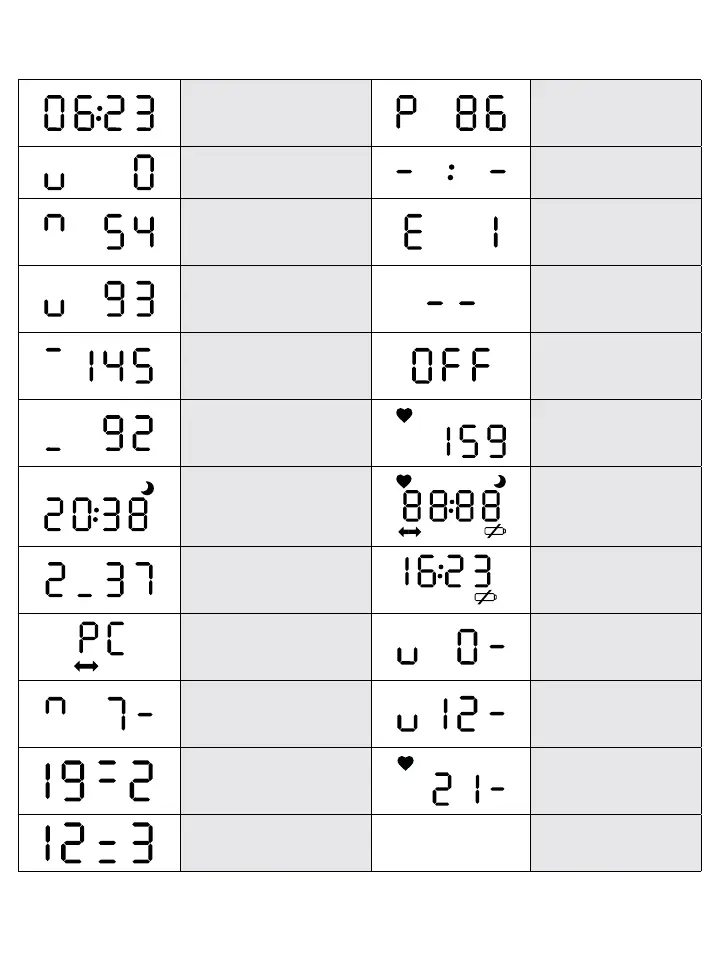
1.1 LCD Display
Information displayed on ABP-01.
Normal status: time is
displayed
Pulse rate value of just
completed measurements
(beats/minute)
Blood pressure measurement
initiated (mmHg)
Event marker set during a
button push
Pumping for measurement,
current pressure is displayed
(mmHg)
Error code display
Deflation during
measurement, current
pressure is displayed (mmHg)
The device is switched off
Systolic value of just
completed measurement
(mmHg)
The blood pressure
measurement is cancelled
by pressing a button
Diastolic value of just
completed measurement
(mmHg)
Heart symbol blinking:
measurement in progress
(mmHg)
Night mode: time is displayed,
moon sign is lit
LCD check: all segments
are displayed
Battery voltage display (2,37V)
The crossed battery
symbol warns of low
battery
Communication with a
personal computer
Blood pressure
measurement initiated
(kPa)
Pumping for measurement,
current pressure is displayed
(kPa)
Deflation during
measurement, current
pressure displayed (kPa)
Systolic value of a just
completed measurement
(19,2 kPa)
Heart symbol blinking:
measurement in progress
(kPa)
Diastolic value of a just
completed measurement (kPa)















 To Next Page