2.3 Storing the Cuff
The cuff used for measuring blood pressure is a delicate component of the device and should be stored
carefully when not in use.
2.4 Inserting the Batteries
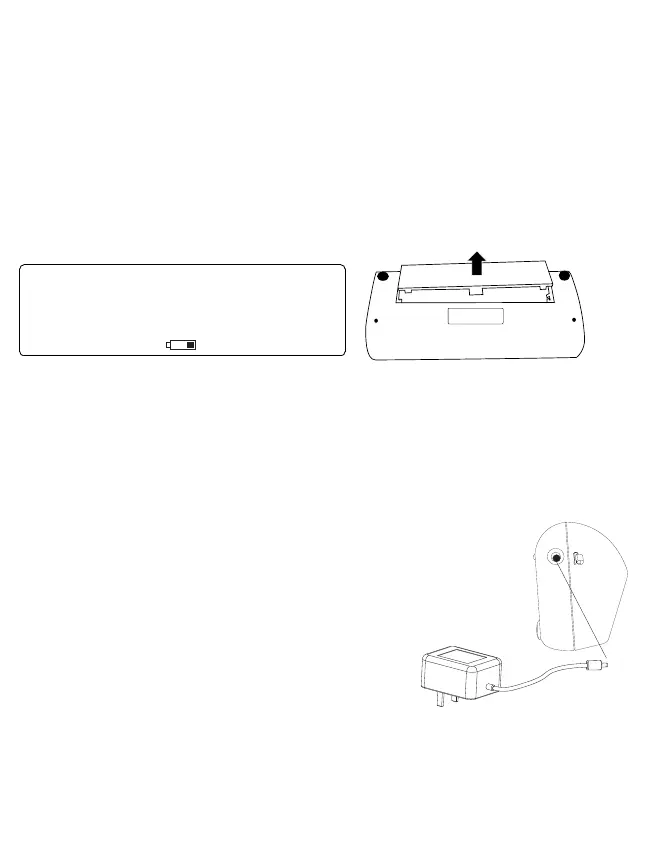
Follow these steps to insert four “AA” batteries in the device.
1. Open the battery compartment cover in the direction shown.
2. Insert four “AA” batteries with the correct polarity as indicated. Once inserted you will hear 2 short
beeps.
3. Replace the battery compartment cover.
Attention!
• When the batteries are approximately ¾ empty the battery symbol will flash as soon as the device is
switched on. Although the device will continue to measure reliably, you should obtain replacement
batteries.
• Please use “AA” Long-Life or Alkaline 1.5V batteries.
• If the blood pressure monitor is left unused for long periods, please remove the batteries from the device.
• Do not mix old and new batteries. Do not mix alkaline, standard (carbon-zinc) or rechargeable batteries.
2.5 Using an AC/DC Power Adapter
You may also operate this monitor using an AC/DC adapter.
1. Ensure that the AC/DC adapter and cable are not damaged.
2. Plug the adapter cable into the AC/DC adapter port on the side of
the blood pressure monitor.
3. Plug the adapter into your electrical outlet. When the adapter is
connected, no battery current is consumed.
Note: The monitor is designed not to draw power from the
batteries when an AC/DC adapter is in use.














 To Next Page