3.3 Measuring Your Blood Pressure
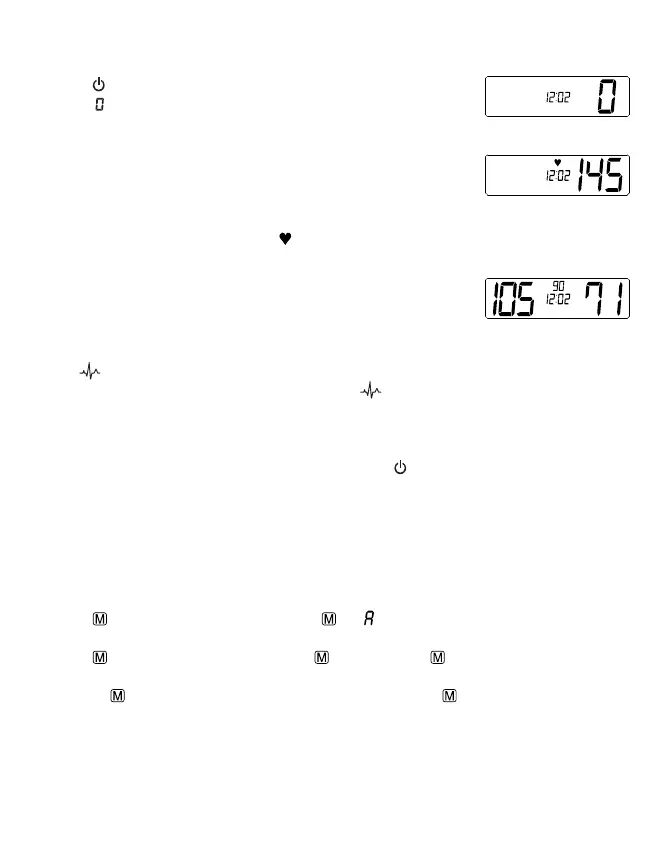
After the cuff has been appropriately positioned, the measurement can begin:
1. Press the
button to start the measurement. You will here 5 short beeps
after the “ ” appears on the screen. The year and date will flash on the
screen stopping on the time. The pump then begins to inflate the cuff. The
increasing pressure in the cuff is shown on the display.
2. After the suitable pressure has been reached, the pump stops and the
cuff gradually deflates. The cuff pressure will be displayed. If the required
pressure was not reached, the blood pressure machine will automatically
pump some more air into the cuff to achieve your blood pressure reading.
3. When the device detects a heartbeat, the symbol on the display starts to
flash and you can hear a beep for every heartbeat.
4. When the measurement has been completed, you will hear a long beep and
the systolic, diastolic and pulse rate will appear on the display.
5. The measurement readings remain on the display until you switch off the
device. If no button is pressed, the device will switch off automatically after
approximately 1 minute.
Note: The symbol will be displayed along with the readings if irregular
heartbeat has been detected during the measurement. If the symbol appears frequently (e.g. several
times a week), it may be an indication of a more serious heart problem, and you should consult your doctor.
3.4 Discontinuing a Measurement
To stop the measurement (eg. the patient feels unwell) press the button. The device will immediately
decrease the cuff pressure automatically.
3.5 Memory Recall
This blood pressure monitor automatically stores 99 measurements. The oldest record will be replaced by
the latest measurement value when there are more than 99 sets of readings.
3.6 Recalling the Memory with Power Off
1. Press the button briefly. The display will show and followed by an average value of all
readings in the memory.
2. Press the button again, so the display shows and a value, e.g. 17. This means that there are
17 values in the memory. The blood pressure monitor then switches to the last stored result.
3. Pressing the button again displays the previous value. Pressing the button repeatedly enables
you to move from one stored value to another.
3.7 Clear Measurements from Memory
Note: You can not clear individual readings stored on the device. By clearing the memory you are clearing
all readings stored.
TIME PM
TIME PM
TIME PM














 To Next Page