13
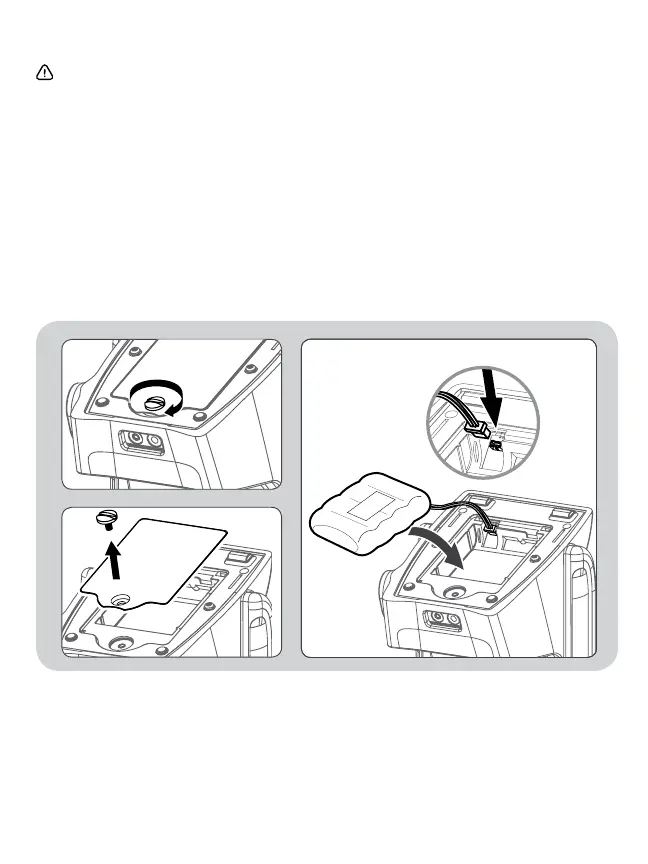
3.2 Installation and Replacement of Battery Pack
Warning:
• If the fluid in the battery gets into your eye, wash the eye with sufficient water without rubbing the
eye, then immediately consult the doctor for treatment. There is danger in losing your eyesight.
• Do not use the exclusive battery pack other than for this unit.
• Do not throw the battery pack into fire, or heat, or disassemble it. It may cause heat, ignition,
short-circuit, or rupture.
• Do not short-circuit the polarities of the battery pack with a metal object such as a wire.
• If the fluid in the battery is stained on your skin or clothes, immediately wash off the fluid with
water. You may suffer injury, or the battery may leak, heat, ignite fire, or explode.
3.2A Using the Rechargeable Battery
1. Remove the screw on the battery cover (Located on the bottom of the unit).
2. Installation: Connect the battery pack to the connector in the battery cover to install it.
Replacement: Disconnect the battery pack from the connector and replace with a new one.
3. Install the battery cover and fasten it with screws. At this time, be careful not to pinch the lead wire.














 To Next Page