23
5. Error Messages and Malfunctions
If any abnormality should arise during use, please check the following points.
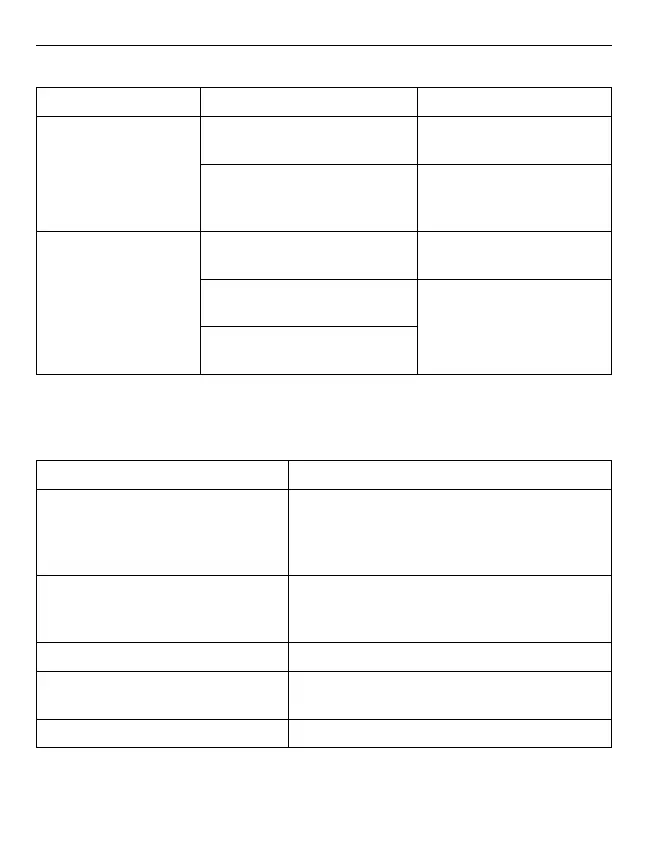
Symptoms Check Points Correction
No display when the ON/
OFF button is pressed
Have the batteries run down?
Charge the battery pack or
replace with a new one
Has the connector of the battery
pack been positioned incorrectly?
Re-insert the connector of
the batteries in the correct
positions.
EE mark shown on
display or the blood
pressure value is
displayed excessively
low (high)
Is the cuff placed correctly?
Wrap the cuff properly so that
it is positioned correctly.
Did the patient talk or move during
measurement
Measure again. Keep arm
steady during measurement.
Did the patient vigorously shake
the cuff during measurement?
Note: If the unit still does not work, call the BIOS Medical Hotline. Under no circumstance should
you disassemble and repair the unit by yourself.
Error Codes
Symptoms Symptoms
EE / Measurement Error:
Make sure the L-plug is securely connected to the
air socket and calmly measure again. Wrap the
cuff correctly around your arm and keep arm steady
during measurement.
E1 / Air Circuit Abnormality:
Make sure the L-Plug is securely connected to the
air socket on the side of the unit and calmly measure
again.
E2 / Pressure Exceeding 300 mmHg:
Switch the unit off and measure again quietly.
E3 / Data Error:
Remove the batteries, wait for 60 seconds, and
reload.
Er / Exceeding Measurement Range:
Measure again quietly.
If the errors continue to occur, call the BIOS Medical Hotline: 1-866-536-2289














 To Next Page