Select
Time (sec.)
Orbital
(rpm)
Reciprocal
(deg.)
Vibro/
/pause
Time
(hr:min)
Run
Stop
Multi-Rotator
o
1-90
0-24.00
1-5
o
0-5
1- 01 0
RUN
1-250 1-250
4. Operation
Recommendation during operation
Arrange the tubes symetrically to the rotation axis when loading.
4.1.Connect the external power supply unit to the electric circuit.
4.2.Place samples on the platform: microtubes - up to the end; vacutainers
and tubes with caps - halfsize.
4.3.Set the appropriate program and operation time (see the Program Setting
Section of this Manual) according to the methodical prescriptions.
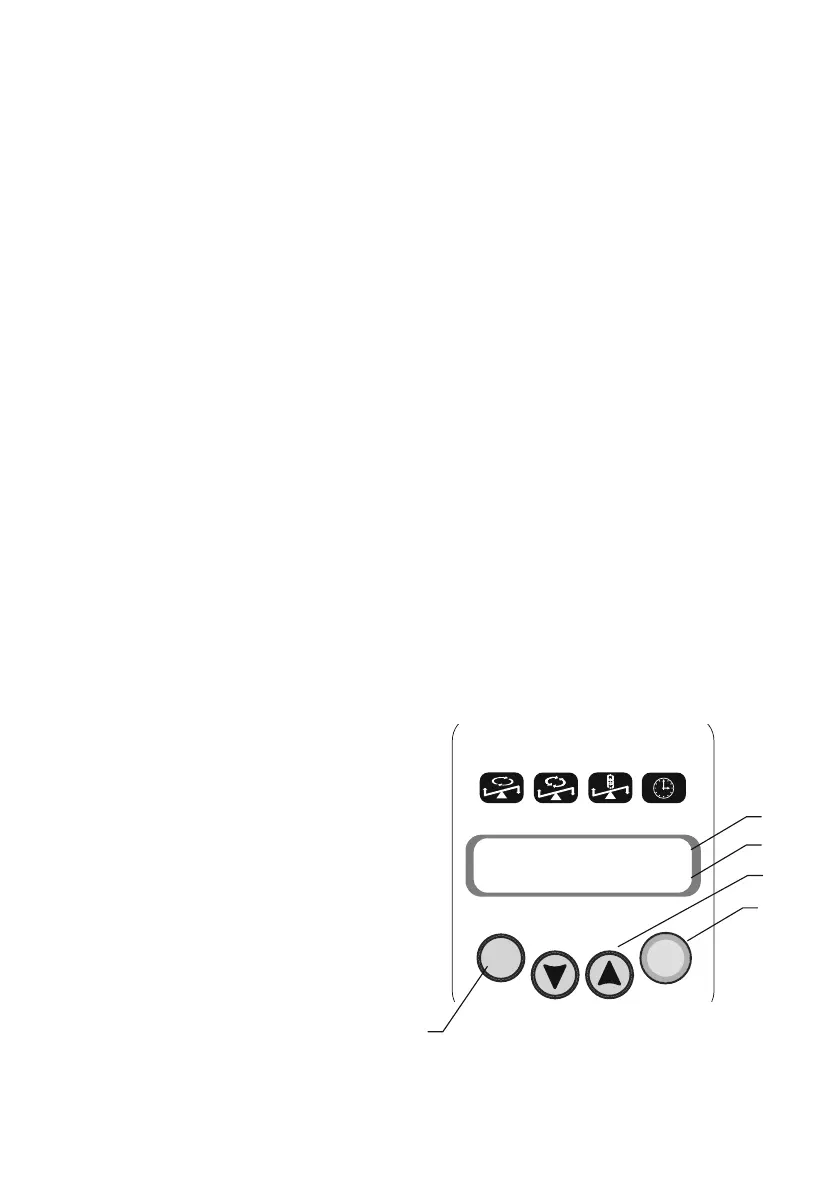
4.4.Press the Run/Stop key (Fig.1/5) to start the program.
4.5.The platform motion will begin and the corresponding indication (RUN
(Fig.1/3) and the changing time values) will be shown on the display.
4.6.If the operation time is not set and the timer indicator (Fig.1/2) shows 0:00,
pressing the Run\Stop key will cause continuous operation of the rotator
until the Run\Stop key is pressed again.
4.7.If the operation time is set the platform movement will stop after its expiring
(flashing indication STOP will be shown on the display) and will start giving
a sound signal about the end of operation (press the Run\Stop key to stop
the signal).
4.8.Press the Run/Stop key to repeat the set program.
4.9.The rotator can be stopped at any
time during operation before the set
time expires if necessary by
pressing the Run/Stop key. In this
case the platform motion stops
when the platform achieves
horizontal position. Pressing the
Run/Stop key again will start the
program from the beginning
(countdown timer will be restarted).
Note: A step motor is used in this
model. Stopping the platform with
hand briefly is allowed and will not
damage the mechanical parts of
the device If the platform is
Page 7
Fig.1 Control panel
1
4
5
3
2


 To Next Page