32 | Chapter 3: UEFI BIOS & Soware
A�I Fan
A.I FAN ulity smartly allows PC users to have more customizability of fan operang modes
and automacally detects dierent temperatures to make fan operang at dened speed for
opmal cooling performance.
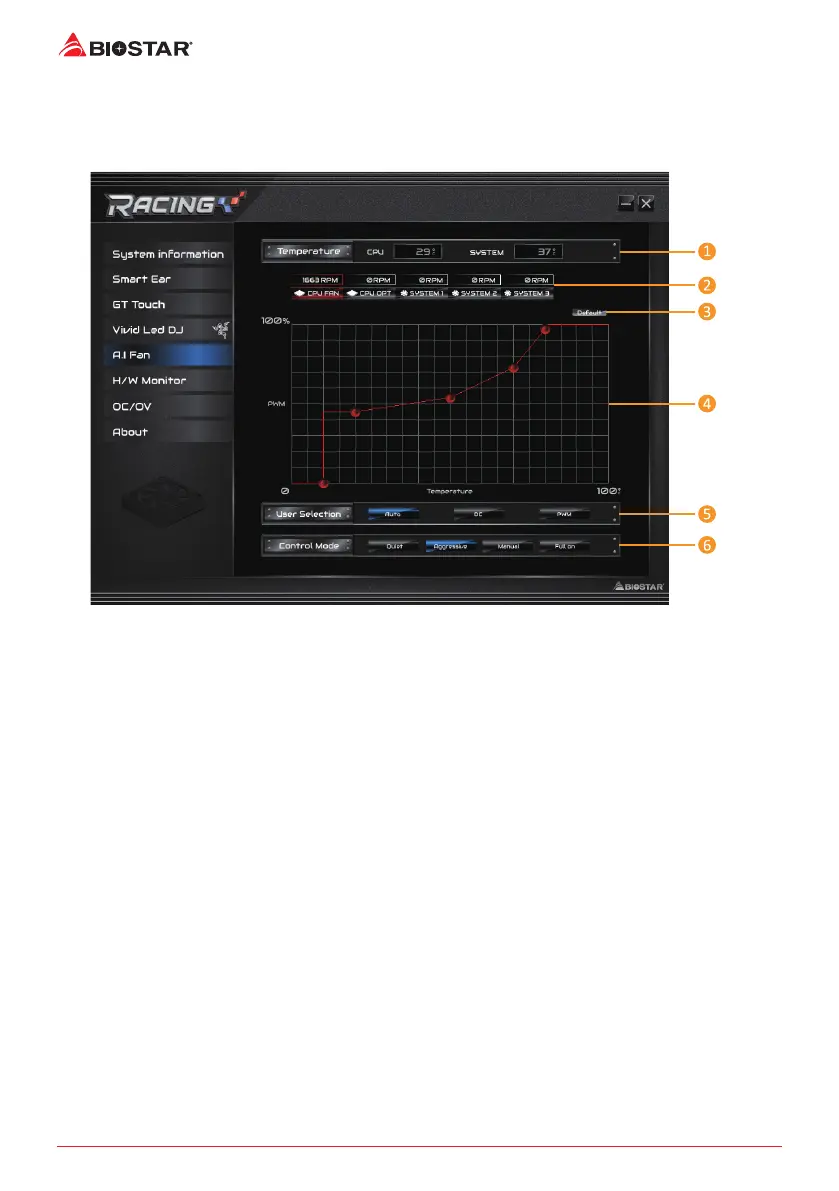
1. Temperature: Shows the current CPU and system temperature.
2. CPU FAN/ CPU OPT RPM & SYSTEM1/2/3RPM: Click buon to set the status value of CPU
and system fan.
»
Displayitems,pleasefocusontheactualmotherboard
3. Default: Restore defaults your changes value of a single item.
4. PWM/Temperature Panel: According to the fan PWM value corresponding to CPU and
system temperature to adjust the fan speed.
»
Allowsyoutoadjustaccordingtoyourpreferences.
5. User Selecon: Sets the fan property controls the actual selecon operaon.
• Auto: Allows you to adjust the Automac detecon Mode.
• DC: Allows you to adjust the Direct Current (DC) Mode.
• PWM: Allows you to adjust the Pulse Width Modulaon (PWM) Mode.
6. Control Mode: Allows you to control mode of the fans.
• Quiet: Enable Quiet mode.
• Aggressive: Enable Aggressive mode.
• Manual: Enable Manual mode.
• Full on: Enable Full On mode.




 To Next Page