16 | Chapter 2: Hardware installaon
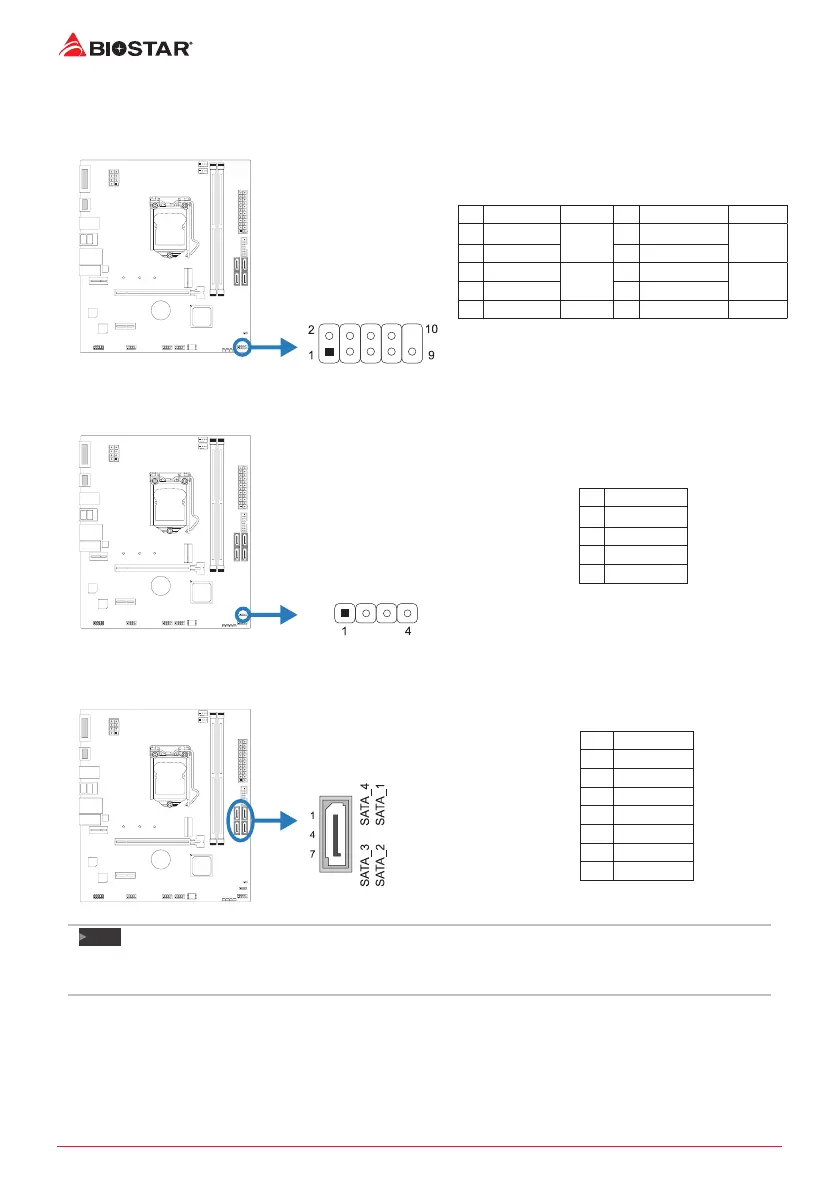
F_PANEL: Front Panel Header
This connector includes Power-on, Reset, HDD LED and Power LED connecons. It allows user
to connect the PC case’s front panel switch funcons.
Pin Assignment Funcon Pin Assignment Funcon
1 HDD LED(+)
HDD
LED
2 Power LED (+)
Power
LED
3 HDD LED(-) 4 Power LED (-)
5 Ground
Reset
Buon
6 Power Buon
Power-On
Buon
7 Reset Control 8 Ground
9 NC NC 10 NA NA
SPKR: Chassis Speaker Header
Please connect the chassis speaker to this header.
Pin Assignment
1 +5V
2 N/A
3 N/A
4 Speaker
SATA_1/ SATA_2/ SATA_3/ SATA_4: Serial ATA Connectors
These connectors connect to SATA hard disk drives via SATA cables.
Pin Assignment
1 Ground
2 TX+
3 TX-
4 Ground
5 RX-
6 RX+
7 Ground
Note
»
WhenusingSATASSDmoduleonM.2slot(M2_PCIEG3_32G_SATA_1),theSATA_1connectorwillbe
disabled.



 To Next Page