5
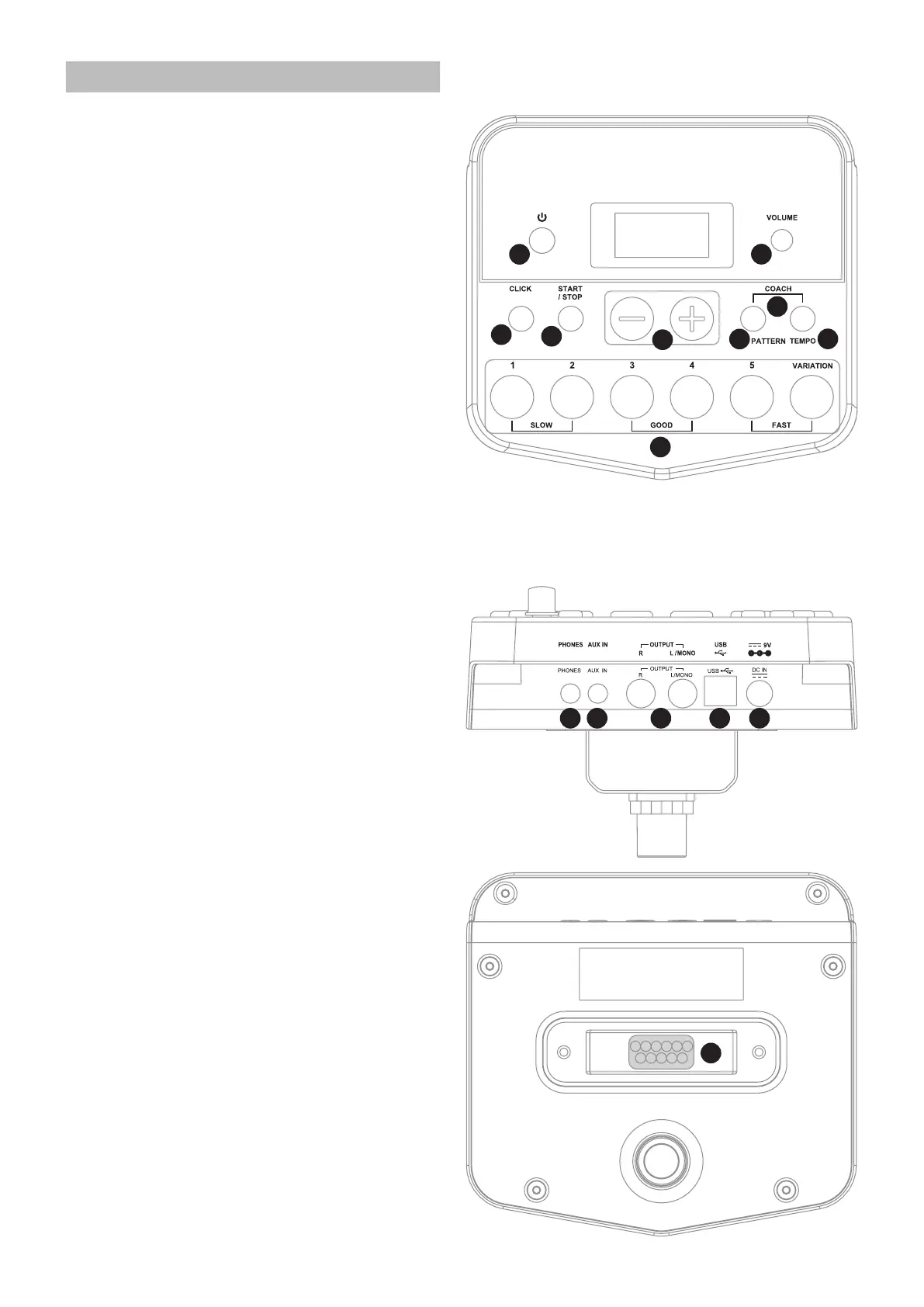
Panel description
Front Panel
1. [POWER] button
Use this button to turn the drum module on
and off.
2. [VOLUME] knob
Adjusts the volume of headphone and line
output.
3. [CLICK] button
Turn the metronome on or off.
4. [START/STOP] button
Start or stop playing patterns.
5. [+] button, [–] button
These buttons are used to change values
when editing. The [+] button increases the
value, and the [-] button decreases it.
6. [PATTERN] button
Enter the Pattern mode.
7. [TEMPO] button
Adjust the current tempo.
8. [PATTERN] + [TEMPO] buttons
Press the [PATTERN] and [TEMPO] buttons
simultaneously to enter the Coach mode.
9. [1-5] / [VARIATION] buttons
Enter the Kit mode and choose a kit.
Choose a coach type in the Coach Mode.
CLICK + 1: Enter the click voice menu.
CLICK + 2: Enter the time signature menu.
CLICK + 3: Enter the interval menu.
Rear panel
10. PHONES Jack (1/8”)
This stereo jack is used to connect the
headphones to this unit.
11. AUX IN Jack (1/8”)
This stereo input jack is for an external
sound source, such as an MP3 or CD player.
12. LINE OUTPUT Jacks (1/4")
Stereo output connection to an audio
system or drum amplifier.
13. USB Connector
This port is used to connect to a computer
(MIDI In/Out via USB).
14. DC IN Jack
Connect the included DC 9V power adaptor.
15. PAD Connectors
Input connections for Snare, Toms, Cymbal
Pads, Hi-Hat pedal and Kick pedal.
2
8
7
6
5
4
3
1
9
10 11 12 13 14
15



 To Next Page