Using the device
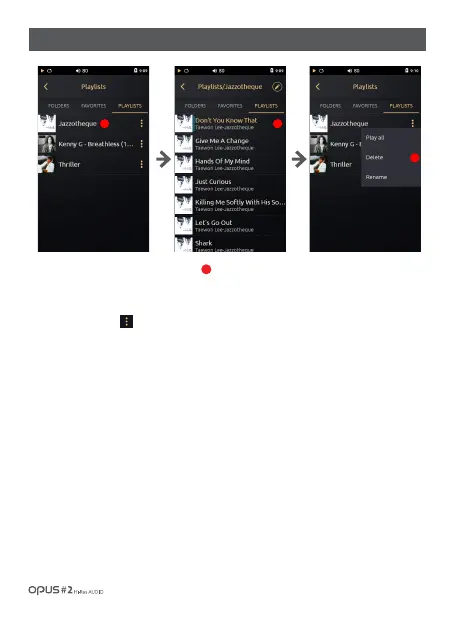
1. ‘Playlists’ list shows all playlists created by a user.
2. Click one playlist to display all songs with a thumbnail at the left side for each song.
3. Click ‘Menu’ icon [ ] at the ‘Playlists’ screen for (Play all / Delete / Rename) menu to pop up.
4. Press “Play all’ to play music in the playlist.
5. Press “Delete” to remove selected playlist.
6. If you choose ‘Rename’, English keyboard will pop up to enter a new name for the playlist.
(*Only English and numerical key board available.)
1
/ 20
| Music library ‘Playlists’ list screen
1
3
2



 To Next Page