Using the device
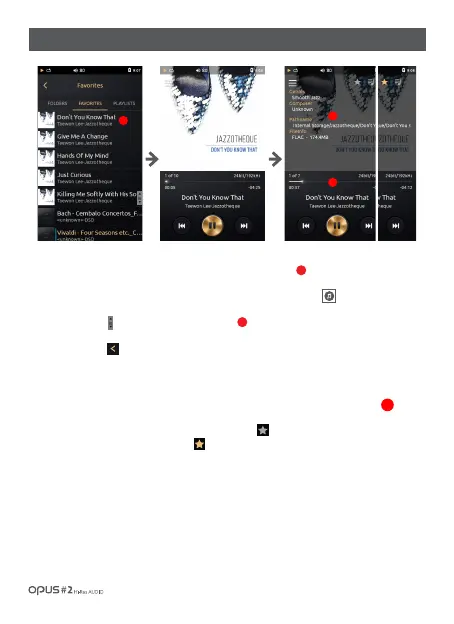
Adding a song to ‘Favorites’ playlist
2
1. ‘Favorites’ list is displayed by song title, artist name and album name, added to favorites by a user and
album artwork is displayed as a thumbnail on the left side of the screen.
2. If file does not contain an album artwork it will be displayed as a musical note logo.
3. Drag ‘Scroll bar’ [ ] up and down to search for a song.
4. Press the button [ ] or select a desired song from the list to go back to the Playback screen.
1. Press ‘Album art’ in Playback screen to enter File information screen for ‘Favorites’ adding function.
2. Add current song to ‘Favorites’ playlist by pressing the ‘Star’ icon [ ] in the right upper corner. ‘Star’ icon
of added to ‘Favorites’ song will turn yellow.
1
2
1
3
3
/ 19
| Music library ‘Favorites’ list screen



 To Next Page