SRP-350plus
Rev. 2.04
- 34 -
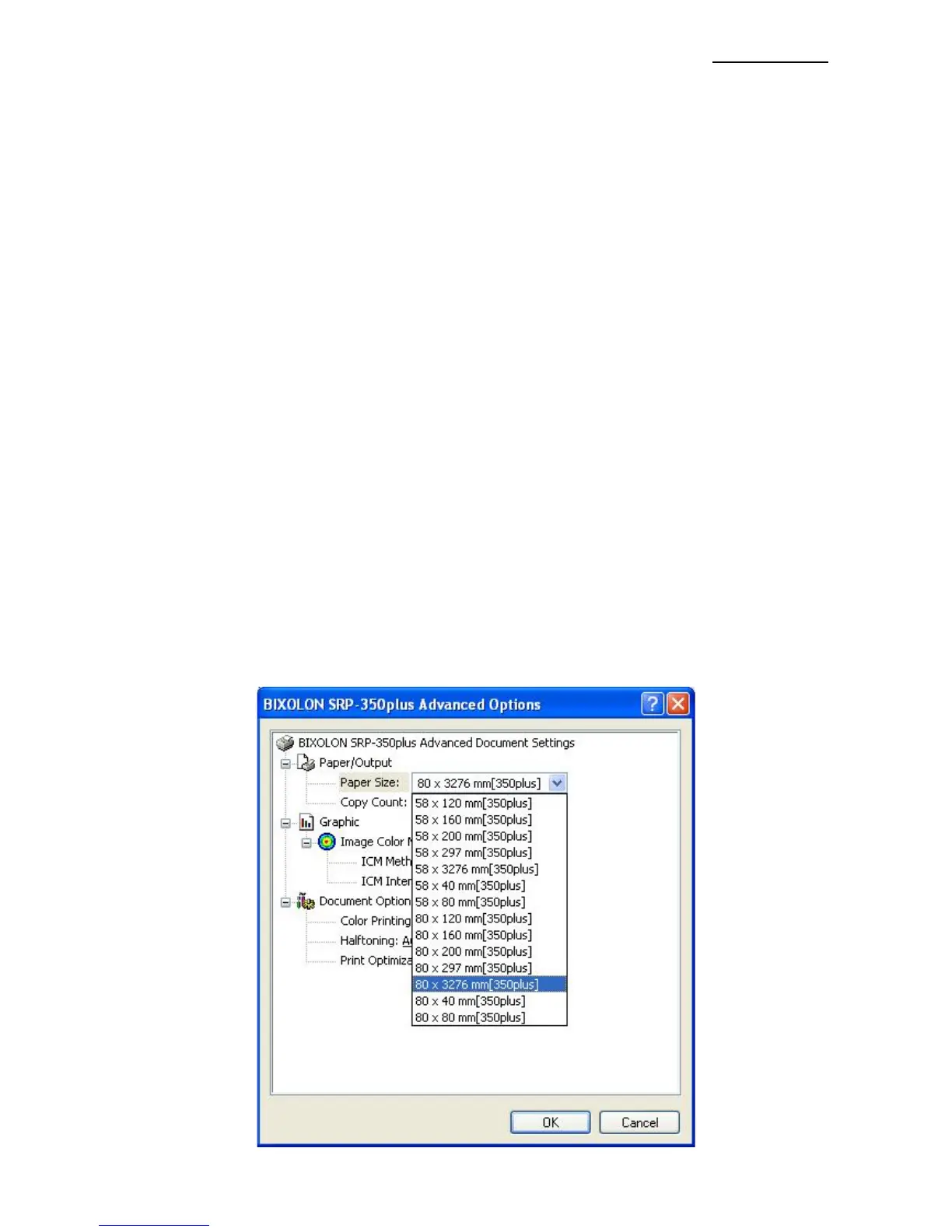
5-2 Paper Size
The paper sizes available in the Windows Driver are as follows.
- 80 × 297 mm [350plus]
- 80 × 3276 mm [350plus]
- 80 × 40 mm [350plus]
- 80 × 80 mm [350plus]
- 80 × 120 mm [350plus]
- 80 × 160 mm [350plus]
- 80 × 200 mm [350plus]
- 58 × 297 mm [350plus]
- 58 × 3276 mm [350plus]
- 58 × 40 mm [350plus]
- 58 × 80 mm [350plus]
- 58 × 120 mm [350plus]
- 58 × 160 mm [350plus]
- 58 × 200 mm [350plus]
Detailed setting can be done as follows.
1) Open the printer properties window in the Windows OS.
2) Click the “Printing Preferences” button in the ”General” tab.
3) Select the ”Paper/Quality” tab, and click the ”Advanced” button.
Select the desired setting.








 To Next Page