724-746-5500 | blackbox.com Page 13
Chapter 3: Installation
3. Installation
1. For the 2-port model (AC1056A-2), you’ll need two HD15 male-to-male output
cables (one of these cables is included). You’ll also need one input cable (includ-
ed).
For the 4-port model (AC1056A-4), you’ll need four output cables (three of these
cables are included) and one input cable (included).
For the 8-port model (AC1056A-8), you’ll need eight output cables (seven of
these cables are included) and one input cable (included).
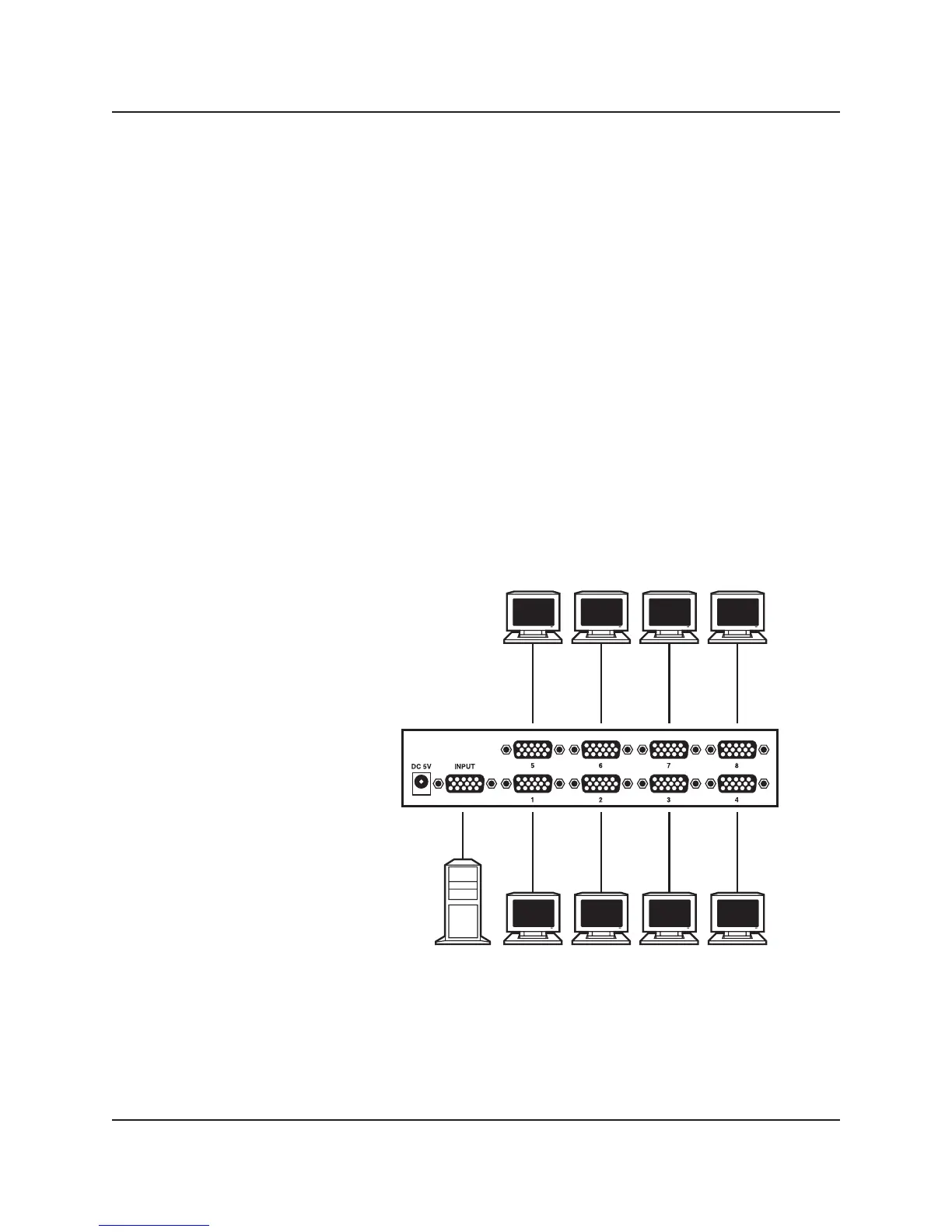
Connect multiple monitors to the video splitter’s output connectors as shown in
Figure 3-1.
NOTE: If you want to use the Compact Video Splitter’s Display Data Channel (DDC)
feature, you must have a monitor on Port 1. If you have additional monitors
on other ports with higher resolutions, they will only support the resolution
of the monitor on Port 1.
VGA outputs to computers
VGA outputs to computers
VGA input
Compact Video Splitter,
8-Port (AC1056A-8)
Figure 3-1. Compact Video Splitter, 8-Port (AC1056A-8) connection.



 To Next Page