Manage Connections
Manage Connections basics
Check what wireless networks your device connects to
You can check the types of networks your device can connect to on your device, as well as by visiting www.blackberry.com/go/
devices to see feature specifications for your device model. The types of networks listed do not reflect network connections,
only the ability of your device model to connect to those networks.
1. On the Home screen or in a folder, click the Options icon.
2. Click Device > About Device Versions. The types of networks your device can connect to are listed in the brackets after
your device model.
For more information about the wireless networks that your BlackBerry® device connects to, see the Safety and Product
Information booklet for your device.
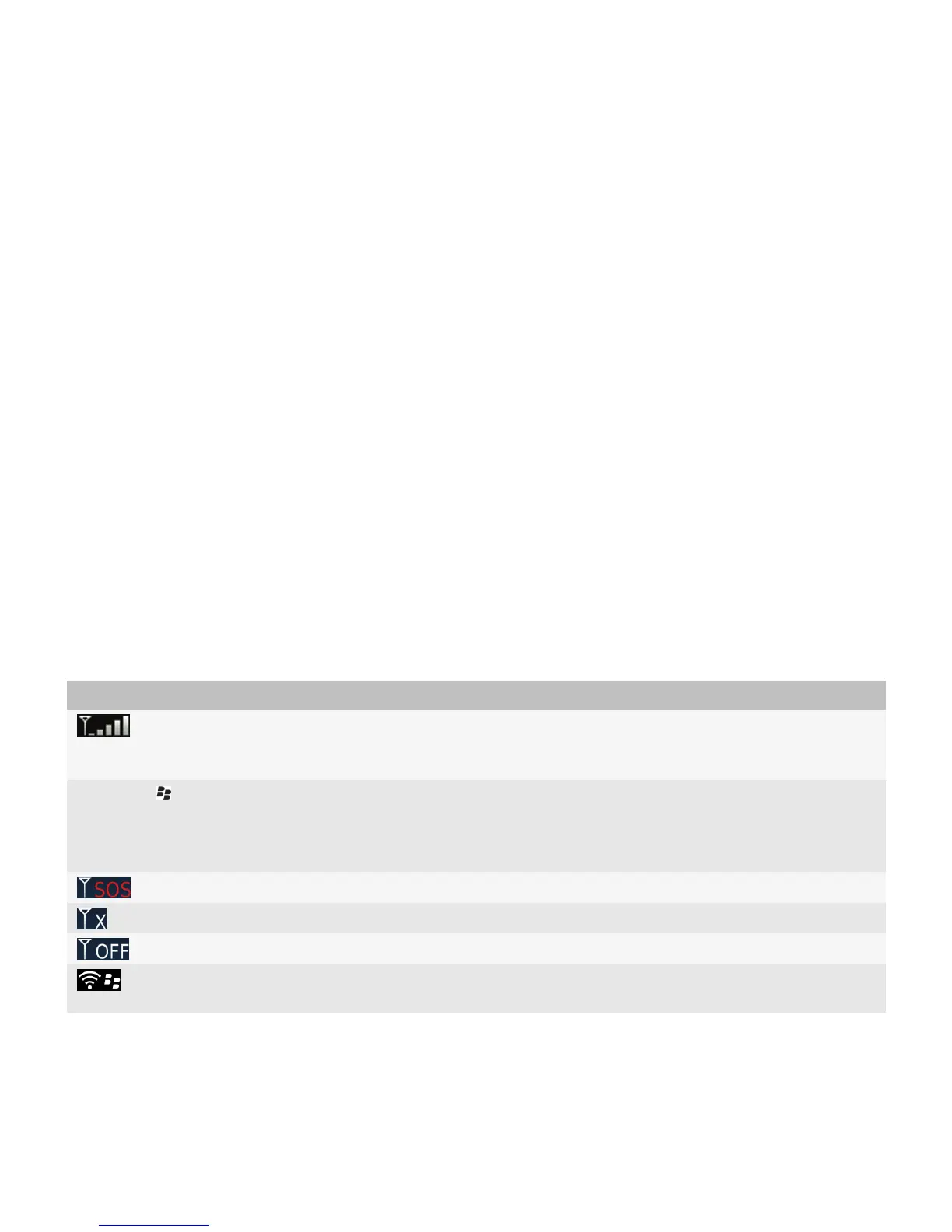
Wireless coverage indicators
Indicators in the upper-right corner of the Home screen display the wireless coverage level for the area in which you are using
your BlackBerry® device. For more information about wireless coverage areas, contact your wireless service provider.
Indicator
Description
Provides information about the strength of the wireless signal. Three or more bars
indicate a strong signal. A reduced signal display might indicate increased power
output from your device as it attempts to connect to a weak signal.
1XEV, 1X, 3G , EDGE, GPRS, NXTL, MIKE,
or NTWK
You are connected to a mobile network and you can access features such as email
messaging and Internet browsing. If you do not see one of the indicators, you might
be in an area of reduced wireless coverage where some features are not available
(you might only be able to make a phone call or send and receive text messages).
You can call only emergency numbers.
You are in an area of no wireless coverage.
The connection to the mobile network is turned off.
You are connected to a Wi-Fi® network and you can access BlackBerry services such
as email messaging and Internet browsing over the Wi-Fi connection.
User Guide
Manage Connections
220






 To Next Page