Understanding the Control Panel
30
LCD User Interface and Menu Controls
LCD User Interface
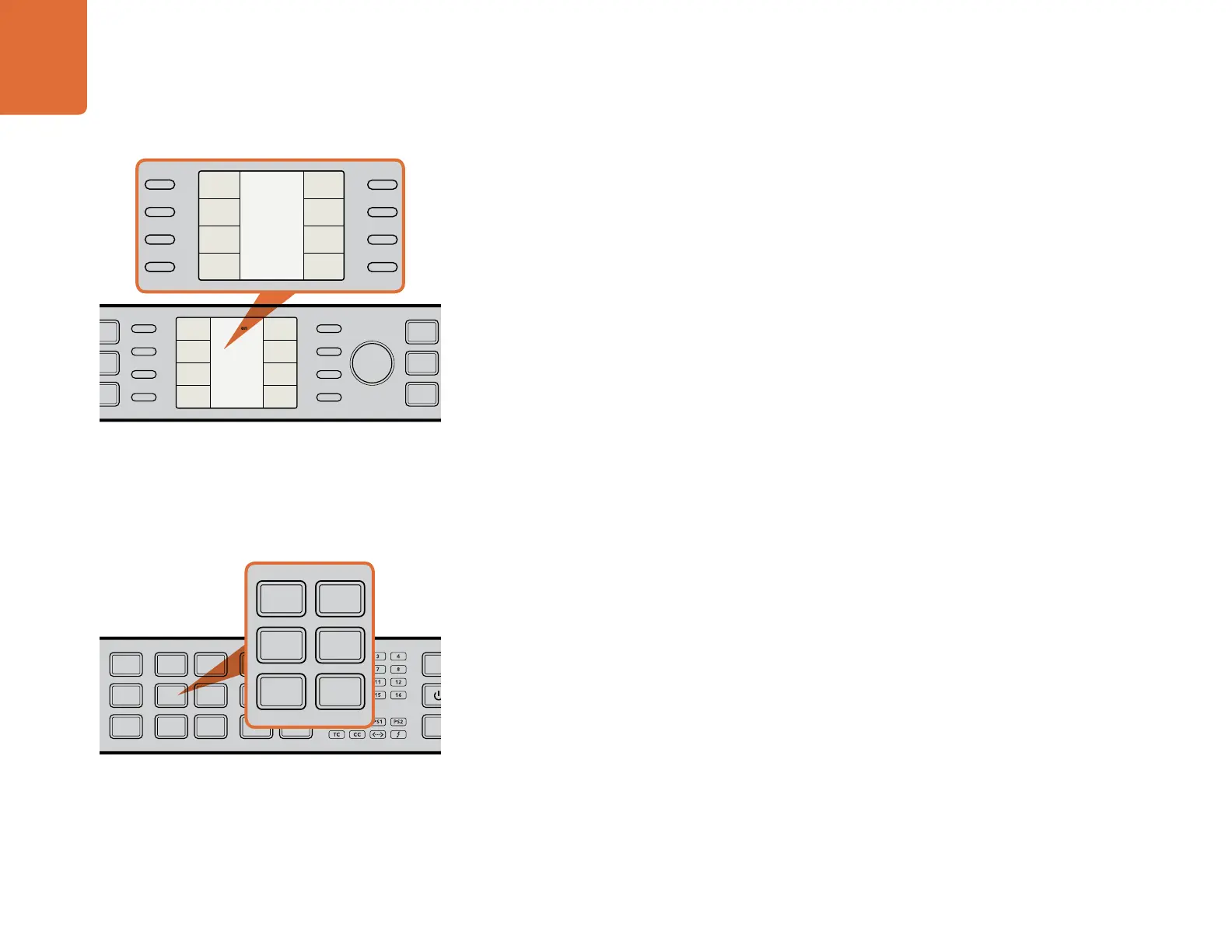
The LCD user interface uses a menu displayed on an LCD with 8 associated “soft buttons”. The menu tree
employs a hierarchical structure offering multiple layers of parameter selection. The 8 buttons are called
“soft buttons” because their function will change based on the current menu tree page. In some menus,
they will take you to the next menu in the menu tree; in other cases they are used for parameter selection.
The rotary encoder knob to the right of the LCD is used to adjust parameter values by turning it clockwise to
increment or counterclockwise to decrement. In menu parameters where a “default” value exists, you can
press the encoder to quickly reset the parameter to its default value.
MENU Buttons
The HOME button toggles the control panel LCD display between active video and the main menu of the
menu tree.
The MENU 1 and MENU 2 buttons may be used to save specific menu pages for instant recall, which can
be useful when a specific parameter must be accessed repeatedly. To store a menu page, navigate to the
desired menu tree page, then press and hold the MENU 1 or MENU 2 buttons for 3 seconds to save the
current menu page. The button will be illuminated to indicate that a menu tree page has been assigned to
it and, when the button is pressed, the LCD will switch directly to the stored menu tree page.
Video Proc Amp
The following Proc Amp controls are available and will take you directly to the corresponding LCD menu
tree page:
GAIN Luminance Gain
BLK Black Level
SAT Chroma Saturation
HUE Chroma Hue
R-Y/B-Y Color Difference value
SHARP Sharpness setting
LCD User Interface and Menu Controls - Right Side of Panel
Video Proc Amp - Right Side of Panel
IN
OUT
SDI
VIDEO
VIDEO
HDMI
ANLG
AUDIO
AUDIO
EMBED
AES
ANLG
FORMAT
FORMAT
486
720
2K
1080
576
1080
FRAME
FRAME
P
I
PSF
MENU
MENU
HOME
MENU
1
MENU
2
REM
LOCK
PANEL
LOCK
RATE
RATE
23.98
25
29.97
30
24
50
59.94
60
VIDEO
VIDEO
GAIN
SAT
R-Y
B-Y
BLK
HUE
SHARP
PRESETS AUDIO STATUS
SYSTEM STATUS
PRESETS
1
3
5
2
4
6
ANAM
LBOX
PBOX
ASPECT
ASPECT
SMART
14:9
CCUT
ZOOM
ADJ
Main Menu
Back
Audio
Setup
3D
Ancillary
Data
Noise
Reduction
Video
IN
OUT
SDI
VIDEO
VIDEO
HDMI
ANLG
AUDIO
AUDIO
EMBED
AES
ANLG
FORMAT
FORMAT
486
720
2K
1080
576
1080
FRAME
FRAME
P
I
PSF
MENU
MENU
HOME
MENU
1
MENU
2
REM
LOCK
PANEL
LOCK
RATE
RATE
23.98
25
29.97
30
24
50
59.94
60
VIDEO
VIDEO
GAIN
SAT
R-Y
B-Y
BLK
HUE
SHARP
PRESETS AUDIO STATUS
SYSTEM STATUS
PRESETS
1
3
5
2
4
6
ANAM
LBOX
PBOX
ASPECT
ASPECT
SMART
14:9
CCUT
ZOOM
ADJ
Main Menu
Back
Audio
Setup
3D
Ancillary
Data
Noise
Reduction
Video
IN
OUT
SDI
VIDEO
VIDEO
HDMI
ANLG
AUDIO
AUDIO
EMBED
AES
ANLG
FORMAT
FORMAT
486
720
2K
1080
576
1080
FRAME
FRAME
P
I
PSF
MENU
MENU
HOME
MENU
1
MENU
2
REM
LOCK
PANEL
LOCK
RATE
RATE
23.98
25
29.97
30
24
50
59.94
60
VIDEO
VIDEO
GAIN
SAT
R-Y
B-Y
BLK
HUE
SHARP
PRESETS AUDIO STATUS
SYSTEM STATUS
PRESETS
1
3
5
2
4
6
ANAM
LBOX
PBOX
ASPECT
ASPECT
SMART
14:9
CCUT
ZOOM
ADJ
L
R
GND
+12V
GND
AUX POWER
STEREO IN AES/EBU DIGITAL AUDIO IN/OUT
ANALOG AUDIO IN/OUT
REF IN Y/NTSC/PAL IN
SD/HD/3G-SDI
B-Y IN
IN LOOP OUT OUT
R-Y IN B-Y OUT R-Y OUT
Y/NTSC/PAL OUT
HDMI IN HDMI OUT REMOTE IN/OUT
SD/HD/3G-SDI
IN
OUT
SDI
VIDEO
VIDEO
HDMI
ANLG
AUDIO
AUDIO
EMBED
AES
ANLG
FORMAT
FORMAT
486
720
2K
1080
576
1080
FRAME
FRAME
P
I
PSF
MENU
MENU
HOME
MENU
1
MENU
2
REM
LOCK
PANEL
LOCK
RATE
RATE
23.98
25
29.97
30
24
50
59.94
60
VIDEO
VIDEO
GAIN
SAT
R-Y
B-Y
BLK
HUE
SHARP
PRESETS AUDIO STATUS
SYSTEM STATUS
PRESETS
1
3
5
2
4
6
ANAM
LBOX
PBOX
ASPECT
ASPECT
SMART
14:9
CCUT
ZOOM
ADJ
L
R
GND
+12V
GND
AUX POWER
STEREO IN AES/EBU DIGITAL AUDIO IN/OUT
ANALOG AUDIO IN/OUT
REF IN Y/NTSC/PAL IN
SD/HD/3G-SDI
B-Y IN
IN LOOP OUT OUT
R-Y IN B-Y OUT R-Y OUT
Y/NTSC/PAL OUT
HDMI IN HDMI OUT REMOTE IN/OUT
SD/HD/3G-SDI


 To Next Page