Understanding the LCD Menus
36
Clip Menu
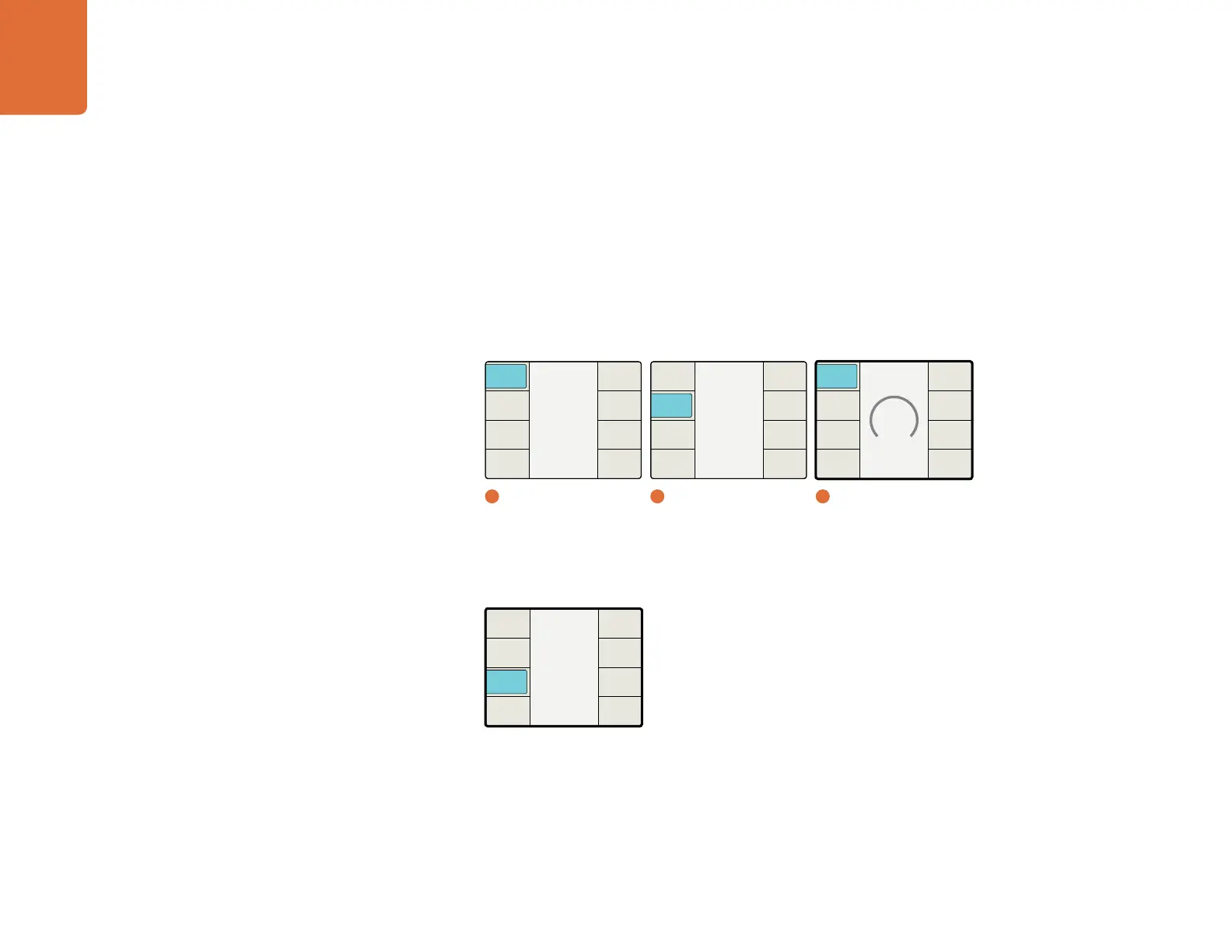
The Clip menu allows you to clip luminance and chrominance (Y & C) overshoots and undershoots from the
incoming video signal. The Clip function is not defined as a "legalizer"; however, adjusting the luminance
and chroma settings will assist in obtaining the desired output video levels.
Luma Low – Range: 4 to 1018. Default: 4.
Luma High – Range: 5 to 1019. Default: 1019.
Chroma Low – Range: 4 to 1018. Default: 4.
Chroma High – Range: 5 to 1019. Default: 1019.
Aspect Menu
The Aspect menu provides access to the Adjustable Aspect Ratio and Aspect Fill menus.
Main Menu
Back
Audio
Setup
3D
Ancillary
Data
Noise
Reduction
Video
1
Main Menu
Video
Back
Advanced
Test
Patterns
Proc
Amp
Aspect
Clip
Color
2
Video
Set Value
4
Back
Reset
All
Chroma
High
Chroma
Low
Luma
High
Luma
Low
3
Clip / Luma Low
Video
Back
Advanced
Test
Patterns
Proc
Amp
Aspect
Clip
Color


 To Next Page