Getting Started
9
Frame Rate Conversion
Moving images exist in three dimensions. Firstly, in the horizontal direction, images are made up of individual
pixels. Secondly, in the vertical direction, they are made up of the lines contained in the field or frame. The
combination is referred to as the spatial domain. Thirdly, the motion image is composed of a number of
fields or frames per second, which is referred to as the temporal domain.
The process of frame rate conversion, also known as standards conversion, is a form of sample rate
conversion in two or three of the above dimensions. It consists of expressing moving images sampled on a
three-dimensional sampling lattice to a different three-dimensional lattice.
Frame rate conversions generally involve changing the number of lines and fields (or frames) per second in
an image. Examples of standards conversions include: 486i59.94 to 576i50; 720p59.94 to 1080i50; 1080i59.94
to 1080i50.
Teranex uses a process called linear interpolation to convert between these various spaces. Interpolation is
defined as computing the value of a sample, or samples, which lie outside the sampling matrix of the source
signal. In other words, it is the process of computing the values of output samples that lie between the input
samples. Teranex processing allows for the processing aperture to be adjusted to provide the optimal result.
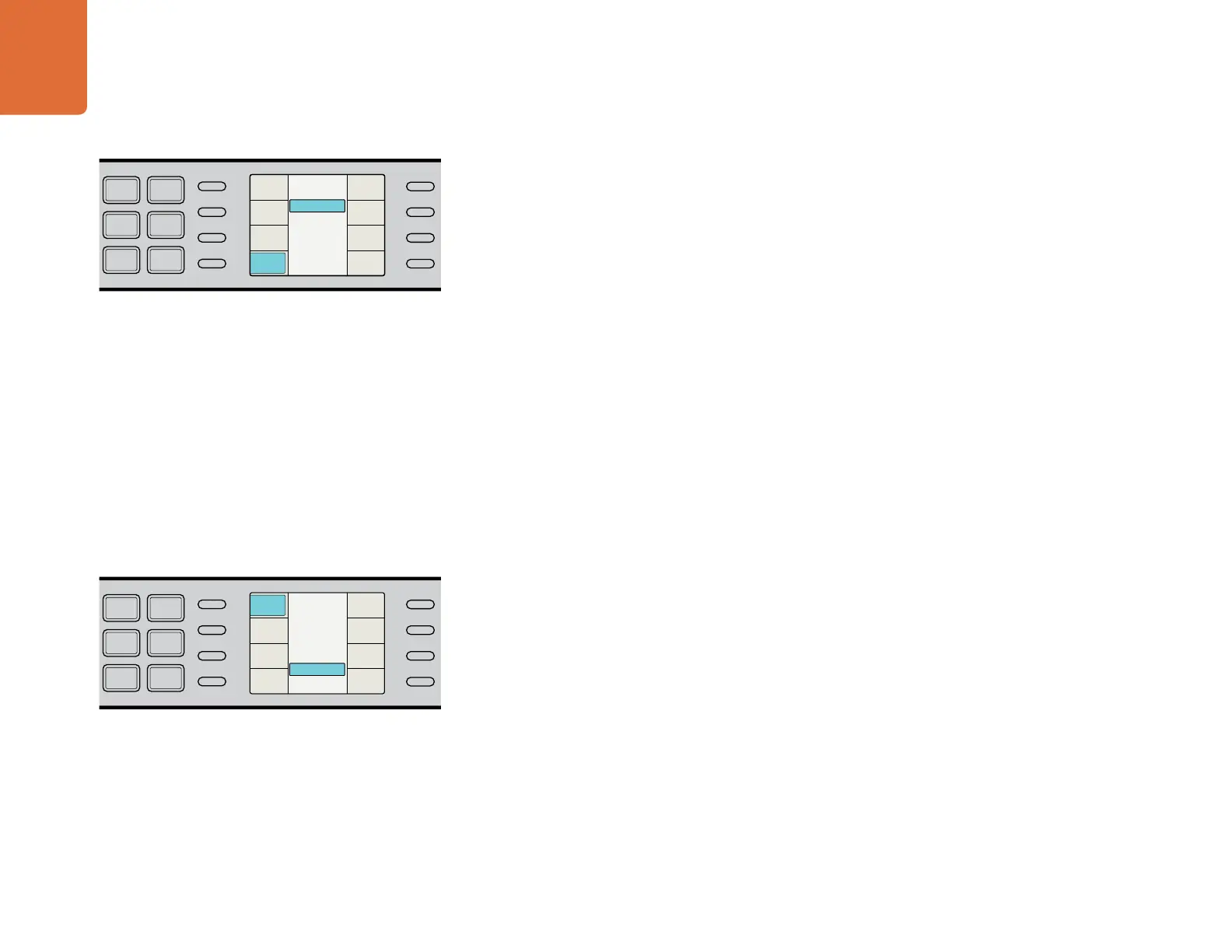
To adjust the frame rate conversion processing aperture, use the soft menus on the LCD to select
Video>Advanced>FRC Aperture and then choose the desired aperture. More information is available in
the "Frame Rate Conversion Aperture" section in the "Understanding the LCD Menus" chapter.
3D Processing
The 3D menu enables the dual internal processors of the Teranex 3D Processor for format or frame rate
conversion of stereoscopic inputs, and for conversion of 2D sources into simulated 3D outputs. The Teranex
3D model lets you convert using dual stream full resolution, side by side, and top and bottom 3D formats. It
also provides frame warping and alignment for 3D camera rigs to shoot perfect 3D images, even if shooting
live with consumer cameras.
To reach the 3D menu settings, use the soft menus on the LCD to select 3D menu from the Main menu.
The 3D menu offers lots of choices for working with different kinds of 2D and 3D material so it's a good idea
to read the "3D Menu" section in the "Understanding the LCD Menus" chapter.
To adjust the frame rate conversion processing aperture, select
Video>Advanced>FRC Aperture.
To reach the 3D menu settings, use the soft menus on the LCD to
select 3D menu from the Main menu. The 3D Align submenu is
shown in this example.
IN
OUT
SDI
VIDEO
VIDEO
HDMI
ANLG
AUDIO
AUDIO
EMBED
AES
ANLG
FORMAT
FORMAT
486
720
2K
1080
576
1080
FRAME
FRAME
P
I
PSF
MENU
MENU
HOME
MENU
1
MENU
2
REM
LOCK
PANEL
LOCK
RATE
RATE
23.98
25
29.97
30
24
50
59.94
60
VIDEO
VIDEO
GAIN
SAT
R-Y
B-Y
BLK
HUE
SHARP
PRESETS AUDIO STATUS
SYSTEM STATUS
PRESETS
1
3
5
2
4
6
ANAM
LBOX
PBOX
ASPECT
ASPECT
SMART
14:9
CCUT
ZOOM
ADJ
3 (Sport)
2
1
0 (Drama)
FRC Aperture
Back
FRC
Aperture
Source
Type
Scene
Detect
Clean
Cadence
IN
OUT
SDI
VIDEO
VIDEO
HDMI
ANLG
AUDIO
AUDIO
EMBED
AES
ANLG
FORMAT
FORMAT
486
720
2K
1080
576
1080
FRAME
FRAME
P
I
PSF
MENU
MENU
HOME
MENU
1
MENU
2
REM
LOCK
PANEL
LOCK
RATE
RATE
23.98
25
29.97
30
24
50
59.94
60
VIDEO
VIDEO
GAIN
SAT
R-Y
B-Y
BLK
HUE
SHARP
PRESETS AUDIO STATUS
SYSTEM STATUS
PRESETS
1
3
5
2
4
6
ANAM
LBOX
PBOX
ASPECT
ASPECT
SMART
14:9
CCUT
ZOOM
ADJ
3D Align
2D to 3D
3D Convert
Off
3D Mode
Back
Camera
Align
Depth
Intensity
Output
Input
3D Mode


 To Next Page