Page 73
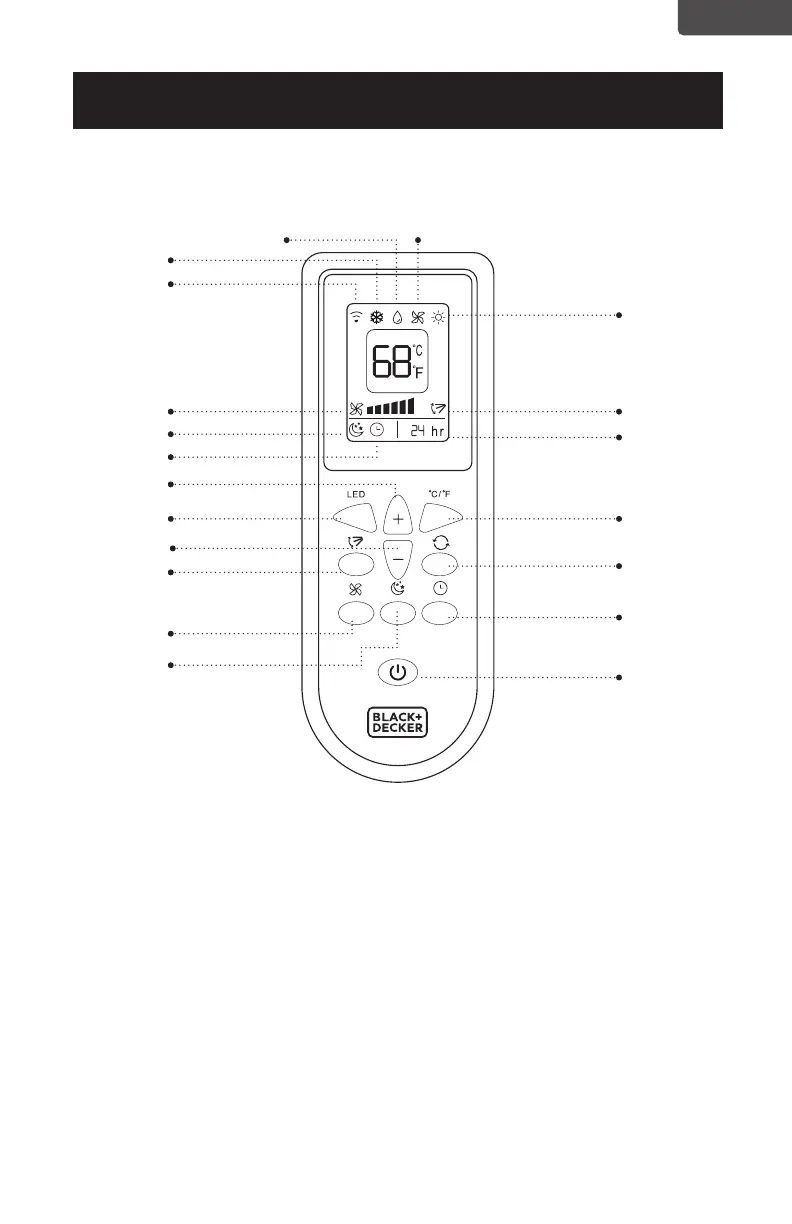
BOTÓN DE ENCENDIDO: presione para encender o apagar
BOTÓN DEL TEMPORIZADOR: Se utiliza para establecer una hora de inicio o
apagado diferido.
BOTÓN DE MODO: Cada vez que presiona el botón COOL, DESHUMIDIFY, FAN,
HEAT (se seleccionan los modelos BPP08HWTB y BPP10HWTB)
BOTÓN SELECTOR ˚C / ˚F: Seleccione Fahrenheit o Celsius.
AUMENTAR: Aumente el ajuste de temperatura.
DISMINUIR: Disminuye el ajuste de temperatura.
BOTÓN LED: Ilumina la pantalla LED de la unidad.
BOTÓN SWING: Activa el swing de aire de las rejillas.
BOTÓN DE VELOCIDAD DEL VENTILADOR: Se utiliza para seleccionar la
velocidad del ventilador ALTA, MEDIA o BAJA.
BOTÓN SLEEP: ajusta gradualmente la temperatura.
Botón de oscilación
Columpio
Calor
Hora
ESPAÑOL
CONFIGURACIÓN Y USO
CONTROL REMOTO
Ventilador
Velocidad del ventilador
Botón LED
Boton Selector °F/°C
Botón de modo
Botón del temporizador
Botón de encendido
Botón de baja
velocidad
Dormir
Deshumidicar
Frio
Señal remota
Hora ON / OFF
Botón de aumento
Botón de disminución
Botón de dormir



 To Next Page