14
Control Test (continued)
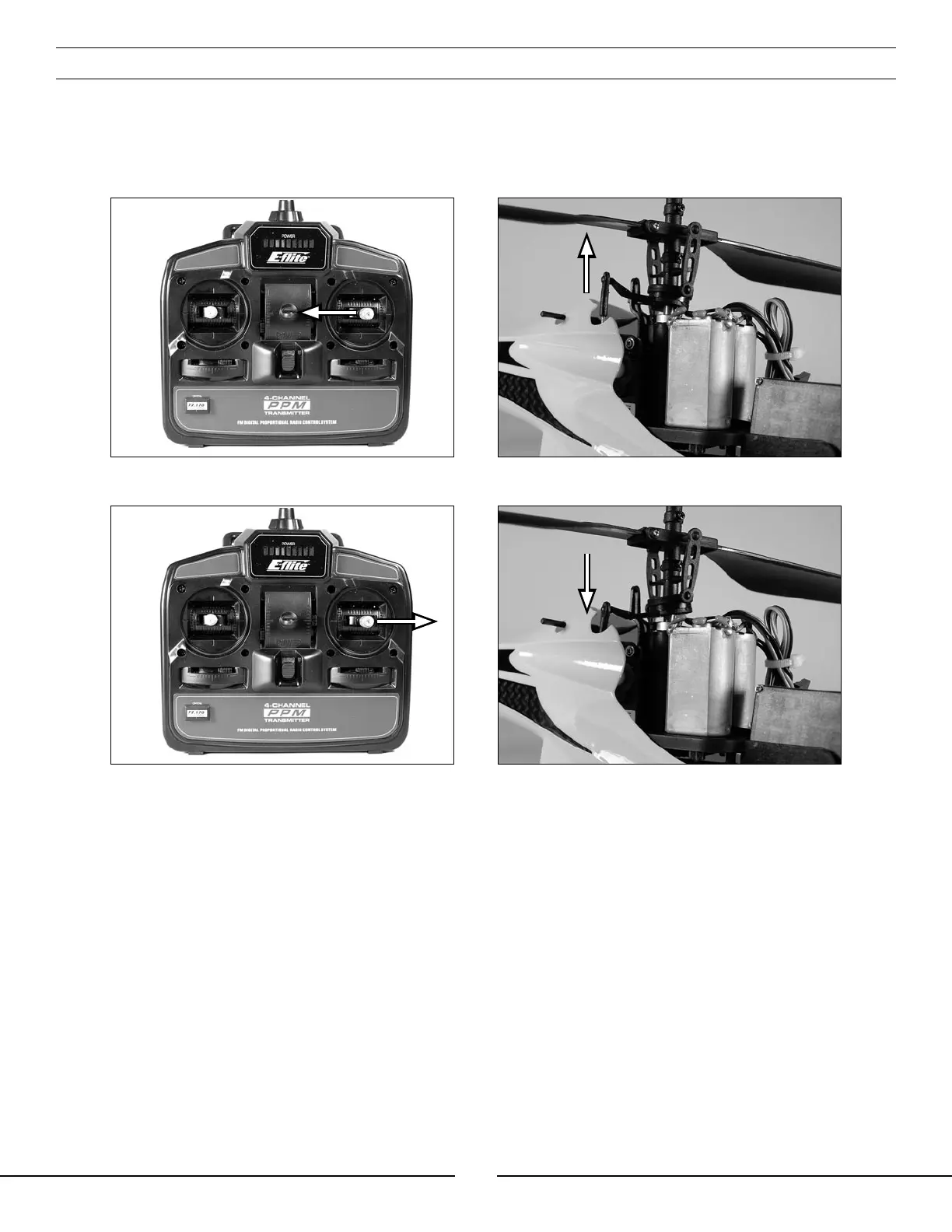
Position the helicopter to view it from the right-hand side. Move the right-hand control stick on the transmitter
left and right to check aileron roll control. When the stick is pushed to the left, the forward servo should
push the swashplate upward. When the stick is pushed to the right, the forward servo should pull the
swashplate downward.
If at any time during the test the controls do not respond properly, double-check the location of the servo
connections on the 4-in-1 unit. These should be positioned as follows (when viewing the helicopter from behind):
Channel 1 (Lower Port) – Forward aileron servo
Channel 2 (Upper Port) – Rear elevator servo
Once you have confirmed that the servo connection locations are correct, all controls should be functioning
properly. If you do encounter any problems with your Blade CX responding properly to the transmitter, do not fly.
Contact Horizon Hobby’s Product Support staff at 1-877-504-0233.
If you have confirmed proper control operation of your Blade™ CX, reconnect the main motor plugs to the 4-in-1
unit, taking care to keep the proper polarity and location of each as they were before the test. Use the label on the
4-in-1 unit for reference of the proper polarity and locations. Note that the red wire leads are positive (+) and the
black wire leads are negative (−).


 To Next Page