27
Upper Main Rotor Blade Tracking Adjustment
Caution: Be sure to maintain a safe distance from the helicopter (approximately 10–15 feet) when
tracking the Upper Main Rotor Blade.
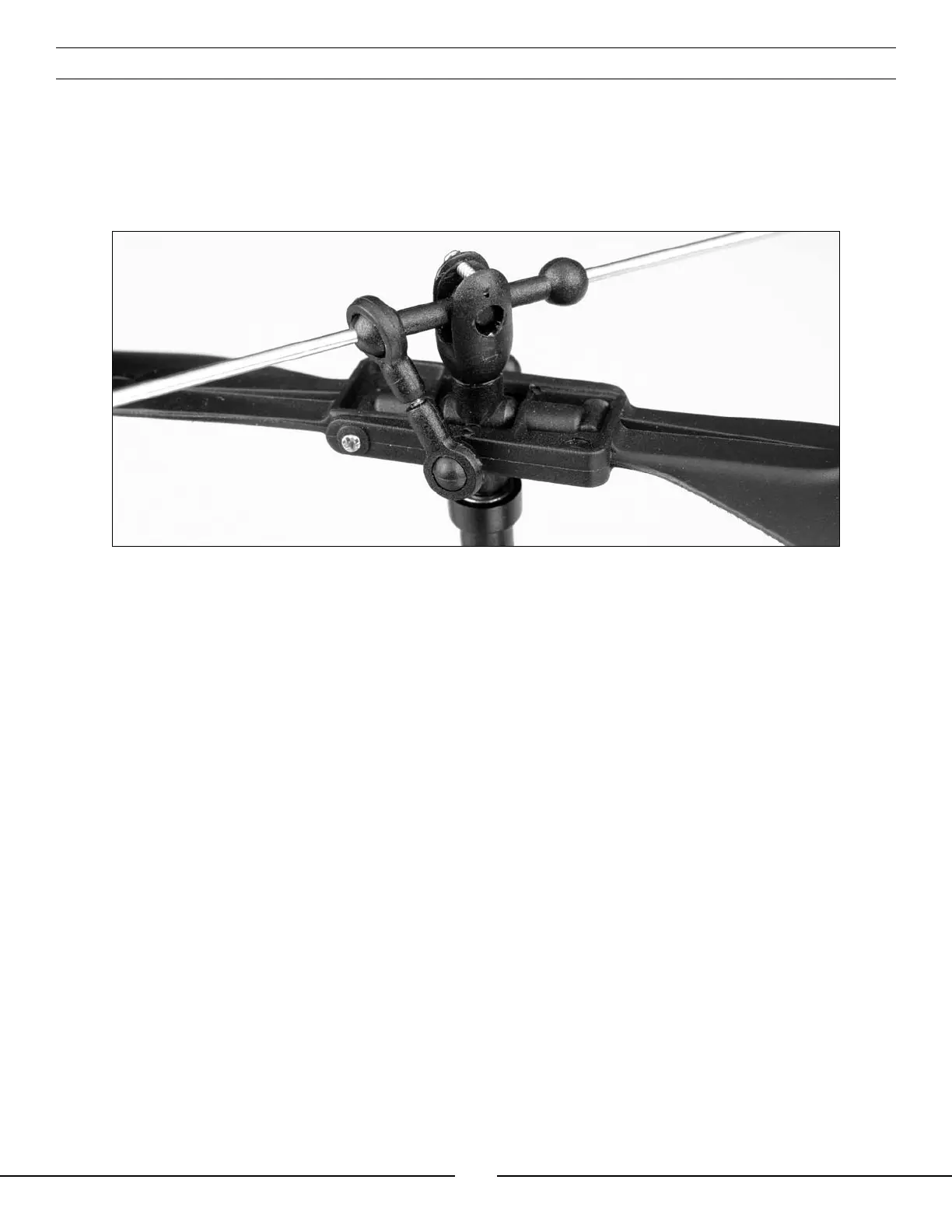
Your Blade™ CX is equipped with an adjustable linkage between the Stabilizer Flybar and Upper Main Rotor Blade.
This linkage allows you to adjust the tracking of the upper main rotor blade for smoother and more stable flight
performance.
• You can check the upper main rotor blade tracking either on the ground or in the air at eye level. It might be a
good idea to have an assistant on hand to help sight the blade tracking.
• Once the main rotor blades have been brought up to speed, note whether the tips of the upper main rotor blade
are tracking in the same plane or not.
• If the tips are not tracking in the same plane, power the helicopter down to make adjustments to the adjustable
linkage. You can start by turning the ends of the linkage in one-half to one-full turn at a time. Power the
helicopter up again and re-check the blade tracking. If the tracking has gotten better, continue to turn the ends
of the linkage in one-half to one-full turn at a time until the tips are tracking in the same plane.
If the tracking has gotten worse after first turning the ends of the adjustable linkage in, turn the ends of the
linkage back out one-half to one-full turn at a time. If the tracking has gotten better, continue to turn the ends of
the linkage out one-half to one-full turn at a time until the tips are tracking in the same plane.


 To Next Page