EN
Throttle Hold
Control Tests
16
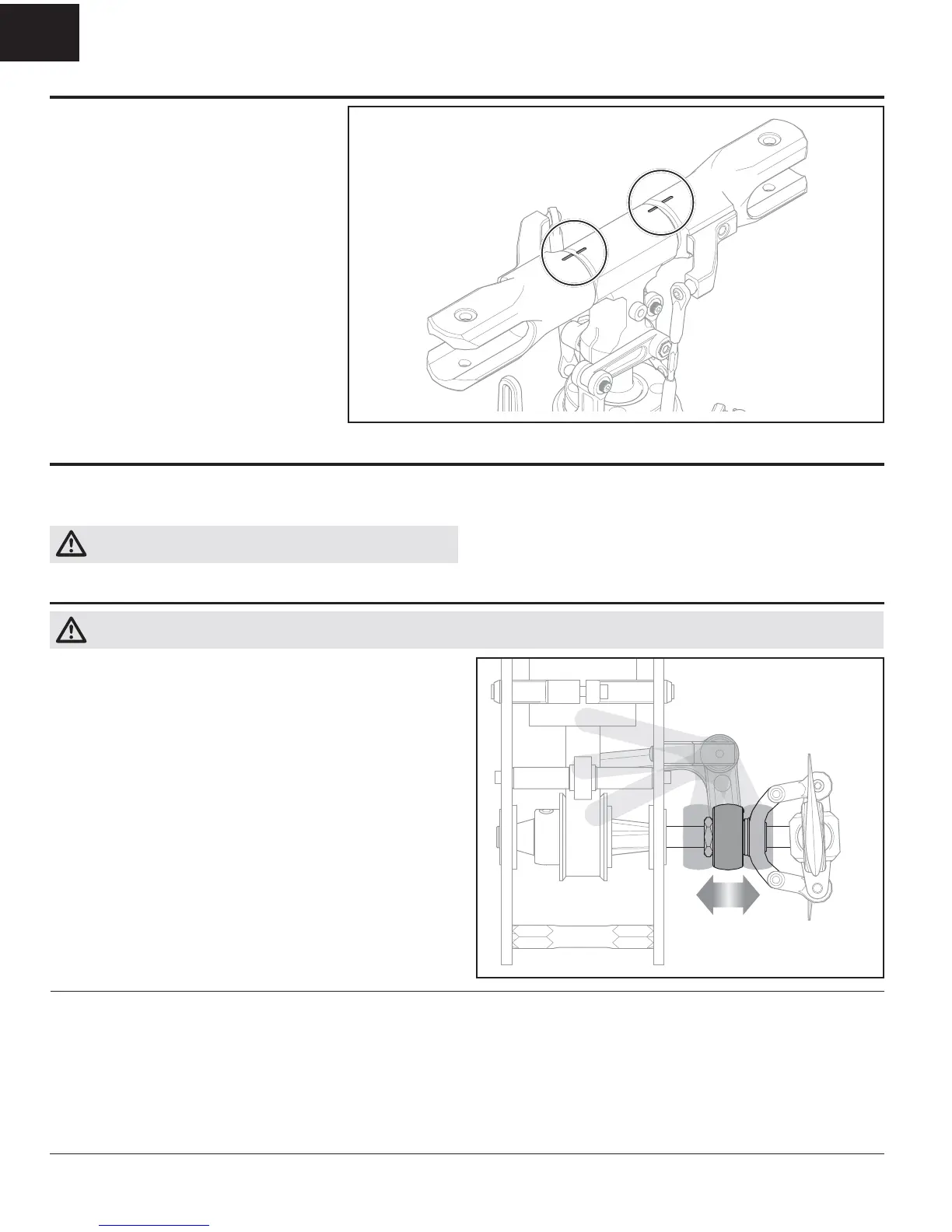
Main Rotor Alignment
Activating and using the Throttle Hold (TH HOLD) function in your chosen
transmitter is highly recommended. Throttle hold only cuts power to the motor on
an electric helicopter. Pitch and direction control are maintained.
WARNING: If your transmitter has throttle hold, always engage throttle
hold before approaching the helicopter for any reason.
The blades will spin if TH HOLD is OFF. For safety, turn TH HOLD ON any time you
need to touch the helicopter or check the direction controls.
Additionally, turn TH HOLD ON to cut power to the motor if the helicopter is out of
control, in danger of crashing, or both.
With the servos centered and arms level, the
swashplate should be level and the 0 degree collective
indication marks on top of the blade grips and
headblock should align, as shown. Adjust the lengths
of the blade grip linkages and servo linkages until
everything is aligned properly.
Cyclic Sensor Test
From the back of the helicopter:
1. Tilt the helicopter forward. The swashplate should tilt backward.
2. Tilt the helicopter backward. The swashplate should tilt forward.
3. Roll the helicopter left. The swashplate should roll right.
4. Roll the helicopter right. The swashplate should roll left.
5. If the swashplate does not move in the correct direction, you will need to
reverse the cyclic sensor direction or sensor orientation setting. Refer to the
fl ight controller manual for information.
CAUTION: You must complete the Rudder and Cyclic tests prior to attempting fl ight. Failure to ensure the sensor directions are not reversed can cause the
helicopter to crash, resulting in property damage and injury.
Rudder
1. Power on the transmitter.
2. Turn TH HOLD ON and set the fl ight mode to NORMAL.
3. Connect the helicopter battery to the ESC and allow the fl ight controller to
fully initialize.
4. Rudder channel test:
Move the rudder stick to the right. The tail pitch slider should move towards
the tail boom.
Move the rudder stick to the left. The tail pitch slider should move away from
the tail boom.
If the slider does not move in the desired direction, refer to your fl ight
controller manual for instructions to correct the issue.
5. Flight controller sensor test:
Release the rudder control. Manually turn the helicopter counterclockwise when
viewed from above. The tail pitch slider should move towards the tail boom.
Manually turn the helicopter nose clockwise. The tail pitch slider should move
away from the tail boom.
If the slider does not react in the proper direction, refer to your fl ight controller
manual for information on reversing the tail sensor direction.


 To Next Page