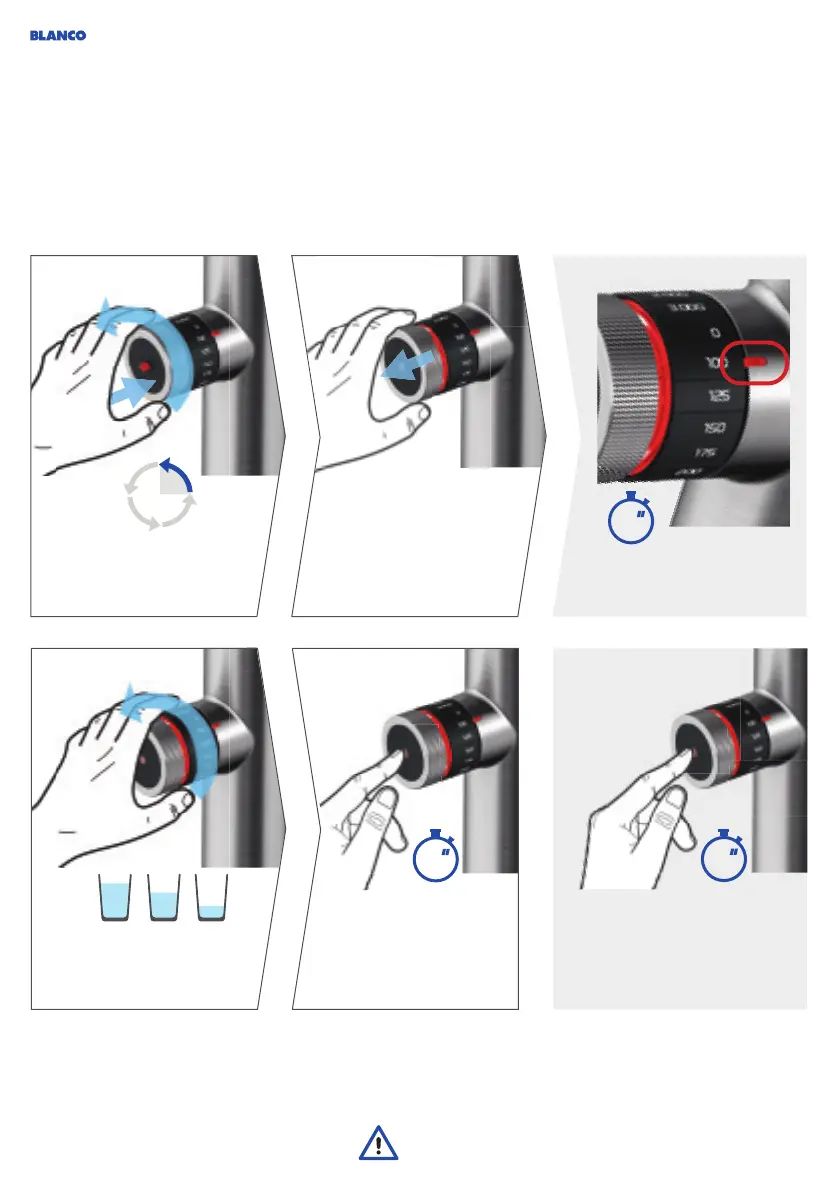
Start-stop and auto-stop:
Ifdesired: set the amount of
hot water in millilitres.
Touch the side sensor for
less than 1 sec. to dispense
the selected amount of
hotwater.
Start-stop: Touch the side sensor
for more than 1 sec. to dispense
hot water. Stopping contact stops
the water.
The automatic fl ow of water can be stopped at any time by
touching the side sensor.
CAUTION: Both water outlets should always be positioned
abovethe bowl in order to prevent water damage.
Operation
Hot water
Push the outer ring inward
andturn it back 90°.
Pull the outer ring
outwardagain.
Hot water mode
is active for 8 seconds.
<
1
>
1
8
90°
38




 To Next Page