770 l
Confi rm
>
3
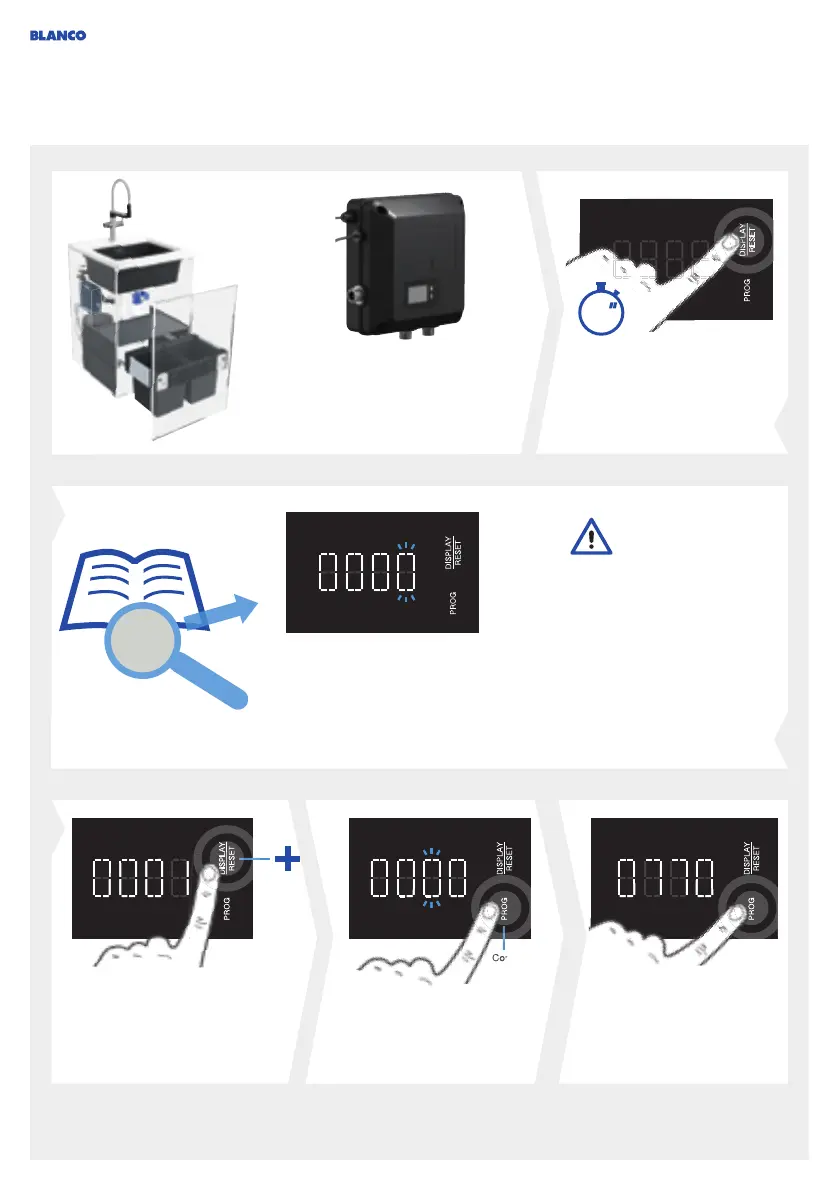
Setting the fi lter capacity
Press DISPLAY/RESET for
longer than 3 seconds until
the fi rst digit is fl ashing
inthedisplay.
The fi lter capacity must
be reset after changing
thefi ltercartridge.
Find out the fi lter capacity
from the Filter capacity section
in the fi lter documents. Enter the
fi gure manually.
For fi lters with ion
exchange technology,
it is necessary to
be aware of the local water
hardness in order to be
able to ascertain the right
fi lter capacity. Note that
centralised water softening
changes the value for your
household, which then
no longer corresponds to
thevalue given by your
water company.
Press DISPLAY/RESET toin-
crease the number.
Press PROG to confi rm
thenumber and change to
thenext digit.
After entering the fi nal
number, press PROG.
Thesetting is confi rmed
and complete.
44




 To Next Page