13 / EN
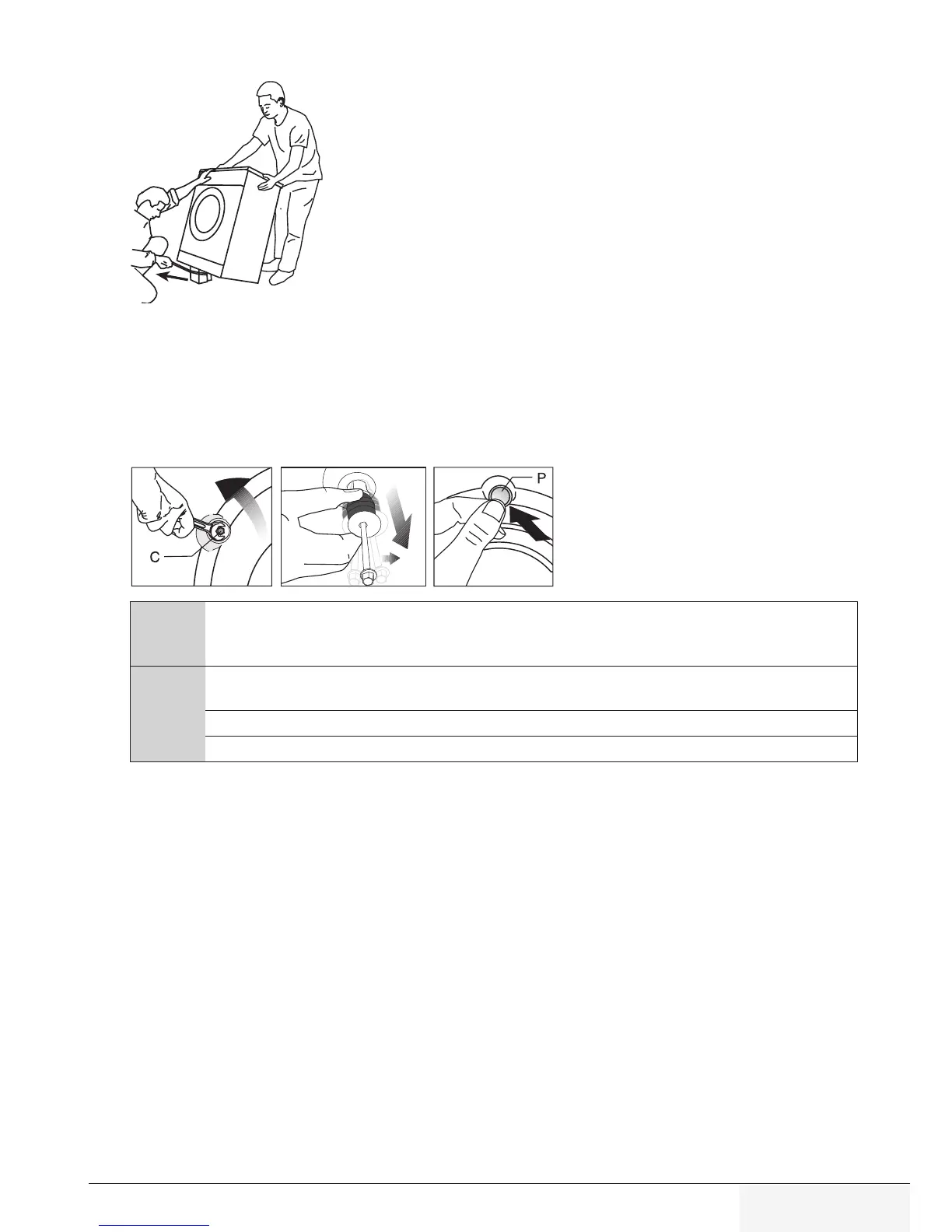
4.4.2 Removng packagng renforcement
Tilt the machine backwards to remove the packaging
reinforcement. Remove the packaging reinforcement that is
attached to the ribbon. Do not attempt this operation alone,
get help.
4.4.3 Removng the transportaton locks
1 Loose all bolts with an appropriate wrench until they turn freely
(C)
.
2 Remove the transport safety bolts by rocking them slightly.
3 Insert the plastic covers from the bag containing the user manual into the openings on
the rear panel.
(P)
A
CAUTION:
Remove the transportation safety bolts before operating the washing
machine! Otherwise, the product will be damaged.
C
Keep the transportation safety bolts in a safe place to reuse when the washing machine
needs to be moved again in the future.
Install the transport safety bolts in the reverse order of the disassembly procedure.
Never move the product without the transportation safety bolts properly fixed in place!



 To Next Page