37
d r i v e r o r i e n t a t i o n
9 1 127 8 2 10
35 4 6 11
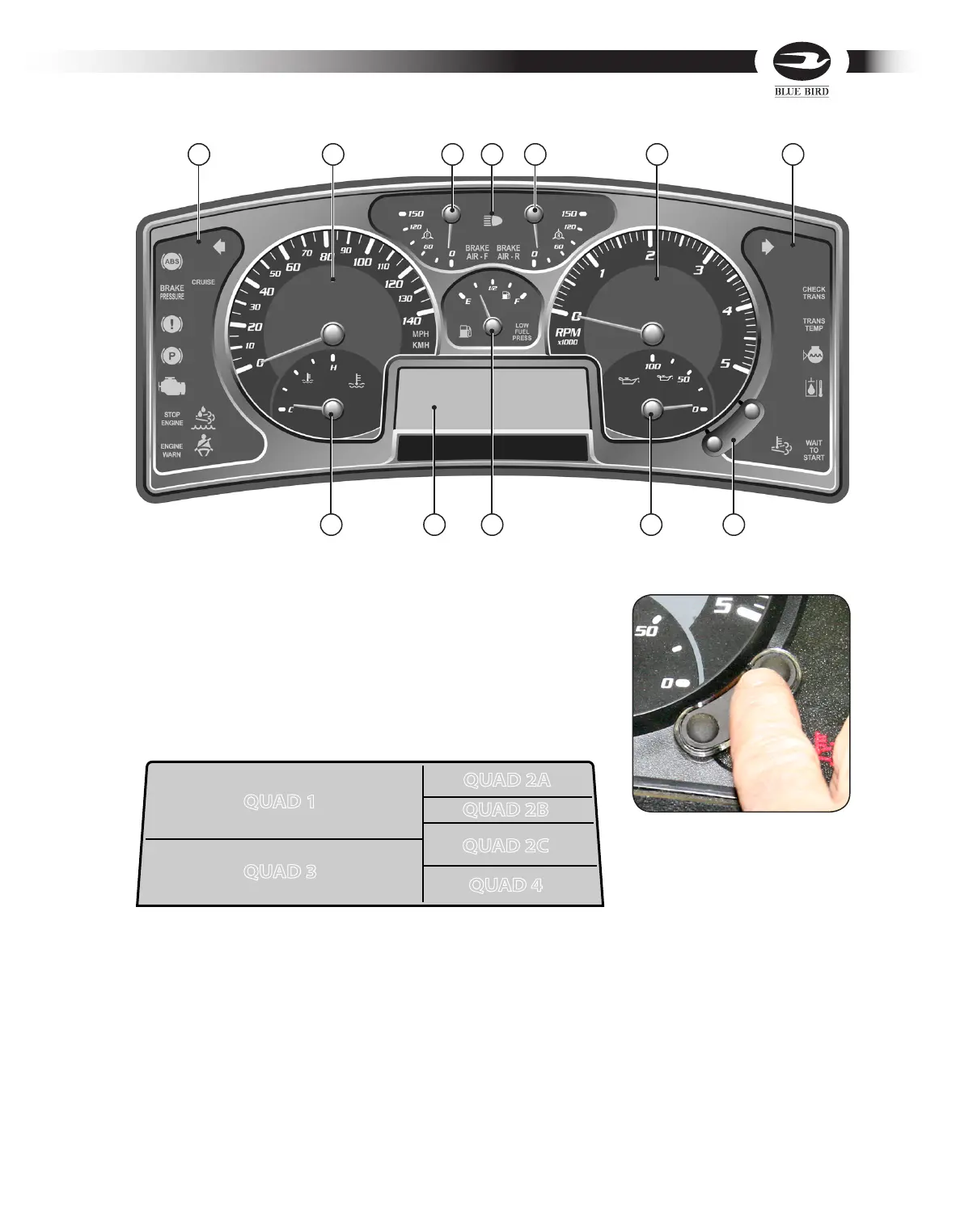
Message Display Center
The message display center provides additional information to the vehicle operator.
It is located at the bottom center of the instrument panel and is divided into six zones.
Each zone displays data relayed to the vehicle operator from vehicle systems. The
message display center can also be used for diagnostic purposes by trained service
technicians. The zones of the display are selected and toggled by the two buttons on
the message display control panel on the lower right side of the tachometer.
Quad 1. Displays the Odometer, Trip 1 Odometer and Trip 2 Odometer. The odometer
registers the mileage on the vehicle and the trip odometers may be set to register
mileage from destination to destination. On the message display control panel press
and release the bottom button to toggle between odometer and trip odometer set-
tings. Press the top button to reset trip odometer.
This quad also displays all general priority messages when triggered. The priority
messages can be removed by pressing the bottom button or cycling the ignition.
QUAD 1 QUAD 1
QUAD 3QUAD 3
QUAD 2AQUAD 2A
QUAD 2BQUAD 2B
QUAD 2CQUAD 2C
QUAD 4QUAD 4
Message Display Control Panel



 To Next Page