English
7
9.0 Troubleshooting guide
Trouble Reason Correction
Drift - readings
slowly varying
Glassware not clean Clean glassware, hydrate and calibrate.
Wick contaminated
or blocked
Soak probe in KCl storage solution for 24
hours and retest. Do not measure proteins or
oils with this unit. Replace unit.
Glassware aged Replace unit.
Displays similar pH
reading in all buffers
no matter what the
buffer value is
Glassware broken Replace unit.
Unsuccessful
calibration
Buffers inaccurate Replace buffers.
Glassware not clean Clean glassware.
Glassware aged
(glassware will not
clean)
Replace unit.
Probe not hydrated Soak probe in KCl storage solution for 24
hours and retest.
Noisy - readings
jumping
Contact zone not
immersed
Lower pen into solution at least 2cm/1”.
Displays pH 7
for all buffers
Broken glassware Replace unit.
Incorrect sample
reading following
successful
calibration
Ground loop (often
occurs in process
systems)
Verify by removing the sample from its
environment and measuring in a glass
beaker. May require electrical circuitry to be
checked in system.
Wick blocked Soak probe in KCl storage solution for 24
hours and retest. Do not measure proteins or
oils with this unit. Replace unit.
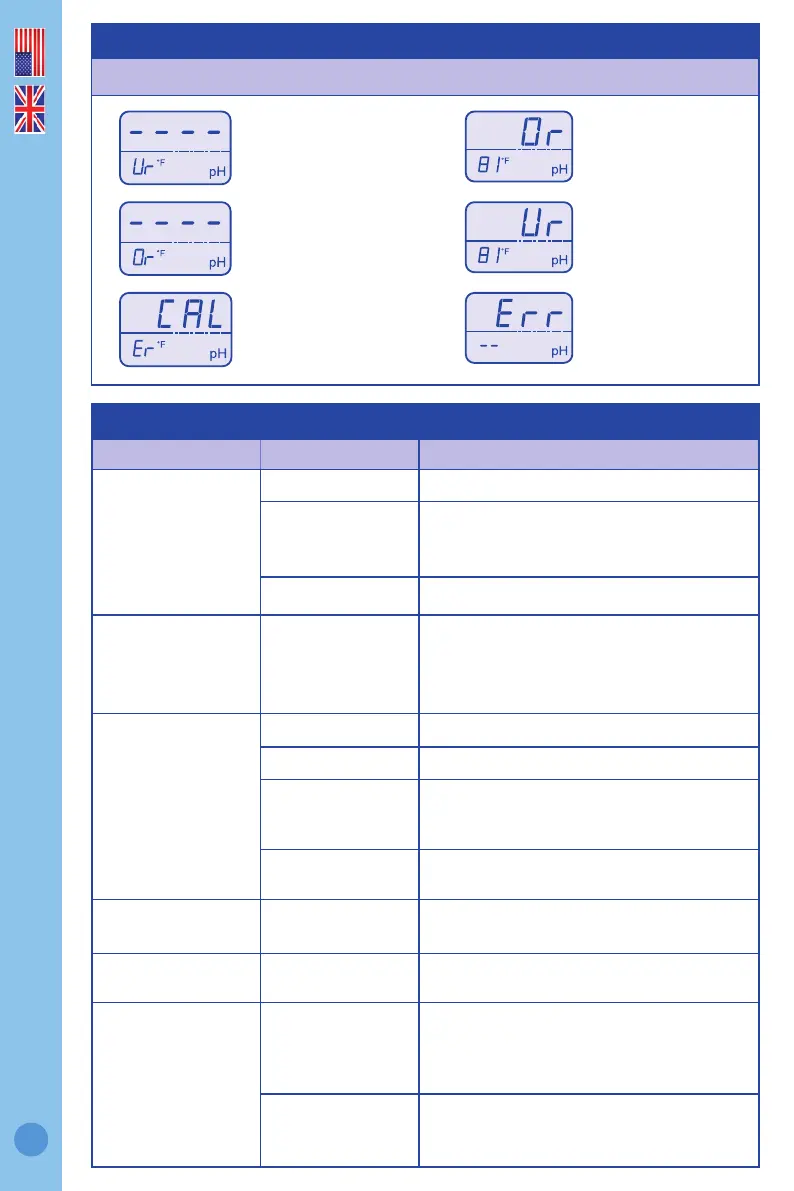
The following error messages appear for the following reasons.
Temperature
over range
pH calibration
failed
pH over
range
Hardware error
pH under
range
Temperature
under range



 To Next Page