The BlueNova HC (High Current) Product Range consists of advanced lithium-ion batteries designed for various energy storage applications. This user manual provides comprehensive information on the structural overview, assembly, installation, monitoring, maintenance, troubleshooting, and safety procedures for these high-current batteries.
Function Description:
The BlueNova HC batteries serve as a reliable and efficient energy storage solution. They are designed to integrate with inverters, chargers, and other third-party hardware devices, providing power for a wide range of applications. The batteries feature an integrated Battery Management System (BMS) that monitors and controls various parameters to ensure safe and optimal operation. Serial communication functionality via CAN protocol allows for seamless integration with compatible hardware, often negating the need for manual voltage-based installation procedures. The MultiCap™ technology, available in batteries with specific firmware versions, enables parallel connection of batteries with varying ages and rated capacities to increase overall capacity, provided certain requirements are met.
Important Technical Specifications:
The BlueNova HC product range includes both single- and multi-enclosure batteries, with varying capacities and voltages. Here's a breakdown of the models and their key specifications:
- BN13V-240-3.2k HC:
- Enclosures per battery: 1
- Dimensions (L x W x H): 51 x 21 x 31cm
- Weight (total): 38kg
- Bolt set: 2
- Bus bar: -
- Terminal sleeves: 1 POS / 1 NEG
- Fuse(s): 1 x 125A
- BN13V-480-6.3k HC:
- Enclosures per battery: 1
- Dimensions (L x W x H): 80 x 21 x 31cm
- Weight (total): 75kg
- Bolt set: 2
- Bus bar: -
- Terminal sleeves: 1 POS / 1 NEG
- Fuse(s): 2 x 160A
- BN26V-125-3.3k HC:
- Enclosures per battery: 1
- Dimensions (L x W x H): 51 x 21 x 31cm
- Weight (total): 38kg
- Bolt set: 2
- Bus bar: -
- Terminal sleeves: 1 POS / 1 NEG
- Fuse(s): 1 x 125A
- BN26V-240-6.3k HC:
- Enclosures per battery: 1
- Dimensions (L x W x H): 80 x 21 x 31cm
- Weight (total): 75kg
- Bolt set: 2
- Bus bar: -
- Terminal sleeves: 1 POS / 1 NEG
- Fuse(s): 2 x 125A
- BN26V-480-12.5k HC:
- Enclosures per battery: 2
- Dimensions (L x W x H): 2 x (80 x 21 x 31cm)
- Weight (total): 160kg
- Bolt set: 4
- Bus bar: 1
- Terminal sleeves: 1 POS / 1 NEG
- Fuse(s): 2 x 160A
- BN52V-125-6.5k HC:
- Enclosures per battery: 1
- Dimensions (L x W x H): 80 x 21 x 31cm
- Weight (total): 75kg
- Bolt set: 2
- Bus bar: -
- Terminal sleeves: 1 POS / 1 NEG
- Fuse(s): 1 x 125A
- BN52V-240-12.5k HC:
- Enclosures per battery: 2
- Dimensions (L x W x H): 2 x (80 x 21 x 31cm)
- Weight (total): 160kg
- Bolt set: 4
- Bus bar: 1
- Terminal sleeves: 1 POS / 1 NEG
- Fuse(s): 2 x 125A
- BN52V-480-25k HC:
- Enclosures per battery: 4
- Dimensions (L x W x H): 4 x (80 x 21 x 31cm)
- Weight (total): 320kg
- Bolt set: 8
- Bus bar: 3
- Terminal sleeves: 1 POS / 1 NEG
- Fuse(s): 2 x 160A
Each bolt set includes 1 x bolt, 1 x washer, and 1 x spring washer. Bus bars include positive (red) and negative (black) insulation sleeves.
Usage Features:
- On-Board Monitoring: The batteries are equipped with an OLED display that provides real-time information on various parameters. Users can navigate through different splash screens and pages using a CTRL button.
- Splash Screen 1: Displays the BlueNova® logo and the installed BMS firmware version (e.g., BMMC v2.4).
- Splash Screen 2: Shows abbreviated product/model information (e.g., 52V 4k HC, 52V_125_6.5) and inverter firmware details (e.g., VICTRON 250 for batteries without serial integration).
- Splash Screen 3: Indicates the current parallel configuration (e.g., Parallel Batteries N = 1 for single batteries).
- Page 1: Displays actual battery voltage (Vbat), current (Ibat - positive for charge, negative for discharge), and State-of-Charge (SOC).
- Page 2: Shows total energy discharged since production (Energy out) and State-of-Health (SOH).
- Page 3: Provides the highest cell voltage (Vch), lowest cell voltage (Vcl), and access to a cell voltage submenu (VC info ->).
- Page 4: Displays average ambient temperature inside the enclosure(s) (Tmax) and unique micro-controller unit identification number (MCU ID).
- Page 5: Shows the current state of the battery (State OK or State Err, indicating a troubleshooting issue).
- Page 6: Displays Battery Management & Monitoring Controller firmware version (FW), unique number for debugging (G#), and currently set parallel configuration (PO).
- Page 7: Prompts for an override procedure for recovery from over-discharge (OVERRIDE? PRESS+HOLD).
- Cell Voltage Submenu: From Page 3, users can access detailed individual cell voltages (Vc1 to Vc16) by pressing and holding the CTRL button for about 2 seconds.
- Remote Monitoring: Once configured, batteries can be remotely monitored via the BlueNova Remote Monitor service at http://brm.bluenova.co.za.
- Firmware Updates: Firmware can be updated locally via a USB-connected laptop or remotely using a compatible internet-connected third-party device.
- Voltage-Based Installation: For systems not using serial communication, specific voltage values (V high set, V float, V reconnect, V low set) must be manually set on the inverter/charger for 13V, 26V, and 52V HC batteries. Calibration of the inverter/charger voltage is crucial for accurate readings.
- Parallel Connection: Batteries with MultiCap™ technology can be connected in parallel to increase capacity, provided all parallel-connected batteries have the same nominal voltage (e.g., 52V), the largest battery's C10 capacity is no more than 4x the smallest, correct firmware versions are installed and updated, and all batteries are within their warranty period. Parallel configurations should always be connected to the inverter/charger from both ends.
- Over-Discharge Recovery: The battery automatically disconnects from the inverter/charger if cell voltage drops to 2.85V. If the total voltage falls below 40V, the battery enters Deep Discharge Lockout (DDL) mode. If the display is still operational, an override procedure (accessed via Page 7) can be initiated to recover the battery by ensuring it is charged upon reconnection.
Maintenance Features:
- General Guidelines:
- Avoid short-circuiting battery terminals.
- Do not use the battery without a BlueNova® approved integrated BMS.
- Do not disassemble, pierce, cut, or physically alter the battery.
- Do not burn, incinerate, or subject the battery to extreme heat.
- Storage Instructions:
- Switch off the battery when stored.
- Disconnect communication cables.
- Store in a cool, well-ventilated area (ideally 25°C ± 3°C).
- Store away from moisture and heat.
- Avoid storing batteries upside down for extended periods.
- Check open circuit voltage monthly and recharge to prevent it from falling below 40V.
- Maintain a State-of-Charge (SOC) above 50% (100% SOC is optimal).
- Troubleshooting: The integrated OLED display shows error messages for electrical malfunctions. The manual provides a list of error codes (Error 1 to Error 12) and corresponding procedures, often advising to check inverter/charger settings, cell voltages, fuse(s), terminal connections, or to contact BlueNova Technical Support.
- Error 1 (BmsCRCfail), Error 2 (BmsCelComs), Error 3 (BmsCommsTO), Error 4 (BmsBadData): Contact BlueNova Technical Support. These errors are typically for production debugging and should not occur in the field.
- Error 5 (Vcell OVER), Error 6 (VcellUNDER), Error 7 (+I_i2tOVER), Error 8 (-I_i2tOVER), Error 9 (Tcell HIGH), Error 10 (Tcell LOW): Check inverter/charger settings, cell voltages (if applicable), and contact BlueNova Technical Support.
- Error 11 (VprechFAIL), Error 12 (Fuse Error): Check fuse(s) and terminal connections. For Error 11, switch the battery off, disconnect from the inverter/charger, then switch it back on and reconnect. For Error 12, power cycle the battery.
Emergency & First Aid:
- In case of fire: Evacuate the danger zone, open ventilation, use a CO2 fire extinguisher, and immerse any remaining smoking cells in water while wearing protective gear.
- Skin contact: Wash the affected area with soap and water; seek medical attention if irritation persists.
- Eye contact: Rinse eyes continuously with clean water for at least 15 minutes; seek medical attention immediately.
- Ingestion: Do not induce vomiting; seek medical attention immediately.

 Need help?
 General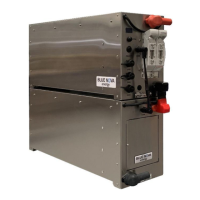

 To Next Page