EasyManua.ls Logo

Blueridge BMKH0938 - Operation and Introduction of Remote Controller

Blueridge BMKH0938
28 pages
Print Icon
To Next Page IconTo Next Page
To Previous Page IconTo Previous Page
Loading...
6
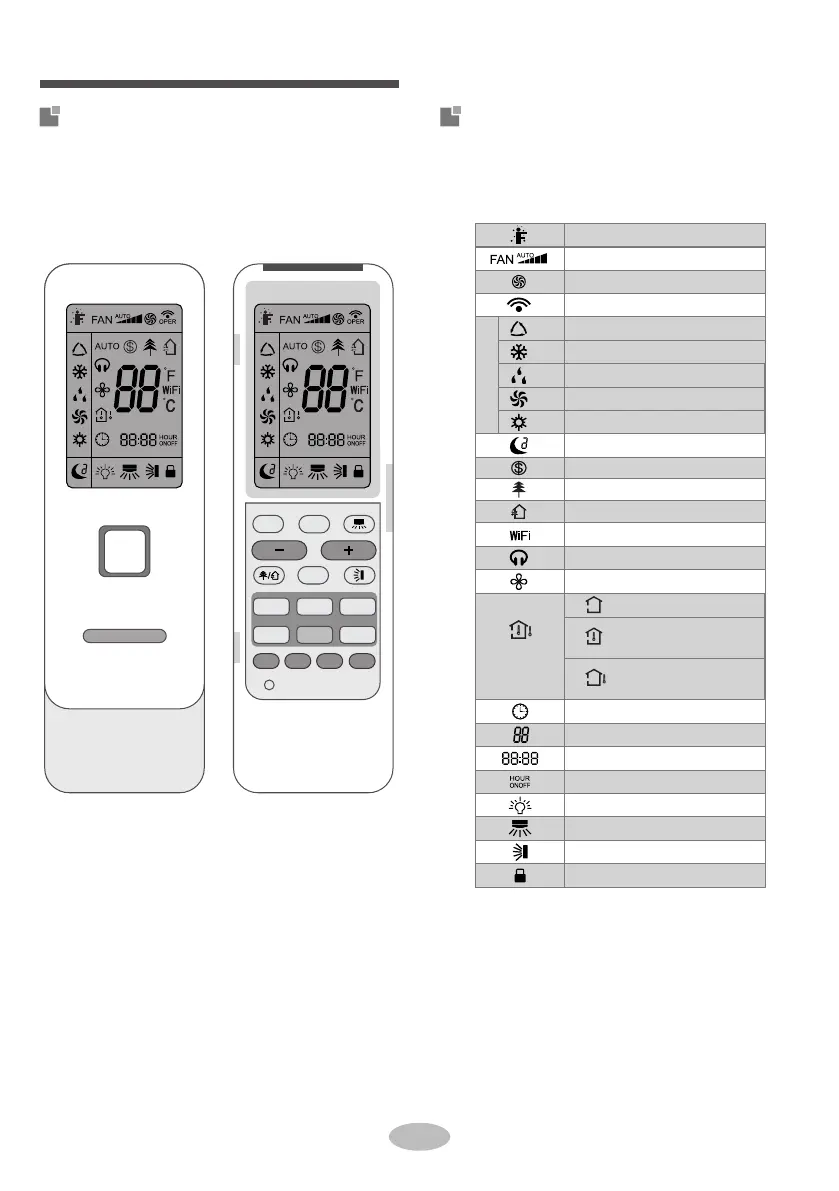
Introduction for icons on display
screen
Buttons on remote controller
Operation and introduction of
remote controller
8°C heating function
Scavenging function
Set time
X-FAN function
Light
Set temp.
Outdoor ambient
temp.
Indoor ambient
temp.
Sleep mode
Clock
Health mode
I feel
Quiet
TIMER ON / TIMER OFF
Auto mode
Cool mode
Dry mode
Fan mode
Left & right swing
Up & down swing
Child lock
Send signal
Turbo mode
Heat mode
Operation mode
Set fan speed
Temp.
display type
Set temperature
WiFi function
-
+
FAN
MODE
ON/OFF
FAN
TURBO
MODE
ON/OFF
SLEEPQUIETLIGHT WiFi
TEMP I FEEL
CLOCK
TIMER ON
TIMER OFF
(before opening cover) (after opening cover)

Related product manuals