9. Settings
The AC200L offers the convenience of adjusting its settings either via the LED screen or
the BLUETTI App. With the unit's LED screen, you have direct control over various settings
such as Power Lifting Mode, ECO Mode, output frequency, and charging modes.
Additionally, by using the BLUETTI App, you can access a user-friendly interface on your
phone to conveniently monitor and control the AC200L.
9.1 Setting Mode
When the screen is on, press and hold the AC and DC Power Buttons for about 2 seconds
till the output frequency flashes to enter the Setting Mode.
9.2 Frequency Switching
The current output frequency (50Hz / 60Hz) is displayed in the lower right corner of the
screen. In the Setting Mode, press the DC Power Button to navigate until the output
frequency appears on the screen. Then, press the AC Power Button to switch the frequency
options based on your requirements.
Note: Turn off AC Power Button before setting Frequency.
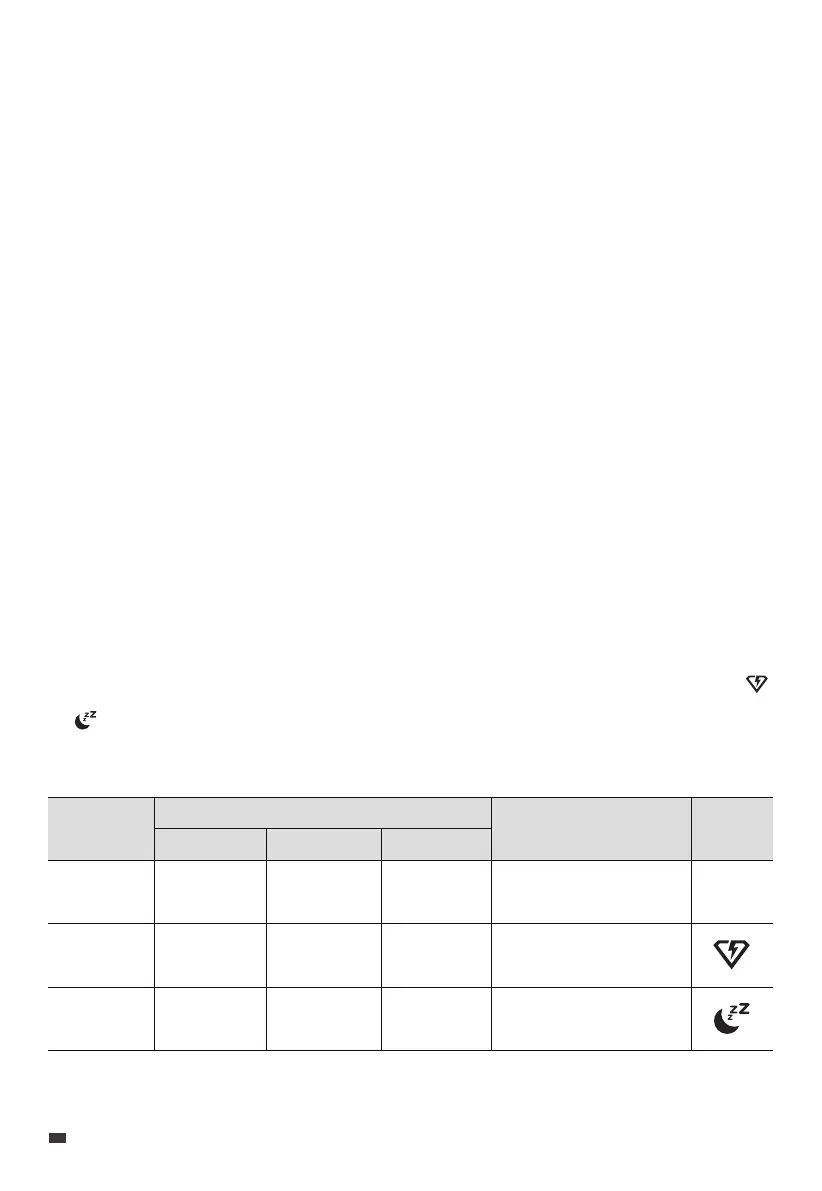
9.3 AC Charging Mode
The AC200L supports 3 AC charging modes - Standard, Turbo, and Silent to fit your
specific needs. In the Setting Mode, use the DC power button to navigate until the
or icon starts flashing on the screen. Then, press the AC power button to choose the
charging modes. Please refer to the table below for useful instructions.
Mode
Standard
Turbo
Silent
Recharging Power
AC
1200W Max.
2400W Max.
800W Max.
PV
1200W Max.
1200W Max.
800W Max.
AC+PV
1200W Max.
2400W Max.
800W Max.
Note
More friendly to
AC200L's battery.
Comes in handy
when recharging time
is a priority.
Offers a quiet,
low-power operation
for long battery life.
Icon
None
EN
JUST POWER ON
20



 To Next Page