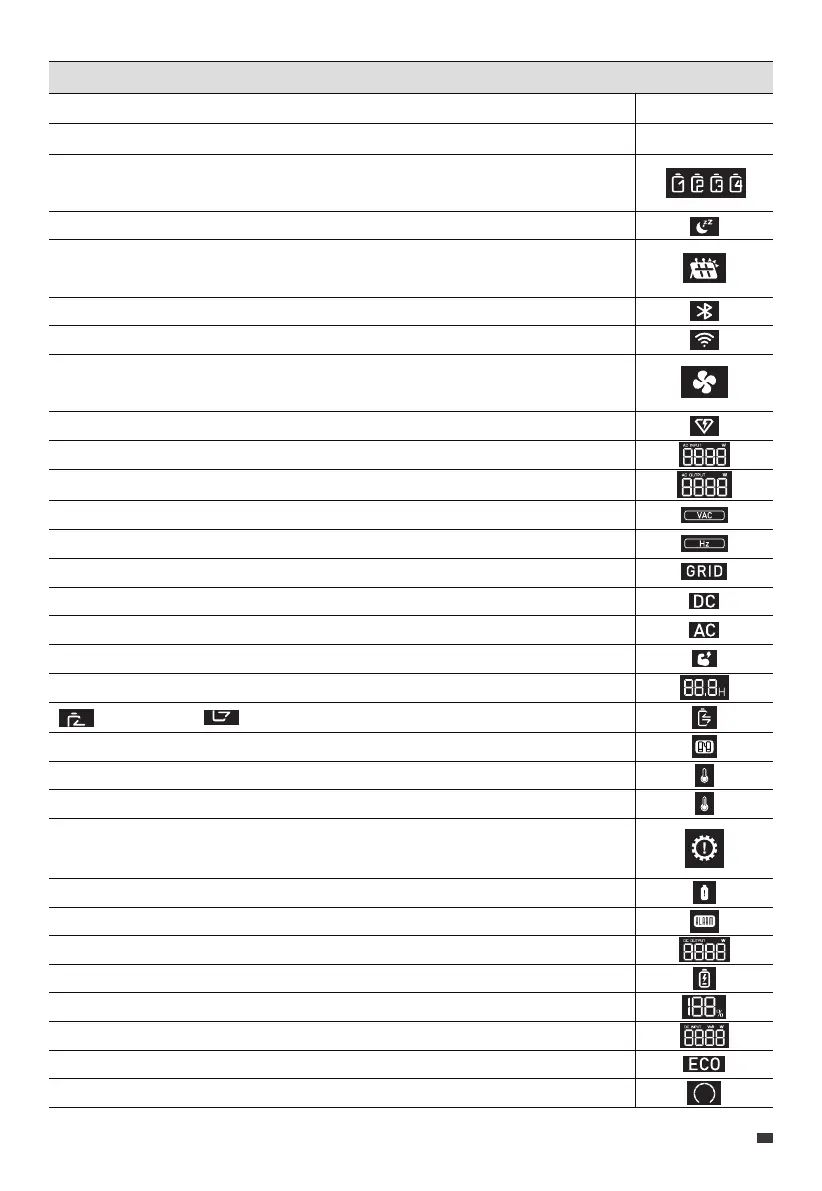
LCD Instructions
Startup
Shutdown
Each icon represents an attached expansion battery. The AC240 can display up
to 4 battery icons.
The AC240 is charging in Silent Charging Mode.
The AC240 is charging from a DC power source, such as solar panels,
lead-acid batteries, etc.
The AC240 connects to BLUETTI App via Bluetooth.
The AC240 connects to BLUETTI App via WiFi.
When it lights up, the fan is activated and working properly. If it flashes, there
may be a problem with the fan.
The AC240 is charging in Turbo Charging Mode.
The real-time AC charging power.
The real-time total AC output power.
The real-time AC output voltage.
The real-time AC output frequency.
The AC240 is charging from the home grid.
The DC output is turned on.
The AC output is turned on.
The AC240 is operating in Power Lifting Mode.
The remaining time of charging or discharging.
: Charging : Discharging
The AC240 is operating in parallel mode with another AC240 unit.
The temperature inside the unit is lower than -20°C (-4°F).
The temperature inside the unit is higher than 70°C (158°F).
The AC240 is drawing too much current, which can cause damage to the
unit or any connected devices.
The AC240 is overloaded.
There's an issue with the AC240, which may require troubleshooting or repair.
The real-time DC output power.
The SoC drops below 5%.
The remaining battery capacity.
The real-time DC input power.
The ECO Mode is activated to save power.
The bar increases during charging and decreases during discharging.
LCD lights up
LCD lights off
JUST POWER ON 15
EN



 To Next Page