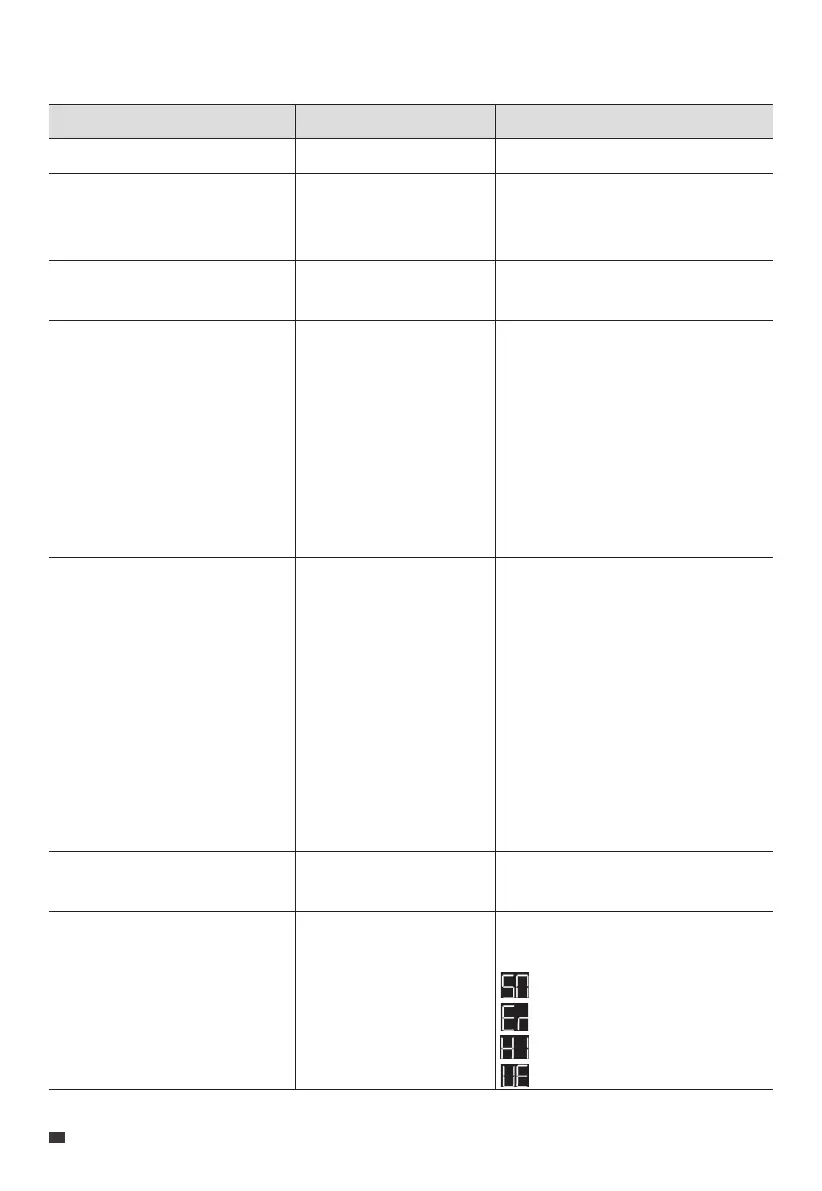
14. Button Operation Instructions
Operation Function
Press the AC Power Button
Press the DC power button
Press the USB Power Button
Press the AC and DC Power
Buttons simultaneously and hold
for more than 2 seconds till the
output frequency flashes
Press the DC Power Button in the
Setting Mode
Press the AC Power Button when
the setting item is flashing
Press and hold the DC Power
Button in the Setting Mode
Turn on / off the AC output
Turn on / off the cigarette
lighter port and RV port
output
Turn on / off the USB
output
Enter / exit the Setting
Mode
Navigate through the
setting items
Enable or disable the
selected function.
Switch the status page
/
/
/
In the Setting Mode, the icons for the
currently enabled functions remain lit,
except for the flashing output
frequency icon.
If you do not perform any operation
in 1 minute, the AC240 will automatically
exit the Setting Mode, and no changes
will be saved.
The flashing setting item is selected
and editable. In the Setting Mode,
the corresponding codes will be
displayed on the left side:
P01: Output Frequency
P03: Charging Mode
P04: Power Lifting Mode
P05: ECO Mode
P06: Bluetooth
P07: WiFi
/
You can view relevant information
on the status page.
: Serial Number
: Error code
: Historical faults
: Version
Description
EN
JUST POWER ON
28



 To Next Page