①
②
③
④
⑤
⑥
⑦
⑧
⑨
⑩
⑪
⑫
⑬
⑭
⑮
⑯
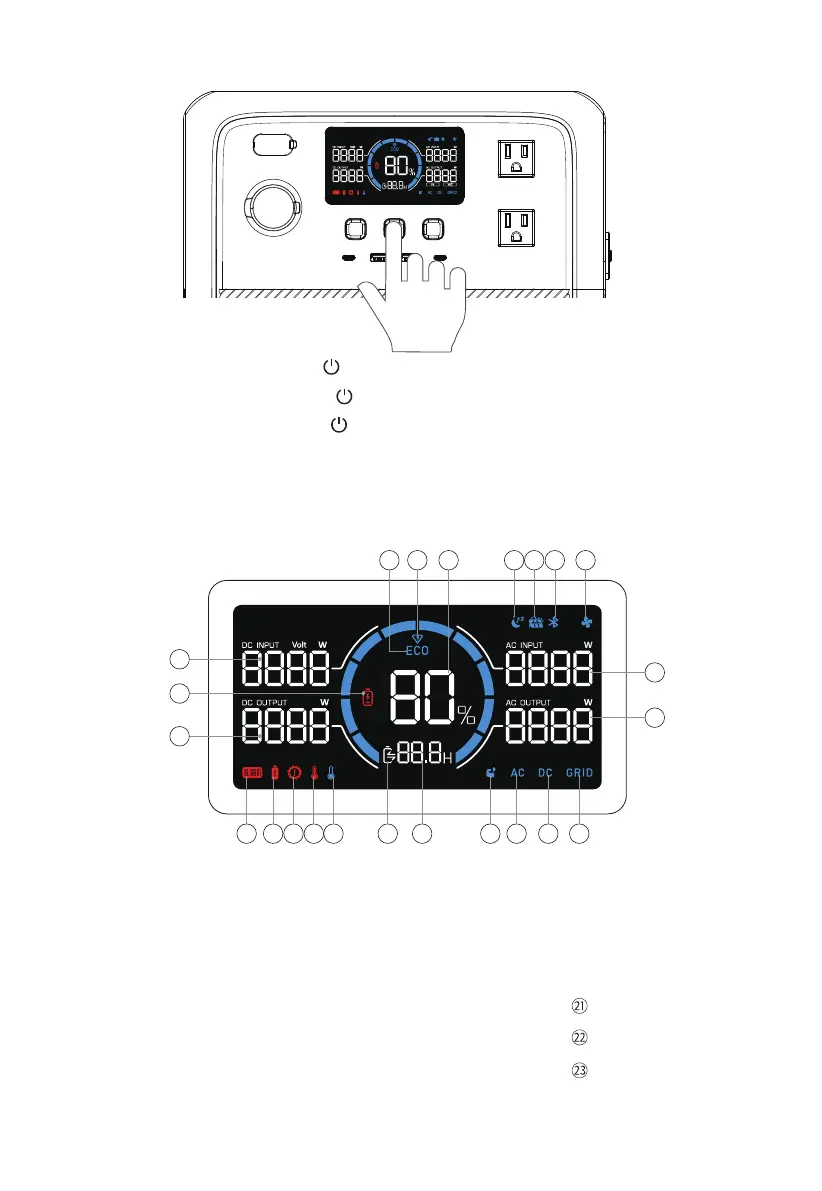
ECO Mode
Turbo Charging
Battery Capacity (SoC)
Silent Charging
DC Input
Bluetooth Connection
Fan
AC Input Power
AC Output Power
Grid Connection
DC Output
AC Output
Power Lifting Mode
Charge / Discharge Remaining Time
Charge / Discharge Status
Low Temperature Alert
5. LCD Screen
4. Power ON/OFF
High Temperature Alert
Overload Alert
Overcurrent Alert
Fault Alert
DC Output Power
Low Voltage Alert
DC Input Power
⑰
⑱
⑲
⑳
• Power ON: Press and hold the for about 2 seconds to turn AC70 on.
When the AC70 is on, press the again to turn on / off the LCD screen.
• Power OFF: Press and hold the for 2 seconds to turn off the unit.
• AC ON / OFF: When the AC70 is on, press the AC power button to turn it on / off.
• DC ON / OFF: When the AC70 is on, press the DC power button to turn it on / off.
1
2 3 4 5 6 7
21
23
22
1011121314151617181920
8
9
JUST POWER ON12



 To Next Page